Create Loadtest repository

Sometimes I clean up / remove / uninstall to much. During spring cleaning I uninstalled some localdb versions because I have a full SQL Server installation already. After some time I noticed my loadtest in Visual Studio would not start. Apparently I was using localdb for the repository database.

First create a new LoadTest2010 database with the script loadtestresultsrepository.sql. See How to: Create a Load Test Results Repository Using SQL

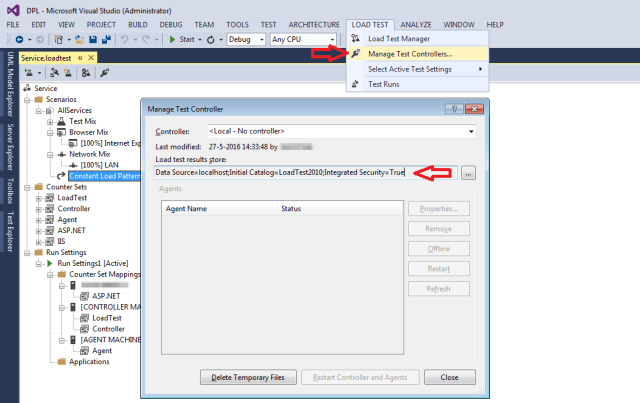
To change the connectionstring go to Manage Test Controllers in the LOAD TEST menu of Visual Studio. There is the Load test results store.

loadtest.repository.connectionstring

Everything is operational again, until my next cleanup.


Posted in Uncategorized | Leave a comment

Be careful when using mocked repository

One of the software development best practices is to use interfaces and dependency injection. But be careful when using a mocked version of your repository.

With FakeDbSet an InMemory IDbSet can be created for unit testing purposes. During setup you’d add the records and the test will simply use those records. But there is a small difference with the actual Entity Framework implementation used with most applications: reading from the database will result in a new object.

The properties of the object will be the same, no matter how often you’d get it, but it is a new object. During integration testing I noticed some strange behaviour due to this. Changes made to the object by my business logic would disappear.

Extra utils used are the Fakes generated by Visual Studio and the Copy extension from github. In my code I changed the setup of the test repository to mimic this behaviour:

private IRepository CreateFakeRepository(object[] records) {
   var fakeRepository = new Fakes.StubIRepository();
   fakeRepository.RecordsGet = () => {
      var fakeDataSet = new FakeDbSet.InMemoryDbSet(true);
      foreach (var record in records) {
         fakeDataSet.Add(record.Copy());
      }
      return fakeDataSet;
   };
   return fakeRepository;
}

After this half (!) my unit tests turned red. Fixing it took some time, but I’m more confident about the business logic now.

Posted in Test | Tagged , , , , , | Leave a comment

Lync for mac crash

After working for several months Lync for mac kept crashing on startup. No warning, no provocation, no survivors. The only way to stop the endless reporting is to uncheck the “restart Microsoft Lync” box.

Lync for mac Error

Upon further investigation I noticed a line in the console.

12/05/16 09:50:33,161 Microsoft Error Reporting[525]: 6   Microsoft Error Reporting           0x00003678 Microsoft Error Reporting + 9848
...
12/05/16 09:50:33,906 ReportCrash[526]: Saved crash report for EpocCamEngine[521] version 1.4 to /Users/Eric/Library/Logs/DiagnosticReports/EpocCamEngine_2016-05-12-095033_MacBook-Pro.crash

I remember installing EpocCam beta drivers and playing with it. This is done with a .pkg file I double click and let install. But how to uninstall? There seems to be no app for that, but a terminal statement.

pkgutil -—pkgs

Output contained the lines below.

...
com.kinoni.epoccam.EpocCamEngine.pkg
com.kinoni.epoccam.libavcodec.pkg
com.kinoni.epoccam.libavutil.pkg
com.kinoni.epoccam.libswscale.pkg
com.kinoni.epoccam.SoftVDigX.pkg
com.kinoni.epoccam.UninstallEpocCam.pkg
...

The last line (UninstallEpocCam) caught my attention. There was an app for uninstall?

uninstall epoccam with alfred

😳 All is well after this …

Posted in Tooling | Tagged , , , , , | Leave a comment

Loadtesting with Powershell

powershellOur product is in the acceptance testing phase. In the assigned environment the available tooling is very limited. But we must do a loadtest to report on the average requests / second our webservice can handle from a single client. Lucky for us we have access to powershell, but it is version 2.0.

The Invoke-RestMethod cmdlet is available from version 3.0 and up. I’ll have to write my own to use it in version 2.0. Below is my “implementation”.

function Invoke-RestMethod {
    [cmdletbinding()]
    param ([string] $url)    
    Write-Verbose $url
    $client = New-Object System.Net.WebClient
    $client.DownloadString($url)
}

We created a loadtest method that reads a csv-file and calls the Invoke-RestMethod with every record. A simplified version of this loadtest method is listed below.

function LoadTest {
    [cmdletbinding()]
    param()
    [System.Reflection.Assembly]::LoadWithPartialName("System.Web.Extensions")
    # this reads 10000 unique id-s
    $testdata = Import-CSV 'C:\loadtest\data.csv'
    $template = "http://srv01/api/information/1/{0}/{1}"
    foreach($record in $testdata) {
        # call webservice
        $request = [System.String]::Format($template, $record.Id, $record.Name)
        $response = Invoke-RestMethod $request
    }
}

Now to measure the time needed to process the 10000 records we use the Measure-Command. The output tells us the time needed to process 10000 records, so divide 10000 by the seconds needed and we have the requests per second.

Measure-Command { LoadTest }

My preferred tool for loadtesting is Visual Studio, but when not available Powershell is the next best thing.

References

Powershell version 2.0 cmdlets, list of cmdlets available in Windows Powershell version 2.0.

Posted in Test | Tagged , , | Leave a comment

Back to T4

We generate our web api. This saves time and makes access uniform. But there are some rules we have to obey to get this working.

With Entity Framework Model First (edmx) we generate our data layer. By customising the template we add an interface and some extra features for better abstraction. The model classes will become our Data Transfer Objects.

Following the Scott Hanselman blogpost we edited the mvc template to generate the web api as we like it to be. During the transformation we query the database for indexes and use that information to generate the queries.

Thanks to “old” techniques as T4 we can automate our “new” technology. 😉maxresdefault

Posted in Development, Tooling | Tagged , , | Leave a comment