I’m Eric Tummers, Software Architect at Statistics Netherlands, and this is how I work

My jobs description says Software Architect. I’m guiding my team through the technical hurdles and do some programming/testing/analysing myself. We follow the scrum guide and are working towards continuous integration and deployment. We do this in small steps. Every sprint we complete means the retrospective is done in the pub.
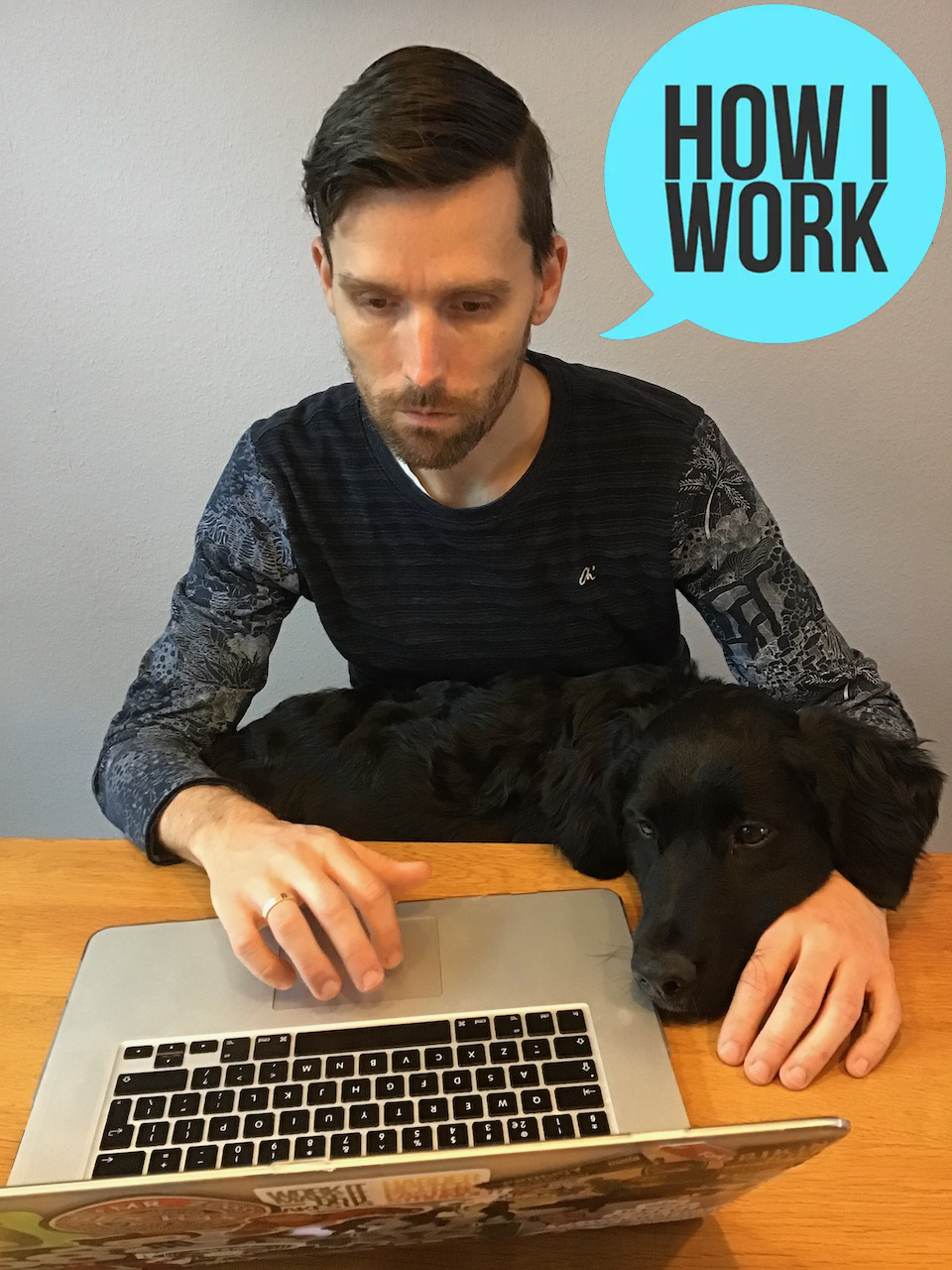
I expect the best and I give the best. Here’s the beer. Here’s the entertainment. Now have fun. That’s an order!
Rasczak

Location: Sittard, NL
Current Gig: Software Architect, CBS
Word that best describes how you work: remote
Current mobile device: iPhone SE 2nd gen
Current computer: MacBook Air M1

What apps/software/tools can’t you live without? Why?

Evernote: I’m a fan for years now.
Spotlight on Mac and Ueli on Windows: for quick start apps and other things.
Microsoft To Do: work tasks, chores, groceries, planning, every task is there.

What’s your workspace setup like?

My home workspace is a Macbook Air M1 connected to a Benq 24 inch monitor (BL2420PT). For input I use the logitech keyboard and mouse (MX800). There is a wireless charger for my iPhone SE or Airpods and a desk lamp (like the Pixar luxo Jr.) This is my main workspace.
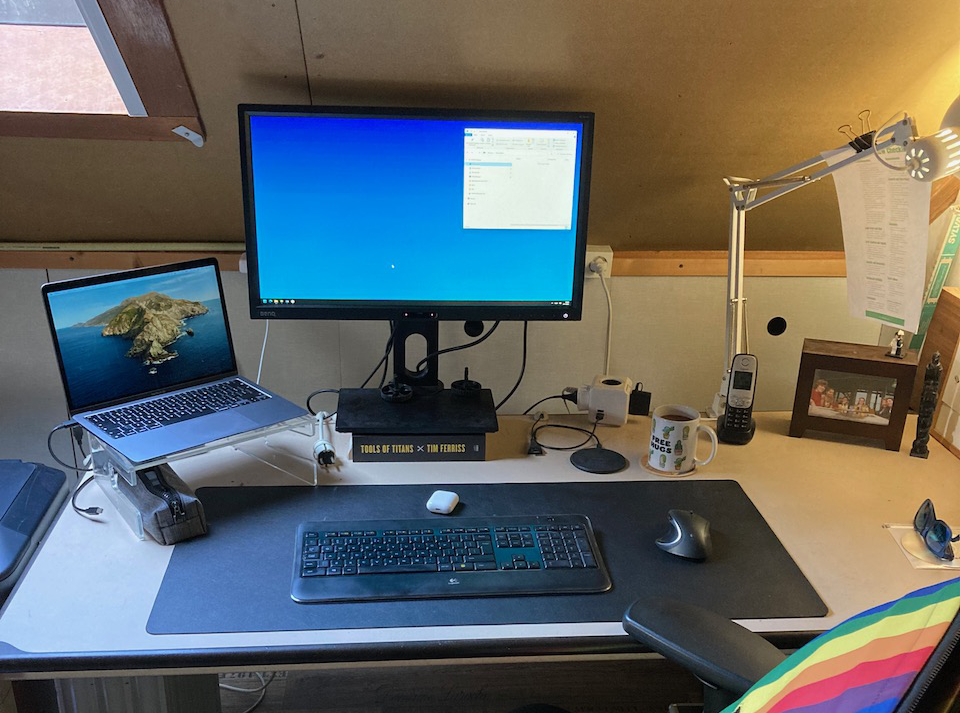
When I go to the office I’m free to work from a coffee table with my MacBook Air M1 or hook it up to an external monitor. We’re a hybrid working organisation so the laptop moves with me in my rainbow backpack.

We communicate with each other via zoom and slack. So those apps are my virtual workspace. Does that count?

What’s your best time-saving shortcut/life hack?

Timebox. Start on a task and spent the time you’ve got to get the best result. Get someone to look at it, get feedback. Then decide if the result is final or to spent some more time.

Besides your phone and computer, what gadget can’t you live without and why?

I replaced my Garmin FR235 with the Garmin FR745. It has smart watch features, an optical heart rate monitor and music. I now go on a run without my phone.
My Apple Airpods 2. Easy to use, small and good sound. Replaced my old first gen with the second gen with wireless charging case – still the best wireless earbuds for me.

What everyday thing are you better at than everyone else? What’s your secret?

Learning new things. My current project lets me implement new things (joy) Also I try to learn the things I know to my team or anyone who listens.
I have a basic understanding of how things work and try to map new things on there. For the details I have a Pluralsight subscription and black belt google skills.

What do you listen to while you work?

My alarm clock plays classical music to wake me up in the morning. The car stereo plays about everything (grunge, rock, kids stories) driving to work. When I need some focus I play drum and bass on my headphones. My ringtone is still Run riot by Camo & Krooked, although it is muted since I got a Garmin.

What are you currently reading?

Nerds. A fun view of the things a nerd does, likes and hates. Good read to get me out of the working mindset.

How do you recharge? What do you do when you want to forget about work?

Spending quality time with my wife and daughters. Phone on silent, no screens, no work. 
Also sports like running, fitness, climbing and snowboarding to keep me fit and healthy.

Fill in the blank: I’d love to see _________ answer these same questions.

Eric Rosen a chess streamer I follow on YouTube. This is someone who does what he loves and loves what he does.

What’s the best advice you’ve ever received?

someecards.com - Make a shit first draft you cannot edit a blank page
I believe this is a variant on a Hemingway quote.

Is there anything else you’d like to add that might be interesting to readers?

Learn Powershell. There is so much possible with Powershell. If you can learn one thing this year pick Powershell.

Original idea from Lifehacker.com.

Posted in Uncategorized | Tagged , , , , , , , | Leave a comment

Testkube journey – Powershell pester

We moved our workloads to Kubernetes and now want to run our tests in the cluster. In this series I describe our journey with Testkube. This setup works for us, your milage may vary. You can view all posts in this series by filtering on tag testkube-journey

Pester

When we deploy our documentation we test for broken links before deploying to production. These tests are written in PowerShell using the Pester module.

We build a docker image with the tests and the Pester module.

FROM mcr.microsoft.com/powershell AS base

# install pester module
COPY <<EOF /tmp/install.pester.ps1
Register-PSRepository -Name 'internal' -SourceLocation 'https://internal-psgallery' -InstallationPolicy 'Trusted'
Install-Module -Name 'Pester' -Repository 'internal' -Scope 'AllUsers'
EOF
RUN ["pwsh", "/tmp/install.pester.ps1"]

# copy tests
WORKDIR /src/tests
COPY . ./

We run the tests by creating a run script in the testworkflow. Important line is the Throw on failing tests so Testkube knows some files failed.

apiVersion: testworkflows.testkube.io/v1
kind: TestWorkflow
metadata:
  name: broken-links
spec:
  content:
    files:
    - path: /src/runtests.ps1
      content: |
        Import-Module Pester
        $config = New-PesterConfiguration
        $config.TestResult.OutputFormat = 'NUnitXml'
        $config.TestResult.OutputPath = '/data/broken-links-output.xml'
        $config.Run.Path = '/src/tests'
        # make sure testkube knows about failing tests
        $config.Run.Throw = $true
        Invoke-Pester -Configuration $config

  steps:
  - name: pester-tests
    run:
      image: internal-registry/company/broken-links-pester
      command: [ "pwsh" ]
      args: [ "/src/runtests.ps1" ]

See Testkube journey – GitOps about updating the image version with gitops.

The file runtests.ps1 is created in the TestWorkflow with the content block. This way we can change the output format or other settings without rebuilding the image. Happy devs 🚀

Posted in Tooling | Tagged , , | Leave a comment

Testkube journey – GitOps

We moved our workloads to Kubernetes and now want to run our tests in the cluster. In this series I describe our journey with Testkube. This setup works for us, your milage may vary. You can view all posts in this series by filtering on tag testkube-journey

GitOps

TLDR: add configurations so Kustomize understands the TestWorkflows CRD.

We use GitOps for kubernetes deployments. This means files in a git repository that can be edited from every tool that has access. On a regular interval (or by git triggers) the GitOps tool will pull the latest version from git and apply it.

Our weapon of choice is ArgoCD and the files in Git are Kustomize file(s). This means we can update the tag for our tests container from the command line.

Kustomize edit set image internal-registry-address/company/e2etests:NEW_TAG

This line actually adds or changes some lines in the kustomization.yaml file.

apiVersion: Kustomize.config.k8s.io/v1beta1
kind: Kustomization

resources:
- playwright-selfservice-testworkflow.yaml
- rbac.yaml

images:
- name: internal-registry-address/company/e2etests
  newTag: "NEW_TAG"

But when ArgoCD deploys this the image tag is not updated. The default implementation can update the image tag in known kubernetes resources like deployments, jobs and statefulsets. It does not know about the image for a step in TestWorkflows. This is where configurations are used.

In the stepimages.yaml below we tell Kustomize where the images must be applied when the kind is TestWorkflow.

images:
- path: spec/steps/container/image
  kind: TestWorkflow
- path: spec/steps/run/image
  kind: TestWorkflow

Add the stepimages.yaml to the configurations of the Kustomization and the image tag is updated.

apiVersion: Kustomize.config.k8s.io/v1beta1
kind: Kustomization

resources:
- playwright-selfservice-testworkflow.yaml
- rbac.yaml

configurations:
- stepimages.yaml

images:
- name: internal-registry-address/company/e2etests
  newTag: "NEW_TAG"

Whenever there is a new build of the e2etests image the pipeline can update the tag in our TestWorkflow. With GitOps this change is applied in kubernetes and we are using the latest version of our tests.

Posted in Tooling | Tagged , , | Leave a comment

Testkube journey – artifacts

We moved our workloads to Kubernetes and now want to run our tests in the cluster. In this series I describe our journey with Testkube. This setup works for us, your milage may vary. You can view all posts in this series by filtering on tag testkube-journey

Artifacts

When we run our tests we hope everything is :mrgreen: but prepare for :!:. The output of the tests is placed on a location that is shared with all steps in the TestWorkflow. Testkube can collect these files in a artifact.
TLDR: artifacts is a wildcard path filter relative to the workingDir.

We added the artifacts to the TestWorkflow with “/data/**/*” as path, but gitops kept synchronising. The artifact entry never showed up in the resource. Turns out the path must be relative to the workingDir. After changing to “**/*” all files from “/data” are saved as artifact with the TestExecution.

To download the artifacts we used the cli. Only to be presented with a failure of EOF.

testkube get artifact 1234abcde1234abcde --client direct --api-url http://testkube-api-server:8088
testkube download artifacts 1234abcde1234abcde --download-dir /tmp --client direct --api-url http://testkube-api-server:8088

The logs from the Testkube-api showed the execution was not found. Printing the artifacts would show no execution is registered with the artifacts. We think this was caused by setting up Testkube without Minio first and adding it later. After removing MongoDB and Minio to get a clean install again, it still would not work. We think this was caused by enabling the legacyTests. So we disabled it in the values.yaml without any change in behaviour . Turns out this was a bug that was fixed in a later release. After the upgrade we were able to download all artifacts.

Another way to get the artifacts is by downloading them from the api.

https://testkube-api-server/v1/test-workflow-executions/1234abcde1234abcde/artifact-archive

We struggled some time to get the api working. The v1 in the url was missing at first. Not sure why this is not on the docs, but we got it from slack.

The api will be used to get our pipeline connected to the tests. As described in Testkube journey – where we start we want to automate the decision to release software to production. More about that in a future post.

Posted in Tooling | Tagged , , | Leave a comment

Testkube journey – testworkflow

We moved our workloads to Kubernetes and now want to run our tests in the cluster. In this series I describe our journey with Testkube. This setup works for us, your milage may vary. You can view all posts in this series by filtering on tag testkube-journey

TestWorkflow

Our app under test uses the keycloak api to provide self-service to developers that want to use oAuth. Your app will most likely use some sort of api too.

What happens in a test is defined with a TestWorkflow. It describes the steps to be performed. Below are the steps we use:

  1. clean the environment by restarting keycloak
  2. wait for keycloak to be up-and-running again using curl to request a page
  3. start the tests in our e2etests container

The yaml is shown below (please read on why this might fail):

apiVersion: testworkflows.testkube.io/v1
kind: TestWorkflow
metadata:
  name: playwright-selfservice-testworkflow
spec:
  steps:
  - name: clean-environment
    container:
      image: registry.user-sb01.k8s.cbsp.nl/docker.io/bitnami/kubectl
    shell: 'kubectl scale deployment/keycloak -n selfservice --replicas=0'

  - name: wait-for-keycloak
    container:
      image: internal-registry-address/docker.io/curlimages/curl
    shell: 'while [ $(curl -ksw "%{http_code}" "http://keycloak.selfservice.svc/realms/master" -o /dev/null) -ne 200 ]; do sleep 5; echo "Waiting for keycloak..."; done'

  - name: playwright-tests
    container:
      image: internal-registry-address/company/e2etests
    shell: 'dotnet test /src --no-build'

Security context

TLDR: add securityContext and workingDir to the TestWorkflow to prevent private registry certificate errors during run.

Running this from the testkube-cli was a bit frustrating. An error showed it could not verify the certificate of the internal-registry-address?

failed to process test workflow: resolving image error: internal-registry-address/docker.io/curlimages/curl: inspecting image: 'internal-registry-address/docker.io/curlimages/curl' at '' registry: fetching 'internal-registry-address/docker.io/curlimages/curl' image from '' registry: reading image "internal-registry-address/docker.io/curlimages/curl": Get "https://internal-registry-address/v2/": tls: failed to verify certificate: x509: certificate signed by unknown authority

Turns out this is documented here: https://docs.testkube.io/articles/test-workflows-high-level-architecture#private-container-registries The issue is that Testkube will check the securityContext and WorkingDir from the metadata that is in the registry. To prevent this call to the registry we must provide the requested information in the TestWorkflow. Below we provide the defaults to all the steps in the TestWorkFlow.

apiVersion: testworkflows.testkube.io/v1
kind: TestWorkflow
metadata:
  name: playwright-selfservice-testworkflow
spec:
  pod:
    securityContext:
      runAsUser: 1001
      runAsGroup: 1001
  container:
    workingDir: /data
  steps:
  - name: clean-environment
    container:
      image: registry.user-sb01.k8s.cbsp.nl/docker.io/bitnami/kubectl
    shell: '.. removed for clarity ...'

  - name: wait-for-keycloak
    container:
      image: internal-registry-address/docker.io/curlimages/curl
    shell: '.. removed for clarity ...'

  - name: playwright-tests
    container:
      image: internal-registry-address/company/e2etests
   shell: '.. removed for clarity ...'

For some steps we needed other rights. This can be overridden in the step by adding the securityContext below the container config. Here is an example for running dotnet test with root access.

apiVersion: testworkflows.testkube.io/v1
kind: TestWorkflow
metadata:
  name: playwright-selfservice-testworkflow
spec:
  pod:
    securityContext:
      runAsUser: 1001
      runAsGroup: 1001
  container:
    workingDir: /data
  steps:
  - name: clean-environment
    container:
      image: registry.user-sb01.k8s.cbsp.nl/docker.io/bitnami/kubectl
    shell: '.. removed for clarity ...'

  - name: wait-for-keycloak
    container:
      image: internal-registry-address/docker.io/curlimages/curl
    shell: '.. removed for clarity ...'

  - name: playwright-tests
    container:
      image: internal-registry-address/company/e2etests
      securityContext:
        runAsUser: 0
        runAsGroup: 0
    shell: '.. removed for clarity ...'

Now the first step starts without the error, but fails because it is not authorised on the kubernetes resources. For this we will add a service account.

Serviceaccount name

TLDR: add a serviceAccount resource and add the serviceAccountName to the TestWorkflow to manage kubernetes resources from your TestWorkflow.

To allow the serviceAccount to scale the keycloak deployment (so that gitops will scale it back up) we must provide the Role and RoleBinding. You can find excellent documentation here: https://kubernetes.io/docs/reference/access-authn-authz/rbac/ We’ve used the Role over the ClusterRole so that the rights are namespaced.

The complete script now looks like this

apiVersion: testworkflows.testkube.io/v1
kind: TestWorkflow
metadata:
  name: playwright-selfservice-testworkflow
spec:
  pod:
    securityContext:
      runAsUser: 1001
      runAsGroup: 1001
    serviceAccountName: deployment-restart-account
  container:
    workingDir: /data
  steps:
  - name: clean-environment
    container:
      image: registry.user-sb01.k8s.cbsp.nl/docker.io/bitnami/kubectl
    shell: 'kubectl scale deployment/keycloak -n selfservice --replicas=0'

  - name: wait-for-keycloak
    container:
      image: internal-registry-address/docker.io/curlimages/curl
    shell: 'while [ $(curl -ksw "%{http_code}" "http://keycloak.selfservice.svc/realms/master" -o /dev/null) -ne 200 ]; do sleep 5; echo "Waiting for keycloak..."; done'

  - name: playwright-tests
    container:
      image: internal-registry-address/company/e2etests
      securityContext:
        runAsUser: 0
        runAsGroup: 0
    shell: 'dotnet test /src --no-build'

Running this with the testkube-cli (see Testkube journey – where we start) will show something like this:

As you can see all tests Passed. But what to do when some tests Failed? For this you can save artifacts. More about that in a future post.

Posted in Tooling | Tagged , , | Leave a comment

Testkube journey – where we start

We moved our workloads to Kubernetes and now want to run our tests in the cluster. In this series I describe our journey with Testkube. This setup works for us, your milage may vary. You can view all posts in this series by filtering on tag testkube-journey

Where we start

Before Kubernetes we deployed workloads on Windows Virtual Machines. Mostly hosted in Internet Information Services and sometimes as a windows service. The language of choice was (and still is) C# with the Microsoft dotnet runtime.

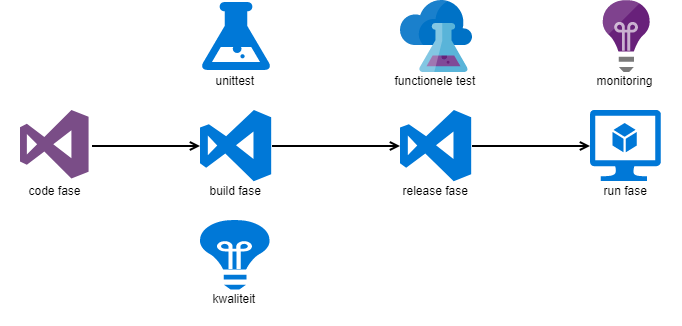
Our sources are hosted in Azure Devops Server (on-prem). Whenever a new version is committed a build compiles the sources and runs the unittests. The completed build artefact triggers the release pipeline to deploy to the VM. After the deployment the integration tests are run. When all tests are green the installation into production is scheduled for that night.

Full tracking of code to production is in Azure Devops Server.

code to production flow

In production we’ve got monitoring. This is added for completeness, but not part of the Testkube journey.

All phases start after the previous completes. Since the complete pipeline is in Azure Devops Server this works great. But with Kubernetes we deploy with gitops and more tools come into play.

Testkube setup

The test orchestration tool of choice is Testkube. It uses Custom Resource Definition (CRD) to store tests. We plan to use gitops for test deployment. Once the tests are in Kubernetes they can be triggered on new versions of the software.

Since we are have no direct internet connection we use the air-gapped installation. This means downloading the chart files from https://github.com/kubeshop/helm-charts/releases and putting them in our local repo. In the values.yaml we needed to specify the global imageRegistry to use our internal image registry and the installation completed without issues.

global:
  imageRegistry: "internal-registry-address"

The chart installs:

  • mongodb, to store logs
  • nats, supporting connectivity component
  • minio, to store artifacts (and logs)
  • testkube-logs, to collect logs and artifacts
  • testkube-api, to interact with Testkube
  • testkube-operator, to create kubernetes resources for Testkube

To test the installation we deployed the testkube-cli. The output signals success.

Next step is to create our first TestWorkflow. This will be a future post.

Posted in Tooling | Tagged , , | 2 Comments
