Behavior Driven Development with SpecFlow

Wouldn’t it be great if analysts, testers and developers spoke the same language? When I develop something great the tester says it is wrong and the analyst says it is not what he meant.
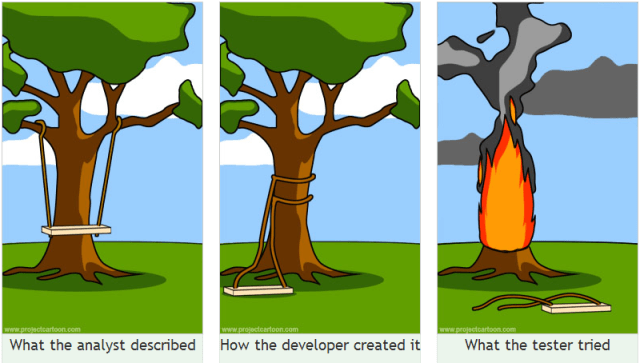
project cartoon swing tree
With SpecFlow the analyst can write what a tester can test and a developer can implement. They all speak the same language.

Setup

First install the SpecFlow extension and the NuGet Package Manager. Now you are ready to start a new solution. I’ll use my Transportation demo as example.

To add the references to the Test Project in your solution you run the following NuGet command

PM> Install-Package SpecFlow

You’re almost done setting up. SpecFlow must know what unit test framework dialect to use, the default is nUnit but I’m using MSTest. Set this in the App.config in the specFlow section.

<unitTestProvider name="MsTest"/>

Features and Steps

Add a new file to the unit test project. Select the SpecFlow Feature File template. This is written in the language Gherkin. SpecFlow will bind the different parts to code written in a SpecFlow Step Definition.
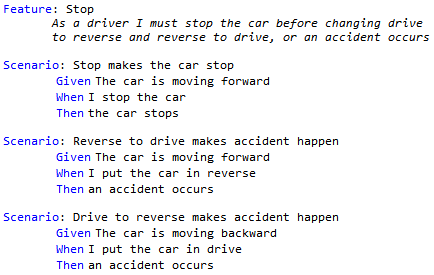
Stop feature gherkin sample

Stop feature in Gherkin with 3 test scenarios

Feature: Stop
	As a driver I must stop the car before changing drive
	to reverse and reverse to drive, or an accident occurs

Scenario: Stop makes the car stop
	Given The car is moving forward
	When I stop the car
	Then the car stops

Scenario: Reverse to drive makes accident happen
	Given The car is moving forward
	When I put the car in reverse
	Then an accident occurs

Scenario: Drive to reverse makes accident happen
	Given The car is moving backward
	When I put the car in drive
	Then an accident occurs

The specflow extension provides a command to generate the SpecFlow Step Definition. After building the Test Explorer will show your tests and you can run them. Since you have not implemented the logic for the steps everything is inconclusive. Implementation can be done with the Refactor operations as with my TDD demo. Generate the Car and it’s operations and properties. Now follow the TDD principles of Add Test, Pass Test and Refactor.
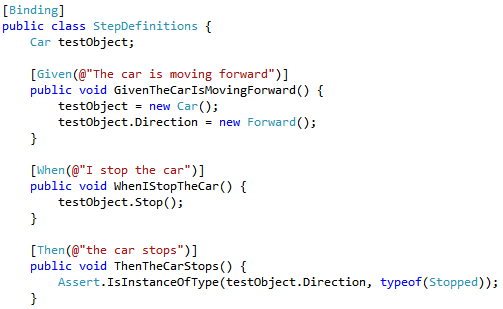
Specflow step sample

Part of the Step Definition bound to the Gherkin from above

[Binding]
public class StepDefinitions {
    Car testObject;

    [Given(@"The car is moving forward")]
    public void GivenTheCarIsMovingForward() {
        testObject = new Car();
        testObject.Direction = new Forward();
    }

    [When(@"I stop the car")]
    public void WhenIStopTheCar() {
        testObject.Stop();
    }

    [Then(@"the car stops")]
    public void ThenTheCarStops() {
        Assert.IsInstanceOfType(testObject.Direction, 
                                typeof(Stopped));
    }
}

First impressions

  • There is no ExpectedException. But this is testing the behavior. When the car is in an accident, you should be able to notice it from a change in behavior.
  • Using this intermediate language the gap between Analyst, Developer and Tester just got smaller.

Further reading:

Posted in Test | Tagged , , , | 1 Comment

ExcludeFromCodeCoverage and Linq

Visual Studio has an attribute called ExcludeFromCodeCoverage to exclude a method from code coverage. But when you use Linq the predicate is included. See sample screenshot below where the code is called with an empty list in the repository.

linq predicate included in codecoverage

Looking deeper you could discover the reason in the code coverage results pane.

linq predicate code coverage results pane

Linq generates a method for the predicate and uses a delegate to the method. This is generated at compile time. Some code coverage frameworks offer the option to exclude attributes (like ExcludeFromCodeCoverage) and adding CompilerGenerated would do the trick. Visual studio code coverage seems to have support for customization also.

💡 read The Art of Unittesting by Roy Osherove

  • is this really necessary?
  • isn’t there something wrong with my tests?
  • should I simply write more tests?
Posted in Development | Tagged , , | Leave a comment

Backup WordPress to Evernote

Since starting my blog here at WordPress in 2010 I’ve done over 100 posts. Recently I decided it was time to backup this extension of my brain to Evernote. (an elephant never forgets) But there is no feature in wordpress.com to facilitate this. Here is how I did it.

Do some google searches on the subject and you’ll find AppleScript to be very useful. I’ve used this post of victorup on evernote discussion forum

Steps

  1. Download NetNewWire v3 at http://netnewswireapp.com/
  2. Download scripts from victorup (will post altered script below)
  3. Add “http:// < blog_name_here >.wordpress.com/2013/feed” to NetNewWire*
  4. Add other years to NetNewWire (see bold year 2013 in previous item)
  5. Uncheck “After clipping” items in preferences of Evernote as stated in the post of victorup
  6. Open script folder from Scripts menu in NetNewWire and drop the script in there
    NetNewWire with 2013 feed and scripts menu pointed out
  7. Run Batch_NNW_to_Evernote_1.1 from Scripts menu
  8. [optional] Pay for Evernote premium to boost upload allowance to 1 Gb. My 120 posts used about 4.5Mb.

* WordPress has limited the items to return in a feed to 50. This is why I used feeds per year.

Final thoughts

This backup can be one time or periodically. I’ve setup IFTTT to backup new posts to evernote so that should cover me for future posts.

I’ve edited the original script to set the Created date of the Evernote Note to the post date: altered script

Posted in Tooling | Tagged , , , , , | 1 Comment

Performance optimization with VS2012 profiler

Many systems are not optimized or sub-optimized by tweaking the wrong features. This post describes the use of the Visual Studio 2012 profiler to get insight in what to optimize and monitor the result of these optimizations.

For this post I’ll use a simple service that reads the contents of a file, deserializes the contents and returns the requested record. Testing is done with a second console app that creates 10 tasks that run for 10 seconds and request as much records as possible. Code below, details omitted for breviary.

// 1. load the file
using (var file = File.OpenRead(fileName)) {
    using (var reader = new StreamReader(file)) {
        content = reader.ReadToEnd();
    }
}
// 2. deserialize data
using (var reader = new StringReader(content)) {
    var serializer = new XmlSerializer(typeof(DataRecord[]));
    records = (DataRecord[])serializer.Deserialize(reader);
}
// 3. find record
var record = records.Where(x => x.Key.Equals(key))
                    .FirstOrDefault();
if (record != null) result = record.Value;
var tasks = Enumerable.Range(1, 10)
                      .Select(x => Task.Factory.StartNew(
                      () => {
    var count = (long)0;
    var timer = Stopwatch.StartNew();
    // run for 10 seconds
    while (timer.ElapsedMilliseconds < 10000) {
        using (var proxy = new Proxy(binding, address)) {
            var value = proxy.GetValue(key);
        }
        count++;
    }
    Console.WriteLine("Repeated test {0:10} times", count);
})).ToArray();
Task.WaitAll(tasks);

Not optimized

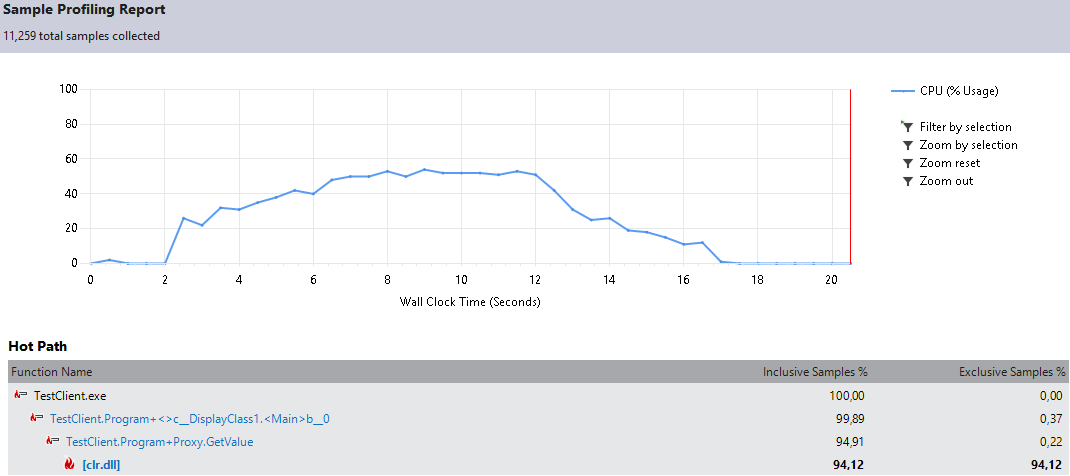
First up is the default implementation of the program. Total 11459 calls in 10 seconds.
profiling not optimized
My machine peaks at 80% and the profiler shows hot path of a framework operation inside the service GetValue implementation.

Cache file

Disk IO is slow. First change is caching the file in memory after it is read. Code changes below.

// thread safe synchronization object
private static object sync;
// constructor to initialize sync object
static DataRecordService() {
  sync = new object();
}

// part of GetValue operation
var cache = MemoryCache.Default;
content = (string)cache.Get(fileName);
if (string.IsNullOrEmpty(content)) {
    lock (sync) {
        content = (string)cache.Get(fileName);
        if (string.IsNullOrEmpty(content)) {
            // 1. load the file
            using (var file = File.OpenRead(fileName)) {
                using (var reader = new StreamReader(file)) {
                    content = reader.ReadToEnd();
                }
            }
            // add file to cache
            var policy = new CacheItemPolicy() { 
                SlidingExpiration = TimeSpan.FromSeconds(2) 
            };
            cache.Set(fileName, content, policy);
        }
    }
}

profiling cache file
Now the total is 12315 in 10 seconds. The peak is still at 80% but it comes later and the decline does not stall at 25%. Now the hot path points to the proxy in the client.

Reuse proxy

Best practice is to create a new proxy for every call, but for this optimization I now reuse the proxy for all calls per task. This brings the total to 13126 in 10 seconds.

var proxy = new Proxy (binding, address);
while (timer.ElapsedMilliseconds < 10000) {
    //using (var proxy = new Proxy(binding, address)) {
        var value = proxy.GetValue(key);
    //}
    count++;
}

profiling reuse proxy
The peak gets below 80% and the incline/decline are less steep. Now the hot path tells to look at the XML serialization of the service.

Cache deserialized records

As we cache the file contents, we can cache the deserialized records. The result would be the same anyhow. Now the calls get to 14588 per 10 seconds and the peak is 50%. The biggest difference so far.

records = (DataRecord[])cache.Get("records");
if (records == null) {
    lock (sync) {
        records = (DataRecord[])cache.Get("records");
        if (records == null && string.IsNullOrEmpty(content) == false) {
            using (var reader = new StringReader(content)) {
                var serializer = new XmlSerializer(typeof(DataRecord[]));
                records = (DataRecord[])serializer.Deserialize(reader);
            }
            var policy = new CacheItemPolicy() { 
                SlidingExpiration = TimeSpan.FromSeconds(2) 
            };
            cache.Set("records", records, policy);
        }
    }
}

profiling cache deserialized records
The hot path is in the framework on the client.

NetTcpBinding

We’ll change the binding from BasicHttpBinding to NetTcpBinding. Both ends use the dotNET framework and the binary binding is faster as the more generic Http. The code change is minimal thanks to WCF. Both the Service and the Client need to change. The number of calls sticks to 14931 per 10 seconds, but the system is no longer “under stress”.

//var address = "http://localhost:8044/datarecord.svc";
//var binding = new BasicHttpBinding();
var address = "net.tcp://localhost:8044/datarecord.svc" ;
var binding = new NetTcpBinding();

profiling nettcpbinding
The hot path shows no real optimizations left as the number behind the path is very low. (4,36)

Conclusion

Using the VS2012 profiler we got the test to service from 11459 to 14931 calls and lower the system resources needed for this. Keep in mind that not every change is without pitfalls like caching fast changing files or reusing proxies. Make sure to run the system with production like load before releasing.

Posted in Development | Tagged , , , , , , , , | Leave a comment

NDepend – first look

Earlier this year Patrick Smacchia from NDepend contacted me on linked-in. He would offer me a professional license to blog about his product. Now I finally have the time to keep my end of the bargain.

ndepend

Since the features are so numerous I will not cover them all at once. After loading my Visual Studio solution a report is shown. This report is a good start to improving your solution.

Tab Main

First a summary with some tips to get you started.

Below the diagrams to visualize your solution. There are a dependency graph, dependency matrix, treemap metric view and abstractness vs instability. Visual Studio Ultimate sometimes has problems with larger solutions (read:crashes) whereas NDepend takes it’s time but finishes the job. Especially the dependency matrix can be a life saver in complex systems.

Then the application metrics. I noted no code coverage was available. VSExpress does not provide it, but I can use other tools. Installed OpenCover and converted the result to NCover 1.x with this XSLT only to discover NCover version 2 and up was supported. I expected more. Then again: paying for NDepend professional and holding out on other licenses?

Last up are the rules. I managed to generate 14 warnings with just 32 lines of code :shock:. That is what I’m going to change in the rest of this post.

Tab Rules

ndepend_rules
Every warning is described by it’s name, the query used to find it and the detailed information about the class that violated the rule. After changing your code you can review the rules by (re)building in Visual Studio and then Run Analysis on Current Project (F5) in NDepend.

Some tips are not so useful like Classes that are candidate to be turned into structures when an attribute is on it that requires the type to be a class or the type has a parameterless constructor. Or Types that could have a lower visibility to make unittest classes internal (and unusable). Others are very smart like Mark assemblies with CLSCompliant and Potentially dead Methods. Using the CQLinq language you can adjust or create your own. Some warnings can be suppressed by using attributes from the NDepend.API assembly.

In the end I was left with 5 warnings about my unittest. Those I can ignore.

Conclusion so far

Personally I prefer to use the build-in features of Visual Studio 2012. But the Express edition is very limited and the perfect candidate to expand with NDepend. Expect no integration as Microsoft disabled this on their free IDE. NDepend can run as a standalone program and still deliver.

Other features will be posted soon.

Posted in Tooling | Tagged , , , , , , , | Leave a comment