Week 38 roundup

Last week recap and links:
Image courtesy of kanate / FreeDigitalPhotos.net

  • Powershell syntax in Sublime Text 2, the method is for Windows but also applies to Mac
  • We used the build definition settings (TFS2015) to use a two digit month and dayOfTheMonth buildnumber. The key is to use the Date token in stead of Month and DayOfMonth: $(Year:yyyy).$(Date:MM).$(Date:dd)$(Rev:.rr)
  • Continuous deployment with TFS and Azure Websites can be customised. Applies to all real-life, multiple-websites-solution and more-advanced-than-the-demo projects.

Image courtesy of kanate / FreeDigitalPhotos.net

What are your best reads this week? Leave them in the comments below.

Posted in Uncategorized | Tagged , , , , , , | Leave a comment

Spark as alternative to Cloudmagic

Cloudmagic used to be my email client on iOS. But with the introduction of Newton it became a paid service. Since there are free alternatives I decided to switch. My new favourite is Spark.

sparkapp

What I want

My list of requirements is short but specific:

  • Support for IMAP, iCloud and GMail
  • Integration with Evernote
  • Free or one-time-purchase

Spark

Setup was simple. Spark recognised my (dutch) provider and only needed my email address and password. Integration with 1Password made entering the credentials a no-brainer.
The integration with Evernote is great. Just grant access via the Evernote App and now you can swipe an email to Evernote. Swipe actions are customisable.
The interface needs some getting used to and I’m not sure if I’ll ever use the quick reply feature.

Alternatives

In my quest I noticed Boxer. Swipe actions just like Spark. Paid app usually mean great support but setup of IMAP failed miserably.
Outlook is praised everywhere. The integration is limited to Calendar events for Evernote reminders. So no chocolate.

Further reading

50 getting started tips for new Spark users on 9to5mac.com
Vimeo promotional video

Posted in Tooling | Tagged , , | Leave a comment

Allow only release build to be published

We have a WPF application that we distribute with click-once deployment. The update feature is exactly what we need for our product. Getting the new build from Development into Production is easy, just publish.

The problem is that we only want Release builds to be published. Config transformation, code optimisation and custom icons are some of the main reasons we want to publish a Release build. Sometimes we forget to change the configuration and a Debug build is released into the wild.

As a safety net we added the BeforePublish build target to the project.

<Target Name="BeforePublish">
    <Error Condition="'$(Configuration)'!='Release'" 
           Text="Only Release build can be published" />
</Target>

Now when we try to publish without setting the configuration to Release the build fails.

publish.debug.fails

Since this is a very small project we haven’t setup automated build. The errors should keep us safe for now.

Posted in Development | Tagged , , | Leave a comment

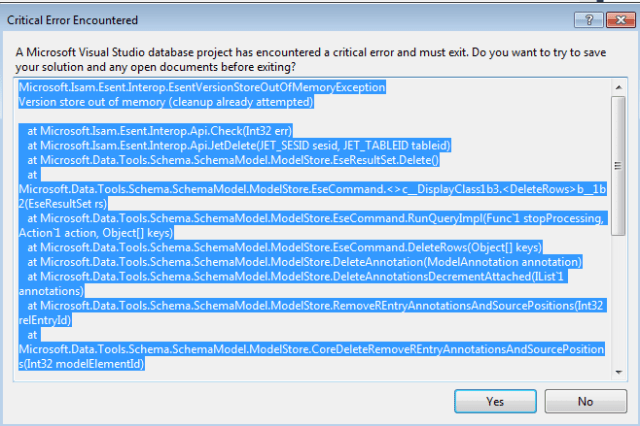
Version store out of memory

In our current project we use Sql Server Data Tools (sqlproj) to put our database in source control. Recently we experienced random exceptions during loading and building the solution with multiple sql projects.

EsentVersionStoreOutOfMemoryException

Last week our builds started to fail. The logging showed something like

MSB4018: The “SqlBuildTask” task failed unexpectedly.
Microsoft.Isam.Esent.Interop.EsentVersionStoreOutOfMemoryException: Version store out of memory (cleanup already attempted)

On Microsoft Connect we found a workaround. By adding commandline option /p:CmdLineInMemoryStorage=TRUE the build worked again. Seems there is someone working at Microsoft with a great name 😉 microsoft.connect.eric.msft

Posted in Development | Tagged , , , | 1 Comment

AngularJs and special characters from json webservice

My current project creates a Single Page Application (SPA) using ASP.NET MVC and AngularJs with data from ASP.NET MVC webapi REST webservices. With the buzzwords out of the way, let me describe the issue we had.

Some data from the webservice contains strings with special characters like “COÖRPERATIE” (dutch). After binding the json data with curly braces the webpage would show malformed strings like “COÃ-RPERATIE”.

Image courtesy of Kittikun Atsawintarangkul / FreeDigitalPhotos.net

We started looking for a solution with ngSanitize. Google gave lots of answers, but none helped. We tried filters, no chocolate. HTML escaping. The horror!

Right after the $http.get we added a $log of the string and found that it already was wrong. But Fiddler said it was correct? Seems to be a header you can send in the request: Accept-Charset: UTF-16

We added the extra header to our request and it worked. No more gibberish. The code samples below add the header to requests.

// client script angular
$http.get(url, headers : { 'Accept-Charset' : 'utf-16' })
     .then(function(response) { });
// client csharp code
var client = new System.Net.WebClient();
client.Headers.Add("Accept-Charset", "utf-16");

Since we always want to return UTF16 we made it the default response over UTF8. With the code below the webservice is configured to use the UTF16 encoding for the json formatter.

// add to global.asax or startup.cs
var utf8json = GlobalConfiguration.Configuration.Formatters.JsonFormatter.SupportedEncodings[0];
GlobalConfiguration.Configuration.Formatters.JsonFormatter.SupportedEncodings.Add(utf8json);
GlobalConfiguration.Configuration.Formatters.JsonFormatter.SupportedEncodings.RemoveAt(0);

The webservice can stil return UTF8 but the client must explicitly request it.

Posted in Development | Tagged , | Leave a comment