Add Sql Server as user provided service in Cloud Foundry

In this post you’ll add Sql Server from Azure to a dotnet core mvc app. We presume you’ve already created the Sql Server in Azure. If not follow my post azure sql server for centralised database.

User Provided Service

A user provided service is a way to connect non-marketplace services to your cloud foundry app. The service will show up in the services tab and the connectionstring (or anything else you need) is added to the configuration.

We use the cli to add Sql Server as a user provided service and then hook it up to the core app. The connectionstring is provided by Azure on the portal. The line below is very long!

cf cups mySqlServerService -p '{"connectionstring": "Server=tcp:cfnorthwind.database.windows.net,1433;Initial Catalog=Northwind;Persist Security Info=False;User ID=eric@cfnorthwind;Password=4Pjby8$wTk;MultipleActiveResultSets=False;Encrypt=True;TrustServerCertificate=False;Connection Timeout=30;"}'
cf bind-service core mySqlServerService

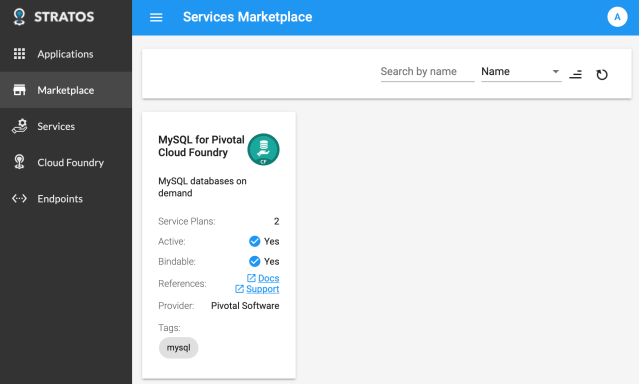
In stratos the service is visible now

Code changes

We’re going to edit the dotnet core app.

First add some nugets:

dotnet add package Steeltoe.CloudFoundry.ConnectorCore
dotnet add package Steeltoe.Extensions.Configuration.CloudFoundryCore
dotnet restore

Then make the changes below.

In the program.cs we need to load the environment variable VCAP_SERVICES and parse it into the configuration. For this we’ll use the Steeltoe extension:

using Steeltoe.Extensions.Configuration.CloudFoundry;

public static IWebHost BuildWebHost(string[] args) =>
  WebHost.CreateDefaultBuilder(args)
         .AddCloudFoundry()
         .UseStartup<Startup>()
         .Build();

Then we need to create a SqlConnection and inject it into the IoC container. With a Steeltoe extension and the microsoft Options extension:

using System.Data.SqlClient;
using Microsoft.Extensions.Options;
using Steeltoe.Extensions.Configuration.CloudFoundry;

// Class with same property as provided in the cf cups statement
public class SqlServerInfo {
   public string Connectionstring { get; set; }
}
// Class that wraps the mySqlServerService in the cf cups statement
// Property is always called Credentials (look at the environment variables)
public class MySqlServiceOptions : AbstractServiceOptions {
   public SqlServerInfo Credentials { get; set; }
}

public void ConfigureServices(IServiceCollection services)
{
   services.AddMvc();
   // link the mySqlServerService from configuration to the class defined above
   services.ConfigureCloudFoundryService<MySqlServiceOptions>(Configuration, "mySqlServerService");
   services.AddScoped<SqlConnection>(x => {
      // retrieve the user provided service from the configuration
      var monitor = x.GetRequiredService<IOptionsMonitor<MySqlServiceOptions>>();
      var config = monitor.Get("mySqlServerService");
      return new SqlConnection(config.Credentials.Connectionstring);
   });
}

We plan to connect to Sql Server on the Contact page. The code below runs a query that returns some text (no sql objects needed) but only when the connection succeeds.

using System.Data.SqlClient;
using System.Data;

public IActionResult Contact([FromServices] SqlConnection dbConnection)
{
    var cmd = dbConnection.CreateCommand();
    cmd.CommandText = "SELECT 'hello world from sqlserver'";
    dbConnection.Open();
    ViewData["Message"] = "Your contact page. " + cmd.ExecuteScalar().ToString() ;
    dbConnection.Close();

    return View();
}

The code changes are done. Now cf push the application.
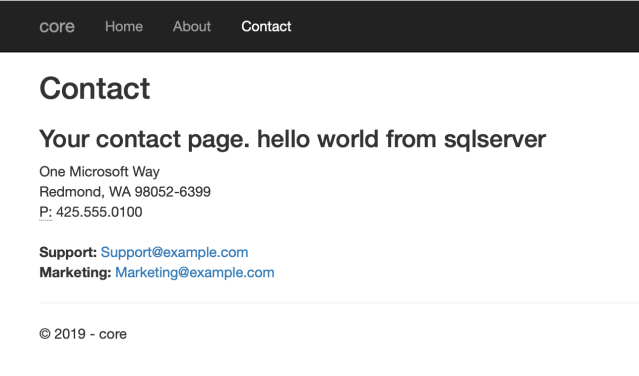
After the app is restarted the Contact page shows us “hello world from sqlserver”.
Tip

Since the Sql Server is hosted outside of Cloud Foundry, you can reference it while debugging. Just add the connection information to the appsettings.json and load it in the program.cs.

{
  "Logging": {
    "IncludeScopes": false,
    "LogLevel": {
      "Default": "Warning"
    }
  },
  "vcap:services" : {
    "user-provided": [
      {
        "name": "mySqlServerService",
        "instance_name": "mySqlServerService",
        "binding_name": null,
        "credentials": {
          "connectionstring": "Server=tcp:cfnorthwind.database.windows.net,1433;Initial Catalog=Northwind;Persist Security Info=False;User ID=eric@cfnorthwind;Password=4Pjby8$wTk;MultipleActiveResultSets=False;Encrypt=True;TrustServerCertificate=False;Connection Timeout=30;"
        },
        "syslog_drain_url": "",
        "volume_mounts": [],
        "label": "user-provided",
        "tags": []
      }
    ]
  }
}

public static IWebHost BuildWebHost(string[] args) =>
  WebHost.CreateDefaultBuilder(args)
         .ConfigureAppConfiguration((builderContext, configBuilder) =>
         {
            // will be overwritten in Cloud Foundry
            configBuilder.AddJsonFile("appsettings.json");
         })
         .AddCloudFoundry()
         .UseStartup<Startup>()
         .Build();

References

https://docs.cloudfoundry.org/devguide/services/user-provided.html
https://github.com/SteeltoeOSS/Configuration/issues/40
Posted in Development | Tagged , , , | Leave a comment

Add MySql to dotnet core app in Cloud Foundry

In this post you’ll add MySql from the marketplace to a dotnet core mvc app. Mysql was added to the marketplace in this post.

Service

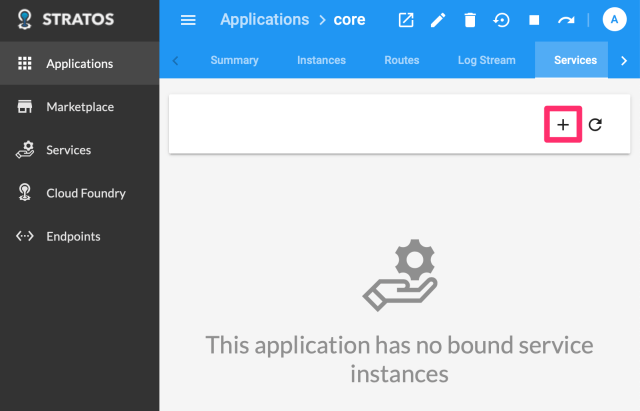
We could use the cli to add MySql and then hook it up to the core app. But since we’ve installed Stratos, we can do this with a wizard:

  1. Select Service: choose p-mysql
  2. Select Plan: choose 10mb (or whatever applies to your needs)
  3. Binding Params (Optional): leave empty
  4. Service Instance:
    • Create and Bind to a new Service Instance
    • Name: mydatastore

You can wait for the changes to be applied or move to Code Changes below.

Code changes

We’re going to edit the dotnet core app.

First add some nugets:

dotnet add package Steeltoe.CloudFoundry.ConnectorCore
dotnet add package Steeltoe.Extensions.Configuration.CloudFoundryCore
dotnet add package MySql.Data
dotnet restore

Then make the changes below.

In the program.cs we need to load the environment variable VCAP_SERVICES and parse it into the configuration. For this we’ll use the Steeltoe extension:

using Steeltoe.Extensions.Configuration.CloudFoundry;

public static IWebHost BuildWebHost(string[] args) =>
WebHost.CreateDefaultBuilder(args)
.AddCloudFoundry()
.UseStartup<Startup>()
.Build();

Then we need to create a MySqlConnection and inject it into the IoC container. Again with a Steeltoe extension:

using Steeltoe.CloudFoundry.Connector.MySql;

public void ConfigureServices(IServiceCollection services)
{
   services.AddMvc();
   // get the connection to the mysql service
   services.AddMySqlConnection(Configuration);
}

We plan to connect to MySql on the About page. The code below runs a query that returns some text (no mysql objects needed) but only when the connection succeeds.

using MySql.Data.MySqlClient;

public IActionResult About([FromServices] MySqlConnection dbConnection)
{
   var cmd = new MySqlCommand("SELECT \"hello world from mysql \"; ", dbConnection);
   dbConnection.Open();
   ViewData["Message"] = "Your application description page. " + cmd.ExecuteScalar().ToString() ;
   dbConnection.Close();
   return View();
}

The code changes are done. Now cf push the application.

Security

After the cf push completes the application throws an exception:

fail: Microsoft.AspNetCore.Diagnostics.ExceptionHandlerMiddleware[0]
An unhandled exception has occurred: Unable to connect to any of the specified MySQL hosts.
MySql.Data.MySqlClient.MySqlException (0x80004005): Unable to connect to any of the specified MySQL hosts. 
---> System.AggregateException: One or more errors occurred. (Connection refused 10.244.0.145:3306) 
---> System.Net.Internals.SocketExceptionFactory+ExtendedSocketException: Connection refused 10.244.0.145:3306

This means the security is not setup for the app to communicate with the MySql endpoint. With a json file we allow communication from our app to the MySql machine over port 3306.

[
   {
      "protocol": "tcp",
      "destination": "10.244.0.145",
      "ports": "3306",
      "log": true,
      "description": "Allow traffic to mysql"
    }
  ]

With the cf statements below we install the security profile in the demo organisation, dev space.

cf create-security-group mysql mysql-asg.json
cf bind-security-group mysql demo dev
cf restart core

After the app is restarted the about page shows us “hello from mysql”.

References

https://github.com/amithn/cloudfoundry-steeltoe-mysql-app
https://steeltoe.io/docs/steeltoe-configuration/#1-2-usage

Posted in Development | Tagged , , | Leave a comment

MySql in marketplace of your Cloud Foundry

This post is a combination of information available elsewhere (links are included) and can be used to get mysql in the marketplace on your local Cloud Foundry.

Tip! Run startupcf.sh from my quickly set environment for local cloud foundry post.

MySql

Follow http://operator-workshop.cloudfoundry.org/labs/services. But first peek below 😉

git clone https://github.com/cloudfoundry/cf-mysql-release.git ~/workspace/cf-mysql-release
cd ~/workspace/cf-mysql-release
git checkout tags/v36.10.0
./scripts/update
bosh create-release
bosh upload-release

git clone https://github.com/EngineerBetter/cf-mysql-deployment.git ~/workspace/cf-mysql-deployment
cd ~/workspace/cf-mysql-deployment

# edit operations/register-proxy-route.yml manually
# edit cloud-config manually

bosh -d cf-mysql deploy \
  cf-mysql-deployment.yml --vars-store mysql-creds.yml \
  -o ./operations/add-broker.yml \
  --vars-file bosh-lite/default-vars.yml \
  --var cf_mysql_external_host=p-mysql.$SYSTEM_DOMAIN \
  --var cf_mysql_host=$BOSH_ENVIRONMENT \
  --var cf_admin_password=$CF_ADMIN_PASSWORD \
  --var cf_api_url=https://api.$SYSTEM_DOMAIN \
  --var cf_skip_ssl_validation=true

I ran into some trouble with the deployment. The url in the register-proxy-route.yml was not working; so I downloaded the file and changed the url in register-proxy-route.yml to my local copy.

In the lab you must find out how to edit the cloud-config. Here’s our take:

# download the cloud-config to a local file
bosh cloud-config > cloud.yml
# edit the local file with vs code
# add massive to vm_types (see cloud.yml below)
code cloud.yml
# upload the cloud-config
bosh update-cloud-config cloud.yml
...
vm_types:
- name: minimal
- name: small
- name: small-highmem
- name: default
- name: massive

Cloud Foundry

After deployment of MySql to Bosh you’ll need to register it in Cloud Foundry. It is in the lab, but we’ve added it for completeness.

bosh deployments
bosh errands -d cf-mysql
bosh run-errand -d cf-mysql broker-registrar 

Now you’ll have MySql in the Marketplace

Posted in Development, Tooling | Tagged , | Leave a comment

Quickly set environment for local Cloud Foundry

We’ve been playing with our local Cloud Foundry installation.

After “save state” and system shutdown some settings are lost. To get our environment quickly setup for local Cloud Foundry we run a script:

source ~/startcf.sh

The contents of the script file is based on the posts on my blog. This sets up the bosh and cf command.

export BOSH_CLIENT=admin
export BOSH_CLIENT_SECRET=`bosh int ~/deployments/vbox/creds.yml --path /admin_password`
export BOSH_ENVIRONMENT=192.168.50.6
export CF_ADMIN_PASSWORD=`bosh interpolate --path /cf_admin_password ~/workspace/cf-deployment/deployment-vars.yml`
export SYSTEM_DOMAIN=bosh-lite.com

sudo route add -net 10.244.0.0/16     192.168.50.6 # Mac OS X

It’s the first command we run in a new terminal window.

Posted in Development | Tagged | Leave a comment

Time drift on Cloud Foundry

On April 24th the ssl certificate of cloudfoundry is renewed.
buildpacks.cloudfoundry.org ssl certificate valid-from april 24th

Directly after that I got errors on the certificate:

**ERROR** Unable to install Libunwind: Get https://buildpacks.cloudfoundry.org/dependencies/manual-binaries/dotnet/libunwind-1.2.1-linux-x64-80af276a.tgz: 
x509: certificate has expired or is not yet valid

Workaround

My workaround was to create an offline buildpack.

Fix

On their Slack channel I got the tip to look at the time setting on Cloud Foundry.
https://starkandwayne.com/blog/bosh-director-time-drift-2/

bosh ssh -d cf -c date

Listing confirms time drift: CF thinks it is still April 17th. Fixed it by setting the date to April 26th:

bosh ssh -d cf -c 'sudo date --set="2019-04-26 08:37:00.000"'

Now the buildpacks work again.

Posted in Development | Tagged , | Leave a comment