Mono.Data.Sqlite and filelocks

While porting my projects to Mono I noticed some file locking on databases. There were no problems with the dotNET code. Seems like a difference in behavior between the two frameworks.

A simple query to a Sqlite database would look a lot like the code below

// create the connection
var connection = new SqliteConnection("Data Source=sample.db");
// don't forget to open the connection once created
connection.Open();
// create command
var command = connection.CreateCommand();
// get the value field from the data table
command.CommandText = "SELECT [Value] FROM [DATA] WHERE [ID] = 2";
var value = command.ExecuteScalar().ToString();
connection.Close();

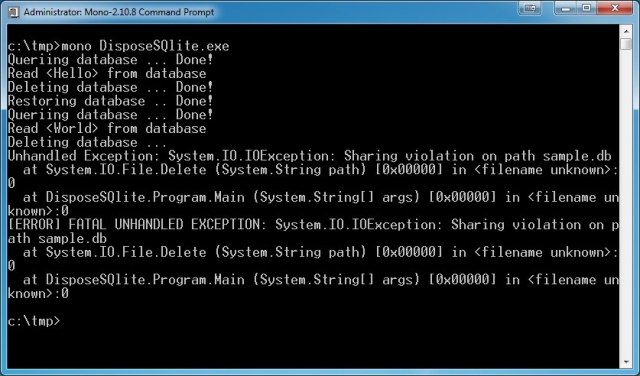
This code works well on both dotNET and Mono. But on Mono the database file is locked until the end of the program. In the sample project at the end of this post I demonstrate this by deleting the database file right after the query result was read, resulting in an Exception. When the project is run on dotNET (change Sqlite reference to dotNET assembly) the sample project works without exceptions.

IO Exception thrown when sample project is run on mono

The solution to this problem is the IDisposable interface. All Sqlite objects implement it. With using blocks the Dispose is automatically called. The code above with using blocks looks like this

var value = default(string);
using (var connection = new SQLiteConnection("Data Source=sample.db"))
{
    // don't forget to open the connection once created
    connection.Open();
    // create command
    using (var command = connection.CreateCommand())
    {
        // get the value field from the data table
        command.CommandText = "SELECT [Value] FROM [DATA] WHERE [ID] = 1";
        value = command.ExecuteScalar().ToString();
    } // disposes the command
    connection.Close(); // not needed anymore, but no damage done when calling it
} // disposes the connection

The code with using blocks works great on both dotNET and Mono.

Sample project

Posted in Development | Tagged , , , , , , | 2 Comments

WinDirStat

From the list of tools Scott Hanselman calles 2011 Ultimate Developer and Power Users Tool List for Windows I downloaded and installed WinDirStat and used it recently to pinpoint why my disk was allways full.

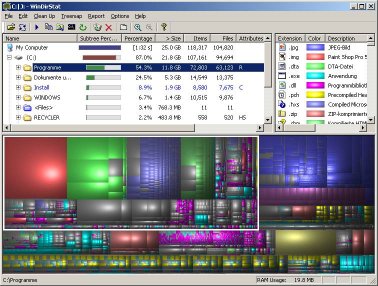
WinDirStat scans the entire harddisk or only a certain disk and shows the size of the folders. This scanning can take a while so be patient and enjoy the process indicators which are pacmans. When it is finished you end up with the Explorer style grid, a list with filetypes and the space it uses and some nice graphical representation. See below for a screenshot from taken their website.

My problem was with Silverlight temp files (2Gb) that an update of the plugin fixed. Also some MP3 files were hogging up space.

Still running smooth and developing Visual Studio on my 30Gb VHD system.

Posted in Tooling | Tagged , , , , , , | Leave a comment

Techdays 2012 – day 2

Astrid Hackenberg – Multi-tenant applications on Windows Azure

There are four models of sharing:

  • Independent – share nothing
  • Isolated – share infrastructure (IAAS)
  • Isolated – share platform (PAAS)
  • Shared – Share everything (SAAS)
    SAAS can be implemented on different ways too. Think about sharing the same Windows Azure worker roles, the same website, but also the same database or even the same data.

When you “apply” SAAS to an existing product think about Access Control and Customization. How can you isolate the users, so no data becomes cross polluted? Users will want to customize the GUI so it looks like an application just for them.

The implementation comes with a lot of choices about what to share. Think about this when you use queues, cache, blobs, tables, compute and endpoints.

Astrid used the FrabrikamShipping sample for showing the migration of an app to the cloud and to SAAS. The new code is in a separate project.

For autoscaling the Cloudninja sample (cloudninja.codeplex.com/) was used.

Alex Turner – Tips and tricks to use Visual Studio to the fullest

Alex showed a lot of keyboard shortcuts so you don’t need the mouse a lot. All the tips are in his presentation that will be published.

Bart de Smet – Behind the scenes of C# async

Bart starts his talk stating it is actually level 600, some stand up an leave, same as last year. He shows a method with three lines of code containing the await statement and then he shows the code the compiler will make of it.

The compiler creates an Awaiter struct (struct as it is not heap allocated), checks if the task is already completed and if not moves it to the threadpool.

Then the sample is expanded with a foreach loop, which the compiler converts into a statemachine.

The async / await stuff comes in the dotNET 4.5 framework and in Visual Studio 11. It is nice to know what the compiler does with it, but in reality you’ll never need to know. 😉

Martin Woodward – Taking your ALM to the cloud with Team Foundation Service

This is Team Foundation on Windows Azure made available as SAAS. It is still under development and a preview is on tfspreview.com. You’ll need an invite to get an account (leave comment if you want one)

  • As a startup you don’t need hardware (it is in the cloud)
  • It needs low bandwidth (Microsoft uses it cross geo)
  • Installation is a breeze (just signup and wait a few minutes, done)
  • Updates are quicker (you can opt-out of an update if you want)
  • It is public facing (no vpn, even your customer could access it)

Some stuff is still missing in compare with the boxed version

  • No data warehouse
  • No sharepoint integration (you could use on premises, office 365 …)
  • No Virtual Test Lab manager

Olaf Conijn – Unittesting Windows Phone 7

Unittesting of your Windows Phone 7 project can be done on the device with a port of the Silverlight unittesting framework. The port has been done by Smarty Pants. The product is not maintained and the automation part of the framework is not ported. This means no GUI testing by clicking the actual button from the unit test.

Option two is unittesting from Visual Studio by changing all Silverlight referenced assemblies to be copied local. Do the same for all Windows Phone 7 assemblies. These Windows Phone 7 assemblies contain no code, but are needed to compile and to run the unittests. Now you need to mock the dispatcher and the database by extracting an interface and use something like unity to resolve the implementation of the interface (the mock at unittest and the actual dispatcher/database on runtime)

A little sidestep showed that a webrequest has this build in by using the RegisterPrefix operation. Implement your own WebRequestPrefix that returns a mocked WebRequest and IAsyncResult. Return a mocked WebResponse too and you’re done.

Summary

Microsoft is pushing Windows 8, dotNET 4.5, MVC4 and VS11 to developers with “build what’s next now”. None of the new stuff is production ready even the Team Foundation Service is a preview. Nice to see what is coming, but it will take some time before I introduce this to a client.

But hé, we’ve got Windows Azure a while now, just like Windows Phone 7. These topics were well represented on techdays. And the overall message was “this stuff is coming, but your old stuff will keep working”.

Posted in Conference | Tagged , , , , , , , , , , , , , , , , , , , , , , , | 2 Comments

Techdays 2012 – day 1

Keynote

Metro the vision of clear applications, like signs in the metro. You just know what they mean. Your application must do the same. That is why you’ll need to redesign it for every platform (desktop, mobile, web, tablet, …) Microsoft worked with 70 people for 3 months just on mockups of the GUI for Windows Phone 7.

Bart de Smet – Introducing the WinRT in Windows 8

WinRT is the solid, efficient foundation for the new Windows 8 developer platform

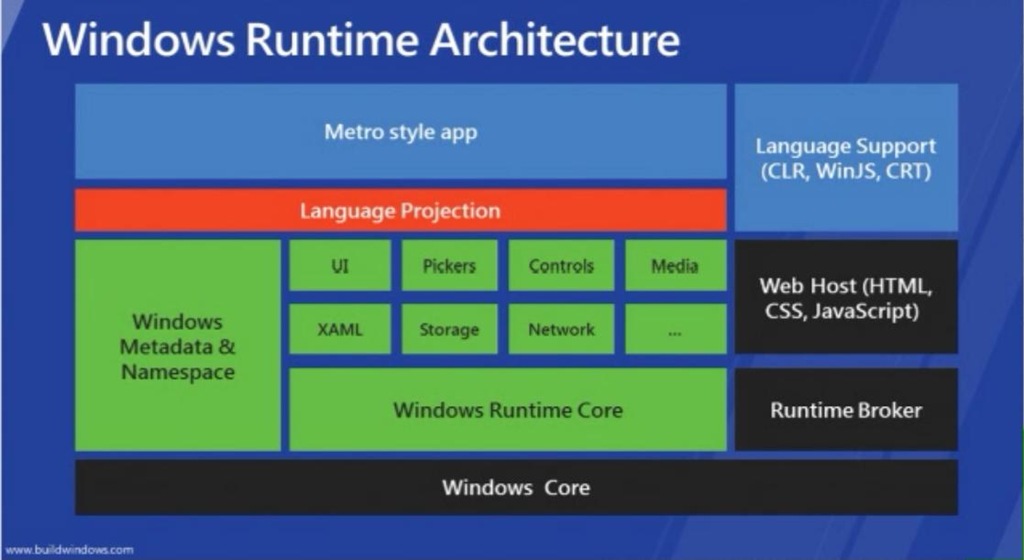
This image shows the windows 8 runtime architecture

Windows Metadata (on the left) supplies the intellisense. It is implemented IL code and hierarchical organized (not like PInvokes) This metadata lives in the System32/windowsmetadata directory.

Language projection translates everything in the language specifics, like naming conventions (captivation) and specific object types. Example the IVector becomes a collection in Java, a List in dotNET and an Enumerable in C++.

IUnknown is the interface for COM. Now there is IInspectable which is used to get more information about the type and use it.

With versioning Microsoft guarantees programs will keep working on future builds. Interfaces may only be added, not modified. To create this in Visual Studio

  • Change the target type from Class Library to WinMD file
  • Make all public facing classes sealed. No inheritance is allowed. This does not apply to private classes.
  • Empty classes (without any implementation) are not permitted as no interface can be extracted from them

In the manifest of an application the capabilities can be set, like Webcam. On startup the user is asked for permission with a brokered object. A brokered object is an out-of-process created object.

Using the Share charm an application can share data with other applications.
Asynchronous (await, async) is the way to go, no synchronous methods are available anymore.

Scott Guthrie – Windows Azure

The integration of Windows Azure development in Visual Studio has improved. Most processes are supported by wizards now. You can even download the profile from the Windows Azure dashboard and you can import it in the wizard.

Scott shows a demo of auto scaling. The remote desktop still shows the “this windows is not genuine” message. That is probably why you need two instances in the first place: after the trial period expires a new machine must be created. So even when your application works flawless it still goes down when you only have one instance.

SQL Azure has got some price cuts. You can edit the databases with the SQL Studio.

Scott Guthrie – MVC4

MVC4 can be downloaded for VS2010 and is part of VS11. It is stil default ASP.NET so no installation on IIS is required. You could run it on your existing machines.
Modernizer, bundling, minification and Razor are part of MVC4 now. With bundling the number of requests are minimized by bundling them and minification makes the response as small as possible by removing comments, spaces and line feeds.
Entity Framework has database migrations now which can be used in the commandwindow.

Update-package EntityFramework
Enable-migrations
Add-migration NAME
Update-Database –TargetMigration: NAME

Publish of a project could migrate the database too.

Web-API provides access to data with REST in json/xml out-of-the-box. The service can be added as a reference which is the advantage over REST. It also uses the http protocol better with statuscode and url’s in the header. It can be unittested by creating the repository and call that. It can be hosted in a console app.

MVC4 is smart enough for mobile web with jQuery, auto adapt and manual override of a view (by the developer)

In between Scott mentions SingalR. A push notification from server to client with javascript. Example on the web jabbr.net.

MVC4 has asynchronous support with async and wait.

Jeff Prosise – Take a ride on the metro

Desktop application (win32, dotNET) and metro apps (WinRT) are supported on Windows 8. XAML can be used in WinRT, but is not 100% compatible with the existing implementation in WPF. HTML5 is 100% compatible, but you’ll make changes to use the extra features that are available like saving files.

Interaction with applications is done by Pointer (clicks), Tapping (tapps) and Manipulation (move, pinch) events.

In WinRT you’ll need to save sate when the application recievs an OnSuspending event. Save this state in the roaming profile and the used can continue at home where he left the application at work. The different events are

  • OnSuspending: user switches, possibly you’re stopped so save your state
  • OnLaunched: started (again) by the user, check the type of launch and restore the state if needed
  • OnResuming: this event always fires when the user activates the application, this has nothing to do with suspending or launching. Use this event to update data if needed, like in a weather app.

You need to define to the eventhandler that you handle something asynchronous with this code (for info only won’t compile)

var defferal = e.SuspendingOperation.GetDeferral();
await ….
deferral.Complete();
 

Use contracts to use the charms in the charms bar: search, transfer and settings.

Tiles are used to start the application. Secondary tiles are shortcuts into you application, comparable with startup parameters. Tile updates (again like weather) can be queued.

All samples can be downloaded: wintellect.com/downloads/metro.zip
alternative download

[Geeknight]

Erik Romeijn – Stop, drop and release

Make minimal apps. These are apps with minimal of features, but that work good. Adding new features can be done later when needed, maybee when the application took off.

Feedback from your customers is important, add it to all your applications.

Rob Miles – Kinect Mayhem

All demos failed, but the guy makes you laugh 🙂

Fons Sonnemans – Windows Phone 7 live

Fons asked the audience what he should build and then did that.

He created an ODATA service. Dropped some prepared code. Used a snippet he developed. Loaded the MVVM Light NuGet package. Used a lot of Blend. Created a partial class to add an extra property to the ODATA service reference class.

In 40 minutes he build an app that showed a list of Hotels with the name and an image, that loaded from the ODATA service. Clicking on a row showed the details and a Bingmaps control, which he needed the extra property for. In such a short timespan you’ll need some accelerators like NuGet packages and some snippets. Fun to watch.

Posted in Conference | Tagged , , , , , , , , , , , , , , , , , , , , , , , , , , , | Leave a comment

Techdays 2012

I'm attending Techdays 2012 on 16 and 17 Februari in The Hague

I’m attending Techdays 2012 in The Hague. Check back for a summary of the talks and the geeknight.

Posted in Conference | Tagged , , | Leave a comment