Vacation project Apple TV

Apple TV
My jailbroken Apple TV plays media files from my NAS. Together with the Airplay from other apple devices this is my home entertainment system.
But bigger files and higher bit rates caused problems. Multiple buffering and loading breaks during playback and sometimes lost connections which meant game-over back to the main menu. This vacation I would solve it.

DiskSpeedTest
Using Blackmagic Disk Speed Test as my testing tool, I found that the read speed over the network was very low. (first row in table below) The direct/wired connection from my router to the Apple TV (second row) was more stable but not without problems. Unfortunately the specs of the Apple TV stated an 10/100Mbit LAN connection. Nothing to gain on that route.

But wait, the Airport Express I was using only has an 100Mbit Lan connection. I replaced it with an Airport Extreme which has an 1Gbit connection. (last row) Now playback is smooth, no more buffering or endless loading.

Setup and read speed score
NAS Router Wifi ATV Score*
1Gbit 100Mbit N (airport express) 2,8
1Gbit 100Mbit (direct) 6
1Gbit 1Gbit N (airport extreme) 16

* bigger is better, tests performed with my macbook

Be sure to measure your setup to see the affects of changes. My wired connection did not do the trick which left me puzzled. Using an 1Gbit connection upstream solved my problems.

Posted in Tooling | Tagged , , , , , , | Leave a comment

TestMatrix

I’ve been using the GhostDoc extension from SubMain for some time. It puts those triple slash (///) documentation tags above my csharp code for me. All I have to do is hit some shortcut keys. Although I never posted about it, I highly recommend it.

This post is about TestMatrix, another product from SubMain. It provides a test runner, code coverage and test profiler as an Add-in for Visual Studio 2005 up to 2012. Since this is an Add-in the express edition is not supported.

The installation requires the dotNET 2.0 framework which my Windows 8.1 Hyper-V machine had not installed. After correcting that, the setup was a breeze.

TestMatrix makes itself visible in Visual Studio with a Menu and some panels.

Test runner

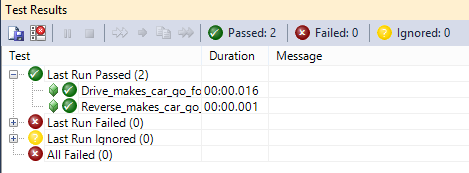
The test runner panel looks like the testresults panel in Visual 2005 – 2010. Since I installed it in Visual Studio 2012, it gave my environment a retro look ;). So far so good.
testrunner

Code coverage

Next I wanted to see my code coverage. Enabled it in the Menu, but got no results. Looked in the output window and found logging of created coverage results. Also the testrunner notified me about performance penalties when using code coverage. But no results.

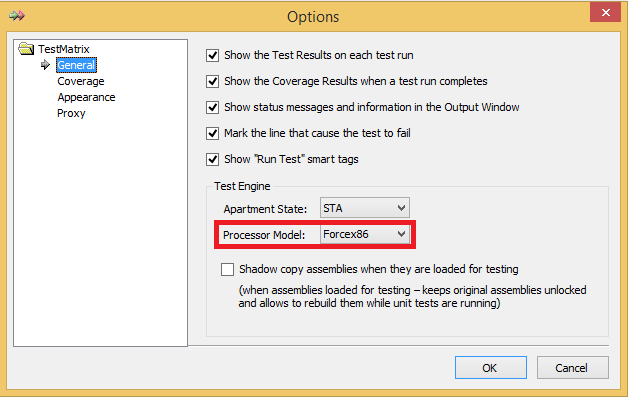
After some digging the answer was the Forcex86 setting in the Options dialog. Why not make this the default?
options

Now the code coverage is not only measured, it is also presented in the panel. The checkboxes in the top are for filtering the results. Nice feature.
codecoverage

Test profiler

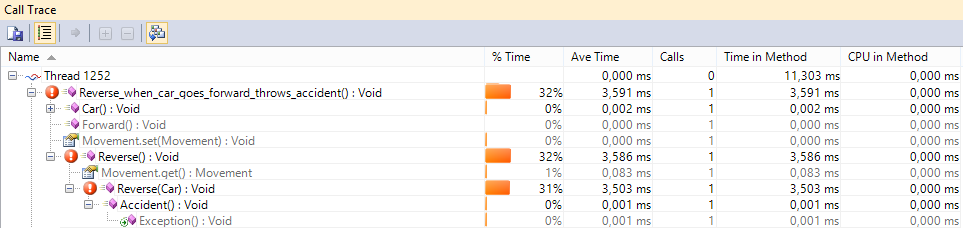
Last the test profiler. This shows the execution time of and number of calls to my (test) methods.
calltrace

Hmm, throwing exceptions is slow

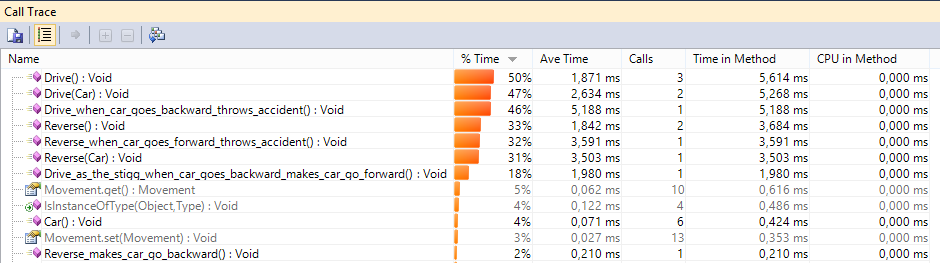
The view can be altered to view a “heatmap” of most called methods. But remember this is measured during unit tests and may not be re-presentable for user actions.
heatmap

Conclusion

TestMatrix is compatible with Visual Studio Professional and up, not express.
When you have Visual Studio Premium or Ultimate code coverage is included. The only adition would be the profiling. Which is nice, but not a deal closer.
For Visual Studio Professional the code coverage feature is the reason to buy this with the test profiler as a nice bonus.

Posted in Tooling | Tagged , , , , , , | Leave a comment

System.DateTime isolation

After System.Random Isolation I now want to isolate System.DateTime. The information in the struct is not very interesting, but the Now property is. That is a static property. Does that require a different approach? Hardly.

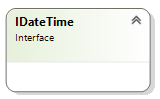
IDateTime

IDateTime

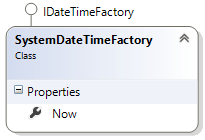
First I’ll define the interface for the DateTime struct. There will be nothing inside because static operations/properties cannot be defined in an interface.

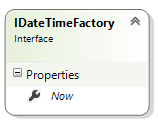
IDateTimeFactory

IDateTimeFactory

My factory interface will contain the property, but not as a static. Read on to see why.

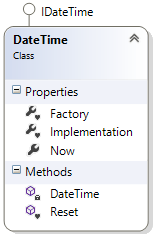
DateTime

DateTime

The DateTime class will implement the IDateTime interface, which is empty, but for completeness I’ve added it.

In the Reset method the Factory property is set to the SystemDateTimeFactory defined below, for now all you need to know it results in using the System.DateTime.

The Factory property is static and is used to create an instance saved in Implementation in the constructors of the DateTime object. Again this is only for completeness, no actual use of this. But the Factory is used for every static call on my DateTime object.

What this means is that the static property Now calls the method on the Factory.

public static System.DateTime Now {
    get { return Factory.Now; }
}

Getting clearer now?

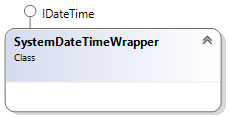
SystemDateTimeWrapper

SystemDateTimeWrapper

Again, the interface is empty, so nothing to do here.

SystemDateTimeFactory

SystemDateTimeFactory

Here the default implementation that points to System.DateTime.Now is programmed. Implement the IDateTimeFactory interface and redirect the Now property.

public System.DateTime Now {
    get { return System.DateTime.Now; }
}

Sample

Replace the factory used with your own implementation to influence the current date. Maybe to check if someone is old enough to drive a car?

// ARRANGE
// our fake datetime factory that returns our fake Now information
var fakeFactory = MockRepository.GenerateStub<IDateTimeFactory>();
var now = new DateTime(2013, 11, 1); // november 1st
fakeRandomFactory.Expect(x => x.Now).Return(now);
// use our fake setup in the execution to know what day it is 
// going to be every time
SystemIoslation.DateTime.Factory = fakeFactory;

Take away

As shown above isolating statics can be handled with the same approach, only use the factory interface.

Posted in Test | Tagged , , , , , , , | Leave a comment

System.Random isolation

Writing a unit test is all about isolating the code under test. The best way to do this is by using interfaces. An interface only described the methods and properties, but lets you change the implementation as long as you use the same signature.

The default framework objects are no exception, except there (almost) never is an interface defined. Isolation something like System.Random in your unit test can be hard. Here’s my way of doing it.

IRandom

IRandom

First I’ve defined the interface for the Random object. In there are the public methods my program needs. The System.Random object does not implement this IRandom interface. I have to do this myself. More on that later.

Using this interface I can replace the Random object with a stub. More on that later too.

IRandomFactory
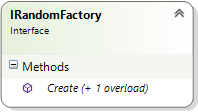
IRandomFactory

Another interface defines the constructors of the Random object. I’ve defined a Create method for every constructor of Random my program uses. This interface is the key to my isolation method.

Random
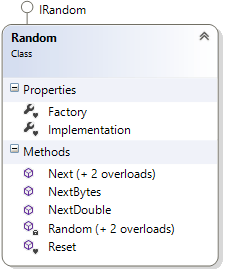
Random

In my own namespace (Company.SystemIsolation) I create the Random class that implements the IRandom interface. This is the object my program is going to use.

In the Reset method the Factory property is set to the SystemRandomFactory defined below, for now all you need to know it results in using the System.Random.

The Factory property is static and is used to create an instance saved in Implementation in the constructors of the Random object.

public Random(int seed) {
   Implementation = Factory.Create(seed);
}

Every method in the IRandom interface is implemented with a redirect to the IRandom method of the Implementation property.

public int Next() {
   return Implementation.Next();
}

Still with me? The hard part is over, just soak up this last two default implementations and you are in isolation zen.

SystemRandomWrapper

SystemRandomWrapper

As stated above the System.Random object does not implement our IRandom interface. This can be solved using the wrapper design pattern.

The System.Random object is passed into the constructor to instantiate the Implementation member.

Now every call to the interface is redirected to the Implementation. Sounds familiar? Right, just like the Random object does, only the Implementation is of a different type.

SystemRandomFactory

SystemRandomFactory

To create a SystemRandomWrapper there must be a Factory that provides it. This implements the IRandomFactory interface by creating a System.Random object and passing it to the SystemRandomWrapper constructor. The result is a System.Random object that implements the IRandom interface.

Ioslate (optional)

For code cleanliness I’ve created a static class for replacing the Factory in the Random class. The method is called Isolate and takes an IRandomFactory parameter.

The class also contains a Reset method that calls the Reset method of the Random class. This can be expanded with the Reset method of other isolated objects.

Sample

To use the isolation in existing code do a find-and-replace of System.Random with SystemIsolation.Random. Maybe you need to fix some references, but the idea is the default behavior remains unchanged. Now you gained a way to isolate your tests from the Random object.

// ARRANGE
// our fake random object to use in the unittest
var fakeRandom = MockRepository.GenerateStub<IRandom>();
fakeRandom.Expect(x => x.Next()).Return(9);
// our fake random factory that returns our fake random object
var fakeFactory = MockRepository.GenerateStub<IRandomFactory>();
fakeFactory.Expect(x => x.Create()).Return(fakeRandom);
// use our fake setup in the execution to create fake random objects
SystemIoslation.Random.Factory = fakeFactory;
// create your testobject and ACT and ASSERT

Take aways

To create another isolation create the two interfaces (one with the methods/properties of the object and one for the factory), then create the entry class that uses the interfaces and last create the default implementation for the two interfaces.

This all seems like a lot of work and it is. Using a code generator can do the big chunks but you will always need some manual labor. But when you are done, you can use it again and again in all your projects. I’m expanding my isolation library on every project and happily reuse my hard work from older projects.

Download the Demo project.

Posted in Test | Tagged , , , , , , | 6 Comments

Automation and Extensibility issue

Today I wrote a wrapper to be in control when unit testing some code that uses System.Random. After completing the task, which is mindless automation, I decided to create a T4 template for it. After completing the few lines in a separate solution I copied it over only to find some ugly error being generated.

After some oldschool write-debug-to-output, I found the issue to be the dots in the namespace. Come on Microsoft, everybody uses dots in their namespace. The best practice is something like Company.Product.Library …

The solution is to avoid dots (joke) or to query one level deeper to find the namespace. Codesample below.

<#@ template debug="true" hostSpecific="true" #>
<#@ output extension=".cs" #>
<#@ Assembly Name="System.Core" #>
<#@ assembly name="EnvDTE" #>
<#@ import namespace="System" #>
<#@ import namespace="System.Linq" #>
<#@ import namespace="EnvDTE" #>
// ----------------------------
// Generated on <#= System.DateTime.Now.ToString() #> 
// any changes will be lost the next time this file is generated
// This file contains a list of all classes in the project
// ----------------------------

<#
var visualStudio = (Host as IServiceProvider).GetService(typeof(EnvDTE.DTE)) as EnvDTE.DTE;
var project = visualStudio.Solution.FindProjectItem(Host.TemplateFile).ContainingProject as EnvDTE.Project;
var rootNamespace = (string)project.Properties.Item("RootNamespace").Value;

// chop into parts between the dots
var dots = rootNamespace.Split('.');
var codenamespace = project.CodeModel.CodeElements.OfType<EnvDTE.CodeNamespace>().Where(cn => cn.FullName == dots[0]).First();
// query with an extra part of the namespace (Company, Company.Product, Company.Product.Library)
for(int i = 1; i < dots.Length; i++) {
	var filter = string.Join(".", dots.Take(i + 1));
	codenamespace = codenamespace.Members.OfType<EnvDTE.CodeNamespace>().Where(cn => cn.FullName == filter).First();
}

if (codenamespace != null) {
	var classes = codenamespace.Members.OfType<EnvDTE.CodeClass>();
	foreach(var classItem in classes) WriteLine("// {0}", classItem.FullName);
} else {
	WriteLine("// namespace not found");
}
#>

Check back for future updates on generating design patterns as I am building myself a library.

Further reading:

[edit September 9, 2013]
Codesample optimization with namespace split on dots and query every part: Company, Company.Product, Company.Product.Library
[/edit]

Posted in Tooling | Tagged , , , | 2 Comments