Async message in Microsoft Visio

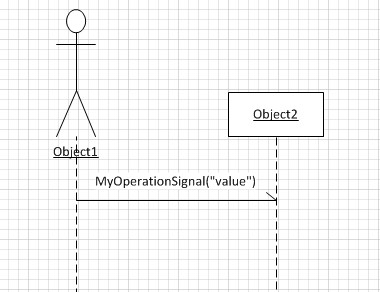
Microsoft Visio is the tool we use to draw our designs. This is the first time I want to draw a synchonous message in a sequence diagram and it’s a hell of a job when you don’t know how. Here is a list of steps to create my simple sample (download)

  1. new UMl Model Diagram
  2. Static structure -> add Class from Shapes
  3. Static structure -> add Signal from Shapes
  4. Static structure -> add Actor from Shapes
  5. Class -> add Reception
  6. new Sequence Diagram
  7. Sequence -> add Object lifeline from Shapes (set Classifier to Actor of 4)
  8. Sequence -> add Object lifeline from Shapes (set Classifier to Class of 2)
  9. Sequence -> add Message (async.) between Object lifelines (defaults to Signal of 3)

Asynchronous message in a sequence diagram of Microsoft Visio

Posted in Development | Tagged , | Leave a comment

Microsoft Developer Days 2011 in The Hague – day 2

DayDays 2011 I'm attending
Declarative refactoring C#
Chris showed the ?? operator that is the ? operator that tests if a nullable type is null and provides a default. He also showed the Tuple.Create and the dynamic type to remove out parameters, Yield return can be used when returning IEnumerable and how extension methods come in handy. To get readable code create extension methods that describe what is happening and move the (complex) implementation in there.
Windows Azure AppFabric ServiceBus
Clemens starts by describing how the servicebus can create a connection like a VPN, but not trusting the entire network behind it like a VPN. He then talked about some business implementations with the servicebus (easyjet, charging your car, mobile devices) where the endpoint is very dynamic. The servicebus is positioned as the Naming fabric, because the name of the servicebus is known. Then Clemens starts up Wireshark and begins showing TCP and HTTP trafic and how that is managed by settings on the servicebus connection. Samples include the Hybrid connection where a direct connection between endpoint is negotiated for cost-efficient communication. He then talked about Tunneling, Queues and Topics. Where tunneling makes remote ports available local, Queues will allow readers to keep a connection open for 60 seconds that decreases the amount of reads in polling and Topics that offers a tap for audit trails.
Automating Quality Assurance
Neno demoed how a project evolves into a project with (datadriven) unittests, automated build, continues integration, architecture validation and gated checking. He showed the build notification tool, how naming convention (projectname.test) tells the buildserver to run tests in a project and that /p:validatearchitecture=true is the checkbox for architecture validation on the buildserver. His advise was to buy a premium version of Visual Studio for the buildserver and professional for the developers. That way the buildserver could do codemetrix, codecoverage, architecture validation for the developers.
Agile project managementNeno explaned the scrum proces and showed the urbanturtle too in team web access. Nice talk but more about scrum than about Microsoft stuff.
Build accessibility
Jeroen’s talk was in dutch about how websites should be accessible to all kind of users. Nice note was that searchmachines like google and bing are like blind users, they are not interested in images or css, just the information. After a short speach of Niels (has spasms) some tips were given:

  • User friendly (feedback, contrast, overview)
  • Quality (use html elements as intended, logic order, css)
  • Findable
  • Crossbrowser, multi-device compatibility
  • Reach of target audience
  • Speed, durable and flexible

Some links Site with bookmarklet to remove images and css (www.kleedjesiteuit.nl), Validator of w3c (validator.w3.org), Dutch microsoft site about accessibility (www.microsoft.nl/toegankelijkheid). By the way my site isn’t very accessible, sorry about that.

Posted in Conference | Tagged , , , , , , , , , , , , , , , | 1 Comment

Microsoft Developer Days 2011 in The Hague – day 1

DayDays 2011 I'm attendingKeynote
The days started with Arie talking us through the keynote.
Scott talked about old programming languages, followed by the MVC and the concept of (Lego) blocks. How everything should be pluggable and fit together.
Wade spoke of the Windows Azure Appfabric Caching going live and how that fits in the whole blocks idea. The blocks in Windows Azure are SQL Azure, Caching and Access Control. Important things from his talk were 1) functionality over technique 2) keep using the same tool(s) as in Visual Studio 3) next generation applications are created now.
Windows Phone 7 Mango was the topic from Ben. The new emulator will have accelerometer and location support. Some additions to the framework/api have been done like fast appswitching. Important url http://create.msdn.com. At the last minute Rob was send in to get us ready to build Windows Phone 7 apps and games.
Entity Framework 4
Pieter showed the new features of EF4 like the new T4 templates and EntityKeyObject to delete an entity without reading first. He showed the different ways to query EF: EntityDataReader, EntitySQL and Linq. Also a nico demo with Dynamic Data which displayed data from a codefirst EF in a MVC application without any excessive coding, watch out GRAILS 😉
Azure AppFabric
Clemens talked about simple three tiers applications and how they are not that simple any more with Apps as clients. The cost aspect of a “Box” and “Cloud” are compared, with the lowering of the service operation cost as a similarity. In the cloud some optimalization can be done to improve the margin (profit) made by deployment automation, self-healing architecture, autoscale, high density and multi tenancy. Here the appfabric comes in handy. The appfabric is an abstraction layer on top of webservices, caches, workflows, access controls, routing, messages and transforms. Velocity is the codename for Appfabric caching, which is an local cache and a centralized cache that is synchronized. Servicebus makes anything available even when it is behind a firewall. This is demonstrated by an image service I tested live. Resulting image of Microsoft people here. Queues with topics, which has rules to determine a message applies to a certain reader. Access Control with Facebook, Live ID, Google ID, Yahoo and ADFS in and SAML token out. This is claimsbased ofcourse. This evolved from supporting Servicebus to something important that it broke protocol. Servicebus will stay on V1, but will come to V2 later this year. Something called the “Container” service will be anounced today in Redmond but was shared with us. A model describes the application in stead of the configuration. The model is translated into (multiple) configuration on deployment. Clemens showed us a very limited demo (I would call it a screenshot) on which an application was designed in the model. Clemens ended his talk with “AppFabric is the new middle-tier”.
Visual Studio Ultimate testing tools
Marcel talked about testdriven unittesting, historical debugging (intellitract) and the testimpact window. After which he showed web performance test with validation rules (validation of the response on css, selected values etc) and extraction rules (flow parameters from one request to another). An coded web performance test can be aquired by conversion from a web performance test which is recorded. Marcel used the robot.xml of msdn.microsoft.com to hit all known pages. He tipped on using the validation rules in a performance test to notice incomplete / wrong responses and to mark those tests as failed. At the end the Performance Profiler was used to test a bad application with sampling. The result was like a defragmentation screen and he told us how to read it. Very usefull.
Behind the scenes of C# languag features
Bart starts his talk with a tweet that states the level should have been 600. Then he shows he has got only one slide. Everything is in demos with VS2010 and ildasm. Some hacking with dumpbin and sos.dll makes it complete. I didn’t know a const readonly array was stored in the resulting assembly and pushed into memory from there. Word to rememeber is “inline-polymorphic-cache” which is what the framework does when a method is called on a dynamic class. Nice new feature in dotnet will be the await statement which suspends the method until a task is completed and than continues. Normaly this is done with events, but this is simpler.
iPhone development with mono
Marcel, Roy and Willem build an application for Windows Phone 7, iPhone and Android using 66% shared code. Mono is used for the iPhone and Android and dotNET for the Windows Phone 7. The emulators of all devices are slow. MVC is the most comenly used pattern. They used a context per device with partial methods that are implemented for each device specific. Important lesson is to do a design or else code sharing is minimal.

Posted in Conference | Tagged , , , , , , , , , , , , , , , , , | Leave a comment

Read It Later Digest

Every now and then I browse the internet. Whenever I end up reading something interesting my attention is needed somewhere else. Then I press the read-it-later button and the site is saved for later reading. After some weeks of reading things later my list was almost endless.
Read It Later is a sort of bookmarking site on which you can read the content of the bookmark. As the items are accessible over the internet you have it in sync everywhere. The whole syncing comes in handy when you have a multiboot Windows system for your work, a macbook for private browsing and an iPhone. The smartphone apps that come with it even syncs the content for offline reading.
You probably didn’t know that the twitter app has a read later option that supports Read It Later. This way I can save links that are in tweets for later reading.
The endless list problem is solved with Read It Later Digest. For a small fee your list is processed for you. No need to tag all your entries. All my items are presented in a nice overview. For more details see the movie below.

Posted in Tooling | Tagged , , | Leave a comment

Icon editor

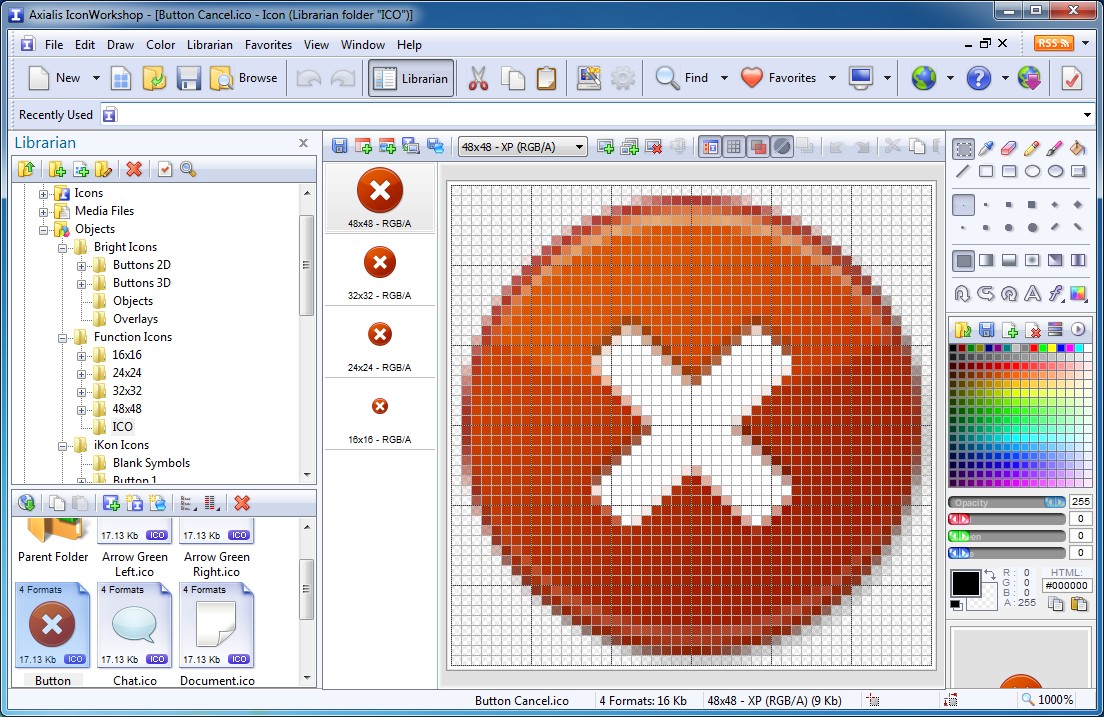
For a nice GUI I need nice icons. The IconWorkshop software from Axialis Software is the tool for me. Giving me more options than I need without making my head spin. A nice feature is constructing an icon from multiple images and generating serveral new image formats at once.

When I wrote this article the softare was on sale for $24.95. I’ll be requesting a license with my delivery manager.

Posted in Tooling | Tagged , | Leave a comment