Target Mono from Visual Studio

Targetting Mono in Visual Studio is possible. This way your assemblies are build using the Mono framework (which should be .NET compatible). Change the target to the Mono profile to get immediate feedback of incompatible references and other Mono things. This can be done in the Properties > Application tab of your project.

To get this working you’ll need to register mono as a profile, just like the client profiles from Microsoft.

  1. Copy the contents of C:\Program Files\Mono-2.10.8\lib\mono\4.0 to
    C:\Program Files\Reference Assemblies\Microsoft\Framework\.NETFramework\v4.0\Profile\Mono.
  2. Create the folder RedistList and add to the new folder a file called FrameworkList.xml with the following content:
    <?xml version="1.0" encoding="UTF-8"?>
    <FileList ToolsVersion="4.0" RuntimeVersion="4.0" Name="Mono 2.10.8 Profile" Redist="Mono_2.10.8"> 
    </FileList>
    
  3. Add the following key to your registry
    HKEY_LOCAL_MACHINE\SOFTWARE\Microsoft\.NETFramework\v4.0.30319\SKUs\.NETFramework,Version=v4.0,Profile=Mono
    

Below are links to the files created / used. The Registration only contains the FrameworkList.xml file, two registry files and a readme.txt. The Complete adds the Mono files which makes the file big(ger).
mono 2.10.8 profile registration only (12Kb)
mono 2.10.8 profile complete (13Mb)

References

Posted in Development | Tagged , , , , , , | 20 Comments

WSDL in Mono

Mono can host WCF services and expose the WSDL. To get around the XmlSchema error: Named item http://your/contract/here was already contained in the schema object table you need to set MONO_STRICT_MS_COMPLIANT to ‘yes’. Here is how I managed to do that.

// set MONO_STRICT_MS_COMPLIANT
if (Environment.GetEnvironmentVariable("MONO_STRICT_MS_COMPLIANT") != "yes") 
{ 
    Environment.SetEnvironmentVariable("MONO_STRICT_MS_COMPLIANT", "yes"); 
}

var host = new ServiceHost(typeof(Service), new Uri("http://localhost:999/Service.svc"));
host.AddServiceEndpoint(typeof(IService), new BasicHttpBinding(), string.Empty);
// add the MetadataBehavior to enable HttpGet
host.Description.Behaviors.Remove<ServiceMetadataBehavior>();
host.Description.Behaviors.Add(new ServiceMetadataBehavior { HttpGetEnabled = true });
host.Open();

Original post in Chinese is here http://www.cnblogs.com/wdysunflower/archive/2011/07/22/2113112.html

Posted in Development | Tagged , , , , , , | Leave a comment

Pocketcloud vnc setup

In my x-mas vacation I prepared all computers for online backup. (more on that will be posted) The problem with online backup is the initial upload of everything. That is wait – run up stairs – check progress – descent – wait – run up stairs – check progress – … . I found the solution in PocketCloud and a vnc setup. Now the desktop of the computer uploading is available on my iPad. This is what I did.

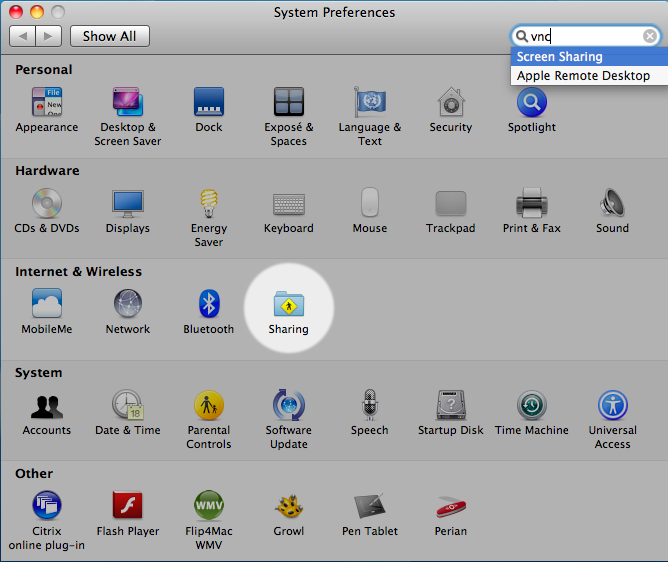
First configure your computer to allow vnc. On a mac this is easy, just go to preferences and search for vnc. This will point you to sharing. In sharing activate the screen sharing (by checking the box) and select the users that are allowed vnc. On a pc you will need to install something like RealVNC and configure it. Best leave everything to default, but set the VNC Password Authentication.

Then install PocketCloud on your iDevice. I put mine on an iPad, but it should be compatible with iPhone and iPod Touch. Then configure it to connect with your computer. Below is the configuration for my white macbook.

Some screenshots. The circle is in fact a feature to move the remote cursor and everything else the mouse could do like left/middle/right click, scroll and hover.

Alternatively to installing a vnc server on pc I could have used Remote Desktop Connection. But the free version of PocketCloud only allows one connection to be saved and it is easier to change just the ip-address than to setup a complete new connection. Yes, I’m a lazy programmer 😉

Posted in Tooling | Tagged , , , , , , , , , , , , | 2 Comments

VS2010 Dependency Graph gotchas

We need to refactor a solution with 200+ projects in Visual Studio 2010. The solution must be split into a runtime and a design solution. As we have the Ultimate edition, the Architecture features will be used. With the Dependency Graphy we planned to view which projects could be simply moved and which projects needed some refactoring. But we came across some gotchas.

To simplify my post and not disclose any details I made a demo project with the problems. The classes are below and can be downloaded at the end of this post. Of course I coded one class per file and one namespace per assembly, but to save space the code below is combined. Also some logic is removed to improve readability

Generics

The Util class DoMyAction is used to perform an action on a IDisposable object. The Using method is generic as it accepts the Type to perform the action on by <T>. In the Businesslogic class Rules this is used to do some checking of the Person object. (that implements IDisposable)

namespace Util 
{
    public static class DoMyAction 
    {
        public static void Using<T>(T client, Action<T> action) where T : IDisposable 
        {
            action(client);
            client.Dispose();
        }
    }
}

namespace BusinessLogic 
{
    public class Rules 
    {
        public void PerformCheck(Person item) 
        {
            // use of class from Util assembly
            Util.DoMyAction.Using<Person>(item, NameNotEmpty);
        }

        public void NameNotEmpty(Person p) 
        {
            // some logic
        }
    }
}

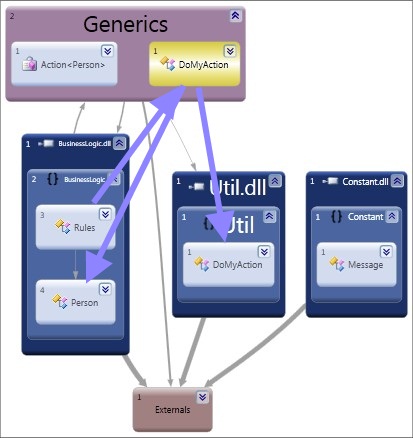
When Visual Studio generates the dependency graph by assembly (picture below) the references between the assemblies are not shown. Externals and Generics are added automatically.
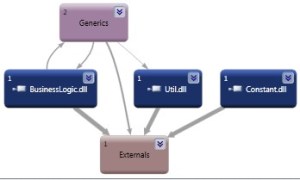
The Generics group contains the dynamic generated DoMyAction method for the Person type. Opening the Generics group shows the DoMyAction class that is the link between the Businesslogic and Util assembly. In the picture below the arrows have been traced 🙂

So the link is there but you have to search for it.

Const

As you could see in the Dependency Graphs above we use a Constant assembly to store those hardcoded strings and provide some sharing. The compiler actually replaces the constant in the code with the value of that constant (MSDN) as you can check with reflector. The Dependency Graph uses the IL code and therefore cannot know the constant is defined in another assembly.

General hickup

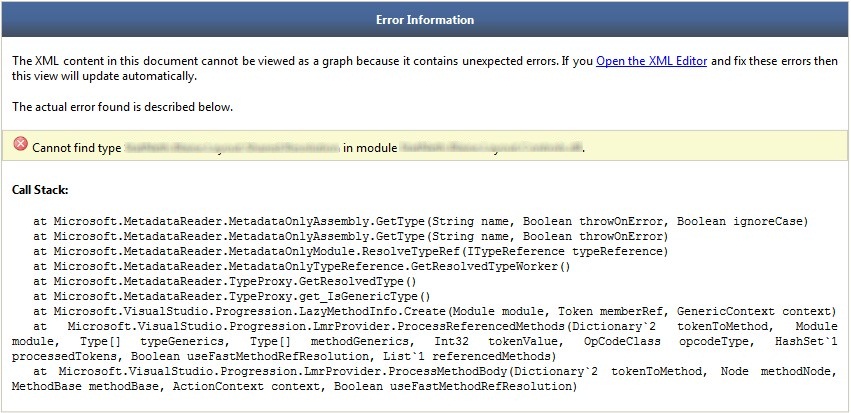
The generation failed for the original solution. We think this is because it contains silverlight assemblies with linked files and Visual Studio cannot unique identify these duplicate files. To be continued …

Download Demo project

Static (printouts) graphs will never contain all the information and be readable at the same time. The dependency graph is a great tool to interact with your codebase. I think that is the only way to document your solution.

[edit August 27, 2012]
Figured out a workaround for the crash from the General hickup.

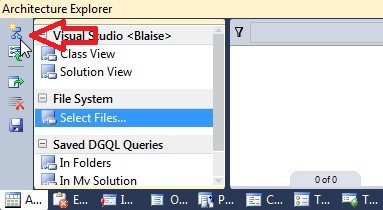
  1. Start the Architecture Explorer from the Architecture > Windows menu (CTRL + W, N)
  2. Choose new Graph in the tool window Mouse pointer on "new graph document" button
  3. Drag-n-drop the assemblies you want to investigate onto the canvas
  4. tip: CTRL + F will work for finding your assembly
  5. tip: Use the Neighborhood Browse Mode to find references down the line

[/edit]

Posted in Development | Tagged , , , , , , | Leave a comment

Cyberduck ftp into Humax iHDR5050

I have a Humax iHDR5050 digital reciever at home with an internal harddisk. To get something of the harddisk a FTP connection can be made (USB is limited to files less than 4Gb) but it needs some configuration. Below is my setup.

  • Crosswire UTP cable from Humax to my MacBook
  • Start FTP server on Humax
  • Manual configure IPADDRESS on Humax
    IP 192.168.1.254
    SUBNET 255.255.255.0
  • Manual configure IPADDRESS on MacBook ethernet
    IP 192.168.1.1
    SUBNET 255.255.0.0
  • (Only first time)In terminal run:
    defaults write ch.sudo.cyberduck ftp.command.stat false
    (here is why)
  • Create FTP connection as image below shows. Make sure Active (PORT) is selected and the browser connection is used on downloading.

A connection with good old commandline ftp works too, but sometimes a GUI is nice. When you use the commandline make sure to use the command “binary” to set the transfer from ASCII to BINARY.

Posted in Tooling | Tagged , , , , , , , | Leave a comment