A first look at IntelliTest

Looking into Visual Studio 2017 features I found that Pex was back in the form of IntelliTest. It was actually introduced in VS2015 but I’ve never seen it. Time to give it a spin.

For this I use my Traffic Demo. The solution shows how a state pattern can be used to implement complex business rules. There are already unit tests because it is a test driven development demo. I will add extra unit tests with the IntelliTest feature.

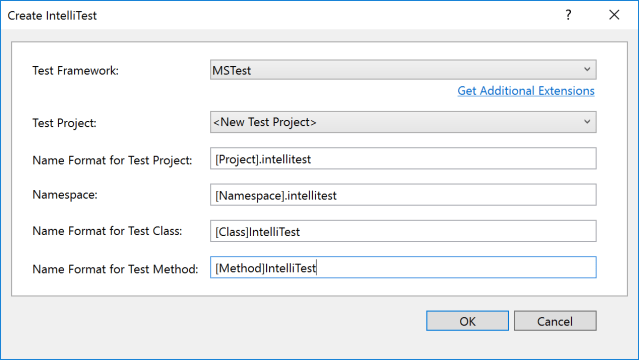
Open the solution in Visual Studio and go to the method to IntelliTest. Then open the context menu and IntelliTest > Create IntelliTest. A dialog will ask for some naming convention.

intellitest_01

After completion there is a generated partial class that contains code to test the method selected. Some lines of comment suggest to add an Assert. I add the Assert that confirms a property is set during the action on the state.

[PexMethod]
public void VooruitIntelliTest([PexAssumeUnderTest]Auto target)
{
    target.Vooruit(); // English: drive
    // TODO: add assertions to method AutoIntelliTest.VooruitIntelliTest(Auto)
    Assert.IsInstanceOfType(target.Verplaatsing, typeof(NaarVoren));
}

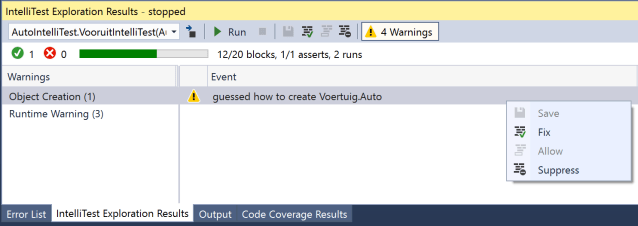
Now run the IntelliTests by going into the context menu and IntelliTest > Run IntelliTest. The result is shown in the IntelliTest Exploration Results. Open the warnings and see the Object creation warning. This is because there is no way for IntelliTest to vary between different states. Context menu on the warning and click Fix.

intellitest_02

This will create a simple factory class that can be altered to allow variation between different states. Do this by adding parameters to the static Create method.

[PexFactoryMethod(typeof(Auto))]
public static Auto Create(Verplaatsing verplaatsing, string bestuurder)
{
    Auto auto = new Auto // English: car
    {
        Verplaatsing = verplaatsing, // English: direction
        Bestuurder = bestuurder // English: driver
    };
    return auto;
}

Now run the IntelliTests again. This time some exceptions are reported.
The first is the NullReferenceException, caused by passing null for the first parameter to the Create method above. We need to tell IntelliTest to not pass null. For this the PexAssumeNotNull attribute is available which I add to the first parameter.

[PexFactoryMethod(typeof(Auto))]
public static Auto Create(
     [PexAssumeNotNull]Verplaatsing verplaatsing,
     string bestuurder)
{
    // rest of factory method
}

The other exception is a exception thrown by my code because a businessrule is violated. In English the businessrule is: in case the car is driving backwards and you put it in drive an accident (ongeluk) is thrown. Again with an attribute this can be told to IntelliTest: PexAllowedExceptionFromType.

[PexMethod]
[PexAllowedExceptionFromType(typeof(Ongeluk), typeof(NaarAchteren))]
public void VooruitIntelliTest([PexAssumeUnderTest]Auto target)
{
    // rest of intellitest
}

This adds the ExpectedException attribute on the generated unit test in case the exception of type Ongeluk is thrown from the type NaarAchteren (English: Reverse) You can see this in the generated g.cs file.

// part of AutoIntelliTest.VooruitIntelliTest.g.cs
[TestMethod]
[PexGeneratedBy(typeof(AutoIntelliTest))]
[ExpectedException(typeof(Ongeluk))]
public void VooruitIntelliTestThrowsOngeluk41()
{
    Auto auto;
    NaarAchteren s0 = new NaarAchteren();
    auto = AutoFactory.Create((Verplaatsing)s0, (string)null);
    this.VooruitIntelliTest(auto);
}

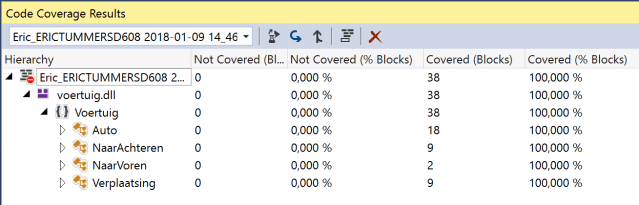
Now compile the intellitest project and run the tests from Test Explorer with code coverage enabled. Code coverage is 100%. Good job!

intellitest_03

Code available on github.

Final thoughts

I prefer test driven development and create the unit test first. This method of generating unit tests feels like cheating. On the other hand it creates some extra tests to up the code coverage and discovery of edge cases. Use it wise grasshopper.

Posted in Test | Tagged , , , | Leave a comment

Internet services that have a great free option

Image courtesy of ratch0013 / FreeDigitalPhotos.net

The internet has a lot of services. Most of them have a free or try-for-a-period option. After trying a service I decide about the paid options stay on the free tier or discard it. Below is a list of services I use with the free tier. Some are already featured in my Dev Tool List.

Image courtesy of ratch0013 / FreeDigitalPhotos.net

  • bit.ly, shorten urls and customised urls for better sharing on slides all with stats.
  • Dropbox, the file sync platform, use it primarily for sharing documents between devices.
  • Freshdesk, self service and ticketing system for small projects.
  • Github, personal projects, demo projects, all public. Private stuff is for work.
  • Namecheap, the freedns service is free and provides the dns for my domain.
  • Opendns, monitor the internet usage for my home network.
  • Pocket, save links for later viewing on my iPad or in my browser.
  • Rescuetime, log the time I use my computer for optimisation of screen time, am I being productive?
  • Spotify, listen to new music with occasional adds.
  • Uptimerobot, 3rd party logging of website availability, keep azure free tier websites loaded by sending requests ๐Ÿ˜‰
  • Wunderlist, my shopping list, my work todo, my maintenance jobs, my chores, all there.

These are the services I use. Am I missing out on something great? Let met know in the comments.

Posted in Tooling | Tagged , , , , , , , , , | Leave a comment

Services I pay for and why

The internet has a lot of services. Most of them have a free or try-for-a-period option. After trying a service I decide about the paid options, stay on the free tier or discard it. Below is a list of services I pay for and why I think they are worth the money.

Evernote Premium

evernoteWith Evernote I have all my information in one place and am able to find what I need. The app is cross platform and I use it on my laptop (Win/Mac), iPhone and iPad. I’m have a premium subscription because I use the annotation and presentation features.

Alternative: Evernote free

ย 

iCloud

icon_hero_icloud_largeWe use iCloud storage for pictures, mail and device backups. It integrates seamless with Photos on MacOS and iOS. I’m stil backing up the original pictures on my NAS just in case.
Alternative: 5Gb storage free with iDevice registration

ย 

iTunes Match

apple-itunes-match-and-icloud-logo-1107Yes, I’m stil using iTunes Match. The price of Apple Music (that has the same features) is so much higher that we’ll not be moving until Apple discontinues iTunes Match.

We have invested in the Apple ecosystem and play music from Apple TV, MacBook (2x), iPad (2x) and iPhone.
Alternative: iTunes server on NAS

ย 

Wired Magazine digital

wiredThe digital edition has extra media content since it has an internet connection and the printed magazine has not ๐Ÿ˜‰ Got to love the “angry nerd”.

ย 

GoDaddyย .NL domain

godaddy-schema-logo-minEveryone should have their own domain. I have it set up to forward requests to other locations through a free dns service. This way I can give out my own domain in slides and know people end up here.

ย 

WordPress Personal

wordpress-logoEver noticed there are no adds here? You’re welcome.
This also includes the custom .com domain and extra storage.

ย 

Pluralsight

pluralsight-logo-vrt-color-2To be honest: my boss pays for this subscription. With Pluralsight I’m able to get up to speed really quick. I have the app on my iPad and iPhone but I mostly use it on my laptop.

TIP: signup here and we both get a discount.

ย 

These are the services I use. Am I missing out on something great? Let met know in the comments.
Posted in Tooling | Tagged , , , , | Leave a comment

My 2018 developer and power user tools

toolbox by vectorolie / FreeDigitalPhotos.net
Below a list of tools I use today. If you’re like me, you check them out and add the ones you like to your own toolbox.

Image courtesy of vectorolie / FreeDigitalPhotos.net

Environment

Chocolatey, installation automation. I’ve written about it before on my blog. (See posts)
F.lux, it makes the color of your computer’s display adapt to the time of day, on mac this is build into the OS
7-zip, the new standard in compressing files
DropBox, file share/sync between computers and the internet
Chrome, best browser today
AdBlock for Chrome, blocks adds in chrome

Productivity

Powershell, the automation solution from microsoft
RescueTime, background logging of where you spend your time
Wunderlist, task list on every platform
Wunderlist parser, convert a plain list of items into wunderlist items
IFTTT, automate the internet
Trello, collaboration tool that uses boards and cards. I’ve written some small automation scripts for my uses. (Post)
Pocket, my preferred read later list, available on all platforms
Evernote, remember everything. I use it for my GTD technique called The secret weapon.
1Password, my password is CTRL + \
Autohotkey, run macro’s on keyboard shortcuts like CTRL+ALT+5 types โ‚ฌ

Development

Visual Studio 2017, the best IDE out there
NuGet, source of all the good in the world
Visual Studio Gallery, extend visual studio
Ghostdoc, CTRL+SHIFT+D to comment your code, that simple
Specflow, cucumber for .net for behavior driven development (BDD)
Just Decompile, see the code of .net assemblies
Fiddler, log http calls via this proxy
Wireshark, deep logging of network traffice
SourceTree, my preferred git tool with advanced branching support
Notepad++, notepad on steroids
BrowserStack, test webpages on any platform, live or automated
Selenium, webbrowser automation, also runs on browserstack
Sqlite studio, manage Sqlite files
Azure Storage Explorer, browse and manage Azure Storage
Snoop WPF, spy on WPF
Pester, test and mock framework for PowerShell.

Misc

ZoomIt, I use this in all my demos to zoom
Bit.ly, url shortener service
windirstat, see what is hogging your hard disk space
prey, install and forget, until you need it
Gifcam, screen recorder with animated gif support
Notebook fancontrol, see processor temperature and set the fan speed

Mac

Cyberduck, connect to anything
DaisyDisk, see what is hogging your hard disk space
Type2phone, make my mac a Bluetooth keyboard for iPad or AppleTV
Handbrake, convert movies
1Password, my password is โŒ˜ + \
Little snitch, monitor network traffic coming from your mac
HyperDock, preview windows from the dock
Alfred, spotlight replacement with lots of options
Parallels, the virtualisation solution for mac
Sublime Text, very complete text editor for code
Visual Studio Code, code editor for any platform
Gimp, freeware photo editor with all the bells and whistles you’ll need

iPhone/iPad

Tweetbot, easy twitter client with pocket integration
Workflow, automate tasks, like send ETA and navigate home
Spark, handles my e-mail and offers tasks like send to evernote or pocket
Pocket, I do my reading mostly on iPhone or iPad
Duet, use your iPad as an extra screen
Lightningtalktimer, timer app that changes appearance with time passed

Some of the tools cost money, some are free, some offer paid options. If it saves you time or improves your work, why not support the developer that made it possible?

SaveSaveSaveSaveSaveSaveSaveSaveSaveSaveSaveSaveSaveSaveSaveSave

Posted in Tooling | Tagged | 1 Comment

VS2017 Live unit testing in Parallels Desktop VM

TLDR; change the project location on disk from shared mac (my documents) to local windows (c:-drive) to prevent Live unittesting from crashing

Live unit testing has been introduced in 2016 (visual studio blog) and got my attention recently by a tweet from Iris Classon.ย 

Since I’m on a Mac my way of working with Visual Studio is with virtualisation. I have Windows 10 running in Parallels Desktop and installed Visual Studio 2017 enterprise. The enterprise version contains the live unit testing feature. If you don’t see it check the version of VS2017 you’re running.

After creating a simple solution with some unit tests I started the live unit testing feature. This can be done in the menu Test > Live unit testing > Start. The output window showed it was compiling and then the thing crashed … Microsoft.CodeAnalysis.LiveUnitTesting has stopped working …

I’ve noticed strange behaviour before when the projects are located in the my documents folder. This is the default location for visual studio projects. In Parallels this location is mapped to the documents folder of the Mac user on the host machine. Windows 10 sees this as a network / mapped drive location and does not trust it by default.

I moved the solution to the local c:-drive and got live unit testing to work without problems. Loving it already. Got to agree with Iris about this one.

Posted in Development | Tagged , , , | Leave a comment