My blog menu

On twitter I read this post:


Since I have a wordpress blog and like a challenge, here is the daily post in my Zero to Hero sequence.

Add a New Page

The header of my blog contains some new links. Under About there are links to my other blogs now. I also added a Zero to Hero link to my posts tagged with zero to hero.

But today’s assignment was to add a new page. So I added Work in Progress to show what I am doing, but (maybe) not writing here about. Like training for a Half Marathon in March. I’m planning to update the page when something important changes.

http://dribbble.com/modassic

Origional by modassic on dribbble.com

This zero to hero challenge makes me more committed to blogging. Why don’t you join us?

Posted in Uncategorized | Tagged | Leave a comment

Blue monday

Blue monday

Posted in Uncategorized | Tagged | 1 Comment

Unittest NServiceBus saga

NServiceBus has it’s own unit test support framework. The nuget package is NServiceBus.Testing. Below I’ll demonstrate how to use it with an example saga from the book Learning NServiceBus.

VerifyUserEmailPolicy Saga

The saga is used to verify an e-mail address before a user is actually created. In the diagram below I’ve described what happens.

  1. User signs up with an email address
  2. Saga sends email to verify the address
  3. Saga waits for User verify command and could timeout (not in my code)
  4. User clicks links in email to verify the address
  5. Saga allows new user to be created

VerifyUserEmailPolicy

Unittests

To test this saga add a unittest project to your solution, add references to the saga and command projects, install the NServiceBus.Testing package.

Below the test methods for the saga. Since I use the tips from Art of unit testing this should be readable for you.

[TestMethod]
public void SagaStartsOnCreateNewUserCmdReceived() {
    var testSaga = CreateNewVerifyUserEmailPolicySaga();
    var message = CreateValidCreateNewUserCmd();
    testSaga.When(saga => saga.Handle(message))
            .AssertSagaCompletionIs(false);
}

[TestMethod]
public void SagaSendsSendVerifyEmailCmdOnCreateNewUserCmdReceived() {
    var testSaga = CreateNewVerifyUserEmailPolicySaga();
    var message = CreateValidCreateNewUserCmd();
    testSaga.ExpectSend<SendVerificationEmailCmd>()
            .When(saga => saga.Handle(message));
}

[TestMethod]
public void SagaCompletesOnUserVerifyEmailCmdReceived() {
    var message = CreateValidUserVerifyEmailCmd();
    var testSaga = CreateRunningVerifyUserEmailPolicySagaWaitingForMessage(message);
    testSaga.When(saga => saga.Handle(message))
            .AssertSagaCompletionIs(true);
}

[TestMethod]
public void SagaSendsCreateNewUserWithVerifiedEmailCmdOnUserVerifyEmailCmdReceived() {
    var message = CreateValidUserVerifyEmailCmd();
    var testSaga = CreateRunningVerifyUserEmailPolicySagaWaitingForMessage(message);
    testSaga.ExpectSend<CreateNewUserWithVerifiedEmailCmd>()
            .When(saga => saga.Handle(message));
}

The plumbing code for better maintenance is below.

public VerifyUserEmailPolicyTest() {
    // initialize NServiceBus.Testing
    Test.Initialize();
}

private Saga<VerifyUserEmailPolicy> CreateNewVerifyUserEmailPolicySaga() {
    return Test.Saga<VerifyUserEmailPolicy>();
}
private Saga<VerifyUserEmailPolicy> CreateRunningVerifyUserEmailPolicySagaWaitingForMessage
    (UserVerifyEmailCmd waitingForCommand) {
    var testSaga = CreateNewVerifyUserEmailPolicySaga();
    var message = CreateValidCreateNewUserCmd();
    testSaga.ExpectSend<SendVerificationEmailCmd>(reply => {
            waitingForCommand.VerificationCode = reply.VerificationCode;
            waitingForCommand.EmailAddress = reply.EmailAddress;
        }).When(saga => saga.Handle(message));
    return testSaga;
}
private CreateNewUserCmd CreateValidCreateNewUserCmd() {
    return new CreateNewUserCmd() {
        EmailAddress = "my.email@provider.com",
        Name = "Eric Tummers "
    };
}
private UserVerifyEmailCmd CreateValidUserVerifyEmailCmd() {
    return new UserVerifyEmailCmd()  {
        EmailAddress = "some.email@provider.com",
        VerificationCode = "ABCD"
    };
}

Execution of the unit tests takes longer for the first test because of the Test.Initialize (10ms). After that it performs rather good. (2ms each) Other frameworks like RhinoMocks have the same payoff.

Now we can verify the working of this NServiceBus saga. Be sure to test the endpoints for CreateNewUserWithVerifiedEmailCmd and SendVerificationEmailCmd.

References

Posted in Test | Tagged , , | Leave a comment

Comments on a better you thru machines

On twitter I read this post:


Since I have a wordpress blog and like a challenge, here is the daily post in my Zero to Hero sequence.

Write a post that builds on one of the comments you left

For my previous Zero to Hero assignment, I commented on a better you thru machines by Elizabeth Bland. She wrote about her pack of apps to get her things done. I use this kind of posts to build my own pack.

Betsy uses Trello, which I discovered recently on this How I work post on Lifehacker.com. Since there are a million and one ways to use Trello: here is my setup / workflow.

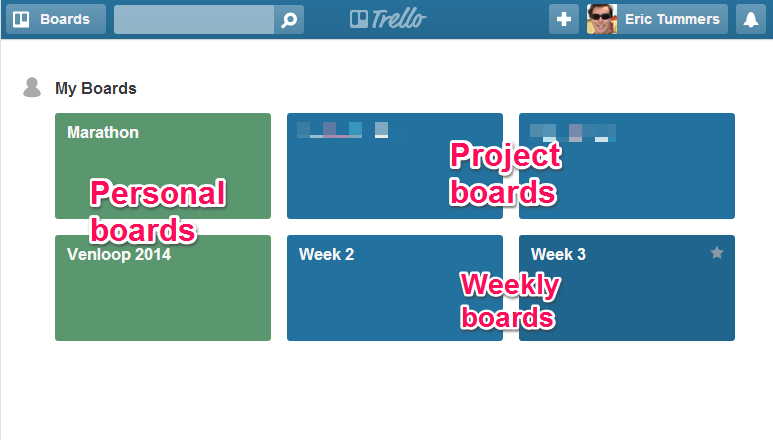
I use Trello to keep track of my tasks. I have boards per project, per week and some personal things. Screenshot below. The boards are alphabetically ordered, so being able to group them this way was pure luck 😉
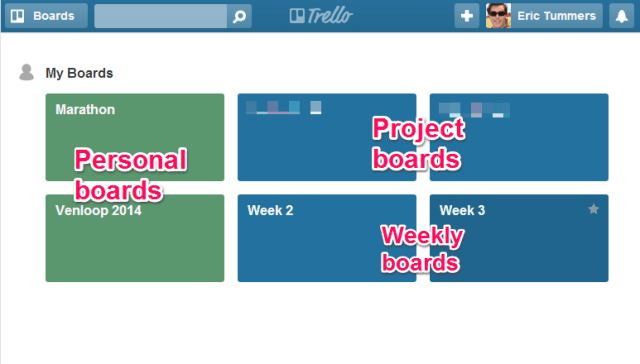
Trello boards

Read about the different board types below.

Project board

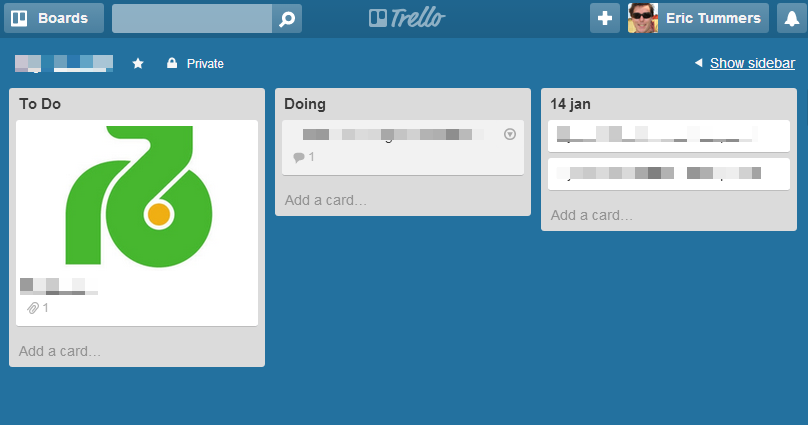
When I start a new project I create a board with the name of the customer and a card with the logo. Then I start to create cards for everything I have to do / remember, like “call this person and ask that” or “backup this file before releasing”. The Done list I rename to the Date and add more Date lists for the days I work on the project.
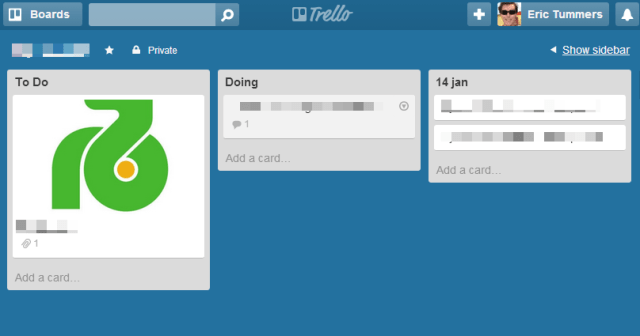
Trello project

Then the project completes. I make a screenshot of the Trello board and save it to Evernote. After that I archive/close the board.

Weekly board

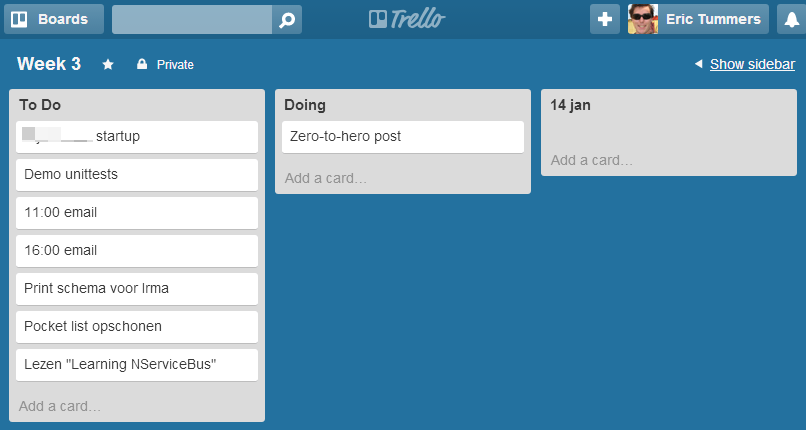
Every week I start a new board with the number of that week. Next year I will delete the old “Week 3” board or remove all cards from it and reuse it. The Done list gets renamed to the Date as I do with the Project boards.
I use the 1-3-5 method where I create cards for 1 big thing, 3 mediocre things and 5 small things. Reading email at 11:00 and 16:00 are the two small things I always add in the morning.
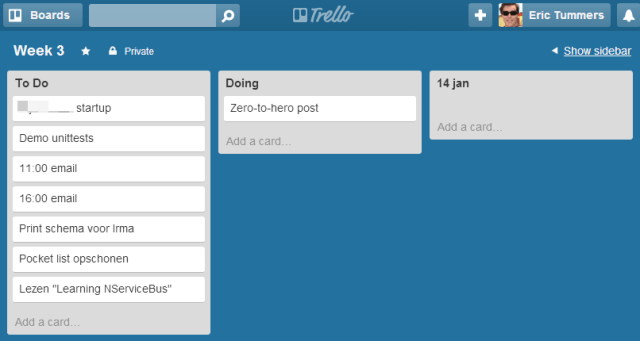
Trello week

Then as the day goes by I move cards from the To Do to the Doing to the Date list. Hoping to finish my To Do list at the end of the day. Tomorrow I start fresh and add my 1-3-5 cards again and create a new List for that Date.

Personal board

For my personal projects I also use Trello. To distinguish work from pleasure I make these boards green. The screenshot below shows my Half Marathon planning in the Trello Calendar Power-Up.
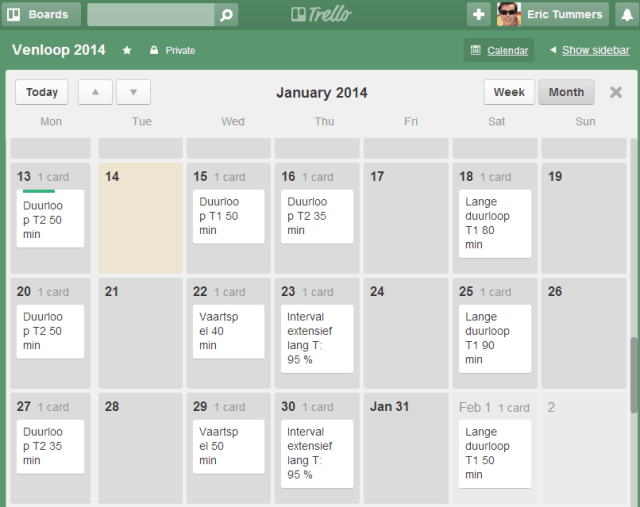
Trello personal

I have no default configuration for Personal boards. Just let it flow and do what feels best.

Posted in Uncategorized | Tagged , | Leave a comment

Hyper-V legacy hardware

Pong
Twice a year my wife boots her legacy laptop and spends days on creating a photo book. I maxed the memory to 2Gb. But nothing more to update since no (cheap) SSD for IDE or processor upgrades available. This is why she spends days.

My hardware is up-to-date and thanks to Hyper-V I can share some of the power with her. By creating a virtual machine on my SSD equipped I5 Probook she can remote desktop from her own laptop and create the book with a faster user experience.

First I recovered the installer for the 2009 software to create the photo book. Back then the web-installer trick was already applied. The downloaded files were in the programs directory.

Then I created a Windows XP virtual machine with a differencing disk from a master VHD. I know the support has ended or will soon, but she likes XP and “never change a winning team”. Gave the VM the same 2Gb of memory. The faster processor and disk read speed will make the difference.

After installing the software and copying the photo’s to an attached VHD she was ready to catch up for the lost minutes and race to the finish line 😉

Posted in Tooling | Tagged , , | Leave a comment