Cannot enlist the Transaction

On an initial load of 60000+ files our nServiceBus handler threw an exception

NServiceBus.Unicast.Queuing.FailedToSendMessageException: Failed to send message to address: queue@machine —> System.Messaging.MessageQueueException: Cannot enlist the transaction.

Repro

No repro – no issue. Sleeping for 61 seconds caused the same exception. Complete solution for download at the end of the post.

public void Handle(DoSomethingCommand message)
{
    // wait for the timeout of 1 minute
    log.InfoFormat("Sleeping");
    Thread.Sleep(61000);
    // throws System.Messaging.MessageQueueException:
    Bus.Send<DoAnotherThingCommand>(m => { });
}

Investigation

Looks like a transaction timeout. This is what the MSDTC Transaction Statistics look like
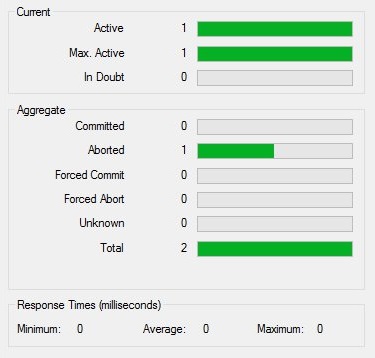
msdtc.transaction.statistics.aborted
Every transaction is aborted.

Solution

Setting the transaction timeout for MSDTC did not solve this issue. The timeout of 0 (never timeout) still gave the exception. But thanks to Teun we’ve solved it.

Overwriting the transaction timeout in the config did the trick.

<system.transactions>
  <defaultSettings timeout="00:05:00"/>
</system.transactions>

Now the transactions succeed and the DoAnotherThingCommands are send and processed.
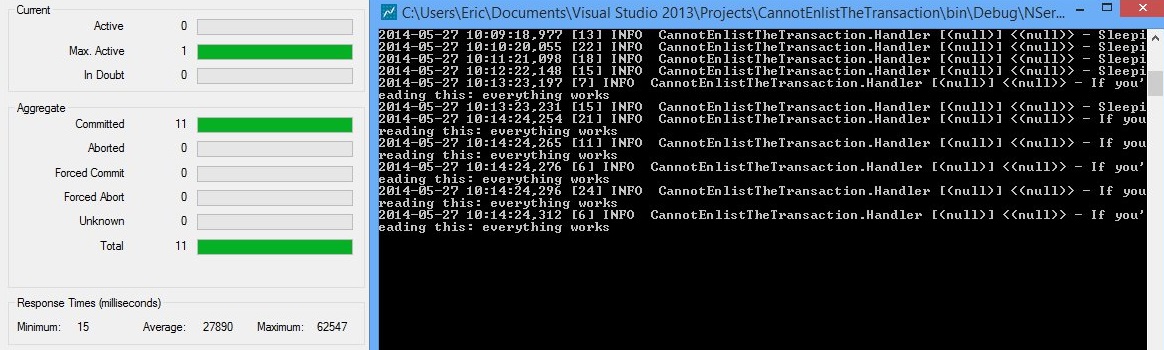
msdtc.transaction.statistics.commited

References

Posted in Development | Tagged , , | 4 Comments

Octopus deploy timeout fix

The nightly build failed and a bug was assigned to me. Digging trough the msbuild.log file the error was in the deployment

One or more tasks did not complete before the timeout was reached. We waited 10.1 minutes for the tasks to complete.
build.log

There is a timeout of 10 minutes? Never knew this. To be precise, the timeout is in octo.exe not in the EXEC task of msbuild (which has no default timeout).

In the octopus deploy task log we read the deployment had succeeded in 11 minutes. Took 1 minute too long 😕

This task started 14 hours ago and ran for 11 minutes
Octopus deploy task summary

In the octopus documentation we found the deploymenttimeout parameter that has a default of 00:10:00. Looks like we found the solution. We must specify the deploymenttimeout from more that 11 minutes.

Octo.exe create-release --server=http://our.octopus.server/api 
  --project="slow deployment" --deployto=Development 
  --apikey=API-123456789 --waitfordeployment 
  --enableservicemessages --deploymenttimeout=00:30:00

Posted in Development | Tagged , | Leave a comment

Chocolatey on Azure provision

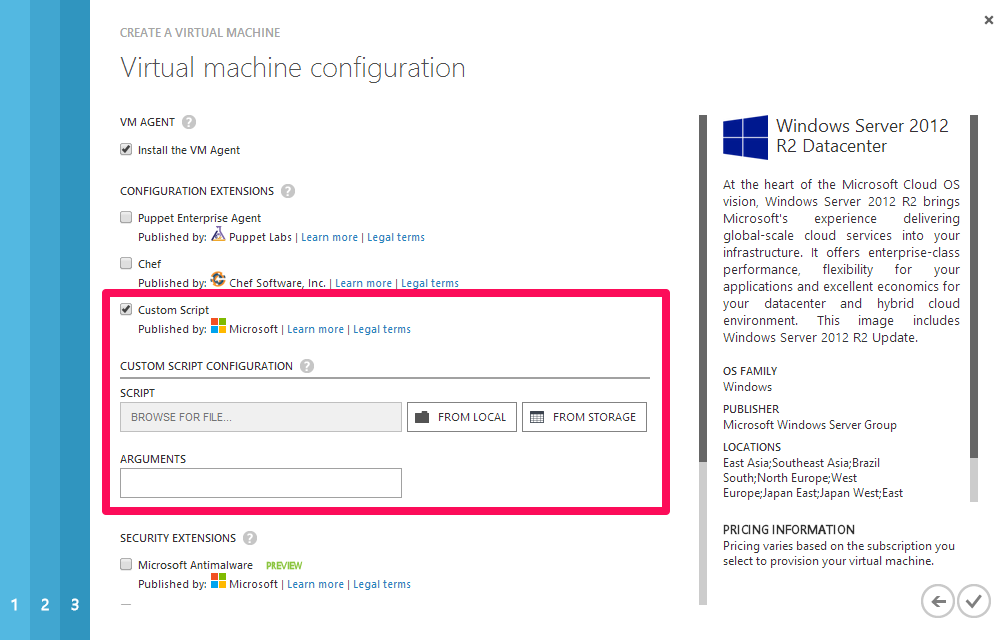
A recent update on the Windows Azure platform enables you to run a custom powershell script when creating a new Virtual Machine. It can be configured on the last step of the Wizard.

custom.script.vm.provision

This is where chocolatey can do it’s magic by installing software I need. No more creating sysprep images :-).

#install chocolatey
iex ((new-object net.webclient)
   .DownloadString("http://chocolatey.org/install.ps1"))
#install nservicebus
cinst nservicebus.dtc.install
cinst nservicebus.msmq.install
cinst nservicebus.ravendb.install
cinst ServiceControl.install
cinst ServiceInsight.install
cinst ServicePulse.install
#done, now your environment is ready
Posted in Tooling | Tagged , , , , | Leave a comment

Week 21 roundup

Last week recap an links:

Image courtesy of kanate / FreeDigitalPhotos.net

Image courtesy of kanate / FreeDigitalPhotos.net

What are your best reads this week? Leave them in the comments below.

Posted in Uncategorized | Tagged , , | Leave a comment

VS2013.2 update issue

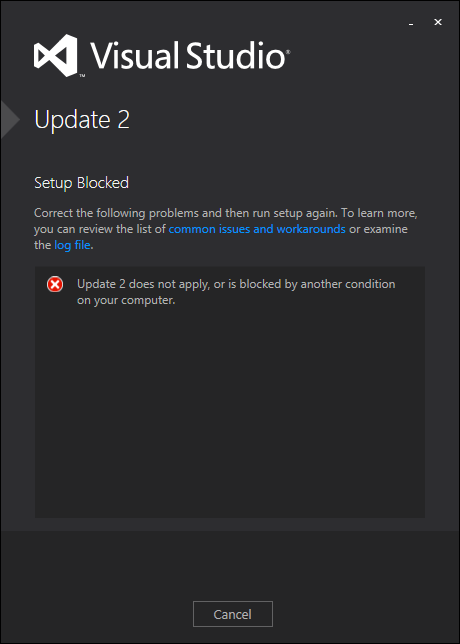
When I tried to install Visual Studio 2013 update 2 it gave me an error. Checked it wasn’t blocked as with other downloaded files. Not the case. The update wasn’t already installed, because the version number was still at 30110.

VS2013.2.issue

After checking the log file at C:\Users\{USER}\AppData\Local\Temp\dd_vsupdate_KB2829760_{DATE_TIME}.log I found the error

Error 0x80070003: Failed to get size of pseudo bundle: C:\ProgramData\Package Cache\{2f6f0fc4-5f66-4635-a4d2-1dd8d9481c63}\VS2013.1.exe

I’ve moved the Package Cache folder and forgot to make a Junction for it.

c:\ProgramData>mklink /J "Package Cache" "d:\system\Package Cache"
Junction created for Package Cache <<===>> d:\system\Package Cache

After this the update installed without any issue.

Posted in Tooling | Tagged | Leave a comment