SDN event December 2016

The SDN – Software Development Network – is a special interest group for dutch developers. Four times a year they organise an event where people present and talk about their passion.

As a member of the SDN you are aware of the latest developments. You are part of a network of professional developers who assist each other in word and deed. This means there is a technical helpdesk at your fingertips so you can book considerable time savings in solving problems.
sdn.nl with Google translate

Here are the talks I attended.

The Things Network

The things network offers a solution for IoT network communication. In the demo / presentation an arduino is used to send an alert when “the machine” has stopped. The alert is send over the things network to azure and a return message resets “the machine”.

ttn-logo

Communication path: board > gateway > the things network > azure webjob (bridge) > IoT hub > stream analytics > Event hub > azure function (sends the reset) > IoT Hub > bridge > the things network > gateway > board > led turns on  🙂

Design your system for Black Friday

Make use of the infrastructure like reverse proxy, caching and message queues. Optimise for read or write, use less layers and do proactive monitoring.

Continuous delivery in practice

All developers at snelstart (50) use the same branch. Every checkin can potentially go to production. With toggles features can be enabled or disabled for certain customers.

Every environment (OTAP) must be the same. Same platform, same amount of data. This way deployment to production will not introduce new problems.

octopusdeployBecause of the speed the build, deployment and tests are automated. Tooling used is Azure, TFS, Octopus deploy and some test automation tools. Every checkin triggers a build and then a release and tests. When build / deployment / test fails the process is abandoned. A new checkin must be done to fix the problem.

Architecture

This talk was mainly about nservicebus and the domain driven architecture. Nice to know there are dutch people working at Particular today.

SDN logo

Download the presentations at SDN.nl.

Posted in Conference | Tagged , , , , | 1 Comment

Case sensitive dacpac for coding standards

In our project we have coding standards for SQL objects. But when a code review made us update casing we noticed the dacpac did not contain the changes after a schema compare. What happend?

Seems that our sql server databases are case in-sensitive by default. That is a good thing since everything keeps working, even with broken coding standards. I’ve never seen a case sensitive database and wonder if they even exist.

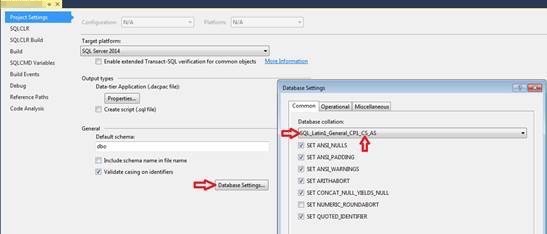
The dacpac is configured to be case in-sensitive too. But that is about to change. Why? Because making the dacpac case sensitive was the solution. On the properties of the SqlProject there is a Database Settings button. Click it and set the Database collation to something with CS in it. (CS = Case Sensitive) Now the casing updates are synced to our SqlProject and compiled into the dacpac.

sqlproject_case_sensitive

Make sure to disable the deployment of database settings. That could break the software. You can exclude this by specifying the commandline option

/p:ScriptDatabaseOptions=false
Posted in Development | Tagged , , , , | 2 Comments

Start-SqlJobAndWait

We have some SqlJobs that we run in our regression tests. To automate this we need something that can start the job and wait for it to finish.

Based on this post we know we need to poll the sysjobhistory table. Wrapping it in a powershell module lets us use it in all our regression tests. The code is listed below.

function Start-SqlJobAndWait {

param (
    [string] $servername,
    [string] $jobname
    )
    # connection to database
    $connectionstring = "Data Source=$servername;Initial Catalog=msdb;Integrated Security=TRUE;"
    $conn = New-Object System.Data.SqlClient.SqlConnection $connectionstring
    $conn.Open()

    # create temp stored procedure to start and wait for the job
    $cmd = $conn.CreateCommand()
    $cmd.CommandText = Get-StoredProcedureDropScript
    $cmd.ExecuteNonQuery()
    $cmd.CommandText = Get-StoredProcedureCreateScript
    $cmd.ExecuteNonQuery()
    $cmd.Dispose()

    # call temp stored procedure
    $cmd = $conn.CreateCommand()
    $cmd.CommandTimeout = 600 # 10 minutes
    $cmd.CommandText = "EXEC #usp_Start_And_Wait_For_Job N'$jobname'"
    $cmd.ExecuteNonQuery()
    $cmd.Dispose()

    # connection close removes the temp stored procedure
    $conn.Close()
    $conn.Dispose()
}

function Get-StoredProcedureDropScript {
"
IF object_id(N'tempdb..#usp_Start_And_Wait_For_Job') is not null
    DROP PROCEDURE #usp_Start_And_Wait_For_Job
"
}

function Get-StoredProcedureCreateScript {
"
CREATE PROCEDURE #usp_Start_And_Wait_For_Job (@jobName SYSNAME)
AS

SET NOCOUNT ON
DECLARE @jobID UNIQUEIDENTIFIER, @maxID INT, @status INT, @rc INT

IF @jobName IS NULL
BEGIN
 RAISERROR('Parameter @jobName have no value.', 16, 1)
 RETURN -100
END

SELECT @jobID = job_id FROM msdb..sysjobs WHERE name = @jobName

IF @@ERROR <> 0
BEGIN
 RAISERROR('Error when returning jobID for job %s.', 18, 1, @jobName)
 RETURN -110
END

IF @jobID IS NULL
BEGIN
 RAISERROR('Job %s does not exist.', 16, 1, @jobName)
 RETURN -120
END

SELECT @maxID = MAX(instance_id) FROM msdb..sysjobhistory WHERE job_id = @jobID AND step_id = 0

IF @@ERROR <> 0
BEGIN
 RAISERROR('Error when reading history for job %s.', 18, 1, @jobName)
 RETURN -130
END

SET @maxID = COALESCE(@maxID, -1)

EXEC @rc = msdb..sp_start_job @job_name = @jobName

IF @@ERROR <> 0 OR @rc <> 0
BEGIN
 RAISERROR('Job %s did not start.', 18, 1, @jobName)
 RETURN -140
END

WHILE COALESCE((SELECT MAX(instance_id) FROM msdb..sysjobhistory WHERE job_id = @jobID AND step_id = 0), -1) = @maxID
      WAITFOR DELAY '00:00:01'

SELECT @maxID = MAX(instance_id) FROM msdb..sysjobhistory WHERE job_id = @jobID AND step_id = 0

IF @@ERROR <> 0
BEGIN
 RAISERROR('Error when reading history for job %s.', 18, 1, @jobName)
 RETURN -150
END

SELECT @status = run_status FROM msdb..sysjobhistory WHERE instance_id = @maxID

IF @@ERROR <> 0
BEGIN
 RAISERROR('Error when reading status for job %s.', 18, 1, @jobName)
 RETURN -160
END

IF @status <> 1
BEGIN
 RAISERROR('Job %s returned with an error.', 16, 1, @jobName)
 RETURN -170
END

RETURN 0"
}

Export-ModuleMember -function Start-SqlJobAndWait
Posted in Test, Tooling | Tagged , , , | Leave a comment

Entity Framework Fake ObjectContext Realization Tool

With Effort (Entity Framework Fake ObjectContext Realization Tool) I can create integration tests for the datalayer in my project. The tool has an Entity Framework provider that works on an in-memory database. This means I can call SaveChanges without mocking it or having a dependency on a real database. It can be run during build.

Installation is easy with the package manager from visual studio.

install-package effort.ef6

Data used in the tests can be loaded from all kinds of sources. I’m loading my testdata from CSV files. The proces is based on naming convention. So the name of the csv file is the name of the table the data is loaded into.

// Load CSV files
var directory = AppDomain.CurrentDomain.BaseDirectory;
var importer = new CsvDataLoader(directory);
// create connection to the in-memory database
return Effort.DbConnectionFactory.CreateTransient(importer);

Remember to deploy the csv files on build by setting “copy if newer” and adding the DeploymentItem attributes on the TestClass/TestMethod. This way I can store the files in a subfolder and deploy them to the BaseDirectory for easy loading.

[TestClass]
[DeploymentItem(@"initialData\table1.csv")]
public class MetaDataToolContextTest {
    // ... 
}
Posted in Development | Tagged , , | Leave a comment

Skype for business mac preview

We’ve been using Lync for some time on Windows and Mac. Microsoft has moved on with Skype for business on the Windows platform. Now a preview for the Mac is available and I decided to sign up for the preview at https://www.skypepreview.com

After been accepted I dowloaded the latest build and started using it. The App has a “check-for-updates” menu item, so no more searching for the download link.

skypeforbusiness-download

Little snitch reports connections to hockeyapp.com, microsoft.com and microsoftonline.nl. This is expected with preview / beta software. Other connections go to lyncdiscover.valid.nl and autodiscover.valid.nl to connect to my colleagues at valid.nl.

Everything works like on the Windows platform. Some features are missing, but the core functionality is there. Like chatting, voice / video and screen sharing.

skypeforbusiness-screensharing

My experience is good. I mainly use the chat to communicate with colleagues and that just works. We’re planning to do monthly virtual meetups and then it’ll have to prove worthy.

Posted in Tooling, Uncategorized | Tagged , , , | 2 Comments