
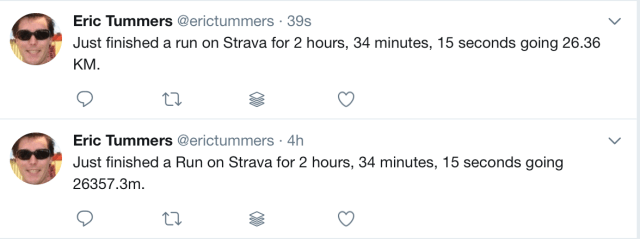
These tweets show the result of fixing the Strava IFTTT service with a webhook. The hook calculates the meters to Kilometers distance. All you’ll need is an IFTTT and Azure account.
TLDR
Setup webhooks in IFTTT and tweet on the Strava event. Use Azure Function to do the conversion to Kilometers (divide by 1000) and push result to IFTTT webhook. Link the Azure Function to the strava service on IFTTT.
Setting up webhooks
Login to IFTTT.com and goto services. You get there by clicking on the my applets button and then selecting the services tab – or – by clicking on your username in the top right and clicking on services in the dropdown menu. On the services tab click the “all services” link and search for the webhooks service.
When this is the first time you use the webhooks it must be activated first. Click on the connect button in the header under the description.

This generates your unique webhook for receiving and sending requests. Once you’ve clicked the connect the button disappears and the settings icon appears in the top right. Click on the settings to view your webhook help url and status.

We’re now ready to setup the first Applet.
Webhook to Twitter Applet
Browse to the help url that is specified in the Account Info. The documentation page shows you how to use the webhook service. We must specify the { Event } we’re going to use. You can have multiple events / webhooks that do different things, just by specifying a different event name. Be aware that the event is Case Sensitive (!) so “Strava” and “strava” are different events. We’ll be using “Strava” for the event.
Create a new Applet and choose WebHook as the THIS. Set the event to “Strava”, making sure the casing is correct.

Click Create trigger.
Use Post to Twitter for the THAT. Configure the tweet to use the generic Value1, Value2 and Value3 from the webhook. We will set these in our webservice to the Type, ElapsedTime and DistanceInKm (=DistanceInMeters/1000) ingredients, more about that later. The tweet will look like this:
“Just finished a {{Value1}} on Strava for {{Value2}} going {{Value3}} KM.”
We’re 50% done, now for the webservice and the applet from strava to the webservice.
Create Azure Function
Azure functions provide the serverless solution for a webservice or webapi as they like to call it. All we need to do is setup a new Azure Function via the portal and provide the code. The code provided is based on C# with ASP.NET WebApi so you could run this on your own setup, but Azure Functions work great and are very fast to setup.
using System.Net;
using System.Net.Http;
public static async Task<HttpResponseMessage> Run(HttpRequestMessage req, TraceWriter log) {
    // Get request body
    dynamic data = await req.Content.ReadAsAsync<object>();
    if (data != null && data?.distanceMeters != null){
        log.Info("distanceMeters = " + data.distanceMeters);
        log.Info("elapsedTime = " + data.elapsedTime);
        // calculation
        double distanceInMeters = data.distanceMeters;
        double distanceInKm = Math.Round(distanceInMeters / 1000, 2);
        // return result to ifttt
        var client = new HttpClient();
        var response = await client.PostAsJsonAsync(
            "https://maker.ifttt.com/trigger/Strava/with/key/SECRET_KEY_HERE",
            new {
                value1 = "run",
                value2 = data.elapsedTime,
                value3 = distanceInKm
            });
        // some result back to caller
        string msg = string.Format("Distance in {0}m = {1}km", distanceInMeters, distanceInKm);
        return req.CreateResponse(HttpStatusCode.OK, msg);
    } else {
       return req.CreateResponse(HttpStatusCode.BadRequest, "Provide distanceMeters in content");
    }
}
The webapi / code expects elapsedTime and distanceInMeters in the post data (more about that in the Applet below) The distanceInMeters is devided by 1000 making it Kilometers. Then the webhook in the previous section is called with the value1, value2 and value3 properties set. That should trigger the post to twitter with the calculated value. Things are falling into place now.
Before closing the portal make sure you’ve started the function and that you’ve copied the function url: click </> Get function URL, select default (Function key), and then click Copy.
Strava to webhook Applet
Create a new Applet and choose Strava as THIS. I only run so only when a Run Activity is added the Applet wil run. Click create trigger.
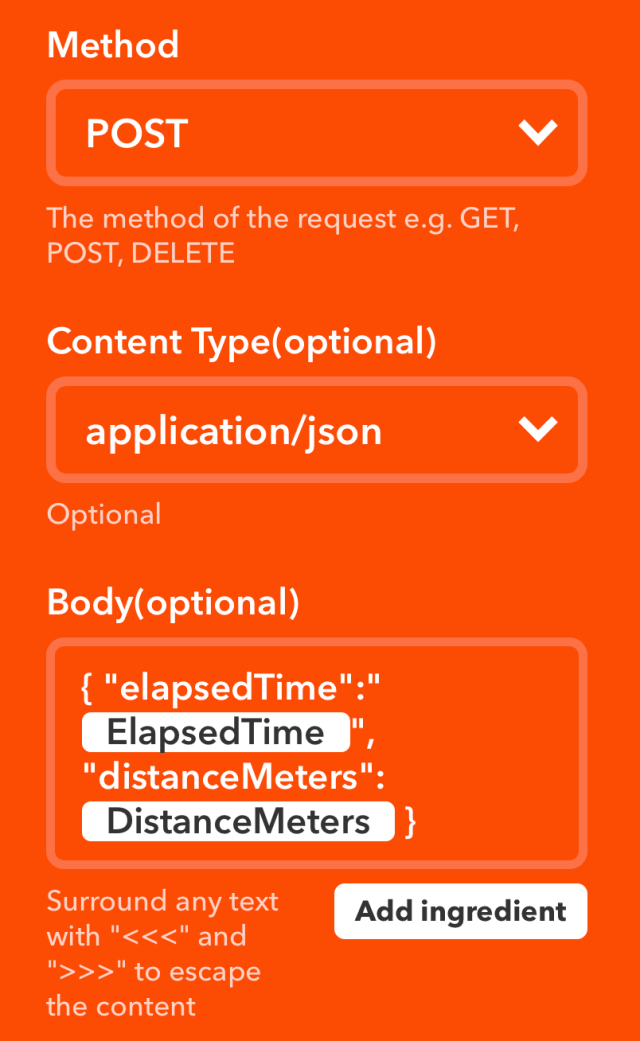
The THAT part will be a webhook. Here we’ll post to our Azure Function. Use the function URL you’ve copied from the azure portal (or the url on your own hosting platform) and set the method to POST. Select “application/json” for the Content Type and set the Body to:
{ "elapsedTime":"{{ElapsedTime}}", "distanceMeters":{{DistanceMeters}} }
Now you’re setup is done.
Next
Go for a run and post it to Strava. This should trigger the Strava to webhook Applet to send the data to your Azure Function. The Azure Function calculates the Kilometers from the distanceInMeters and calls the Strava event Webhook on IFTTT. On receiving the Strava event the run is posted to twitter with the distanceInKilometers.
References
Create your first azure function
… sharing of applets no longer available … links below won’t work anymore
https://ifttt.com/applets/60251344d-if-new-activity-by-you-then-make-a-web-request
https://ifttt.com/applets/60251482d-if-maker-event-strava-then-post-a-tweet-to-erictummers





 .NET Development by Eric