Computer setup COVID-19 update

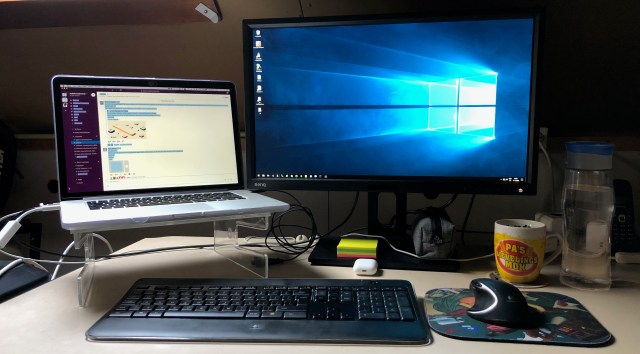
I invested in a good computer setup for working-from-home a while ago. When the lockdown for COVID-19 came I was prepared. Still I made some changes and investments to go from one-day-a-week to fulltime working-from-home. Time for an update.


No cable management and I love it

The laptop

I’ve raised my laptop so I can see the slack updates next to my actual work. The clear pastic stand was from when I used only my laptop. After buying my 24 inch monitor it was stuffed away somewhere. Luckily I could still find it and raise my laptop to eye level.

Now that my laptop is always open (used it clamshell mode before) the webcam bothered me. I bought some webcam covers and installed them on all my laptops. Just for some ease of mind.

With everybody working/learning from home my wifi wasn’t stable enough for remote desktop. I bought the thunderbolt UTP adapter and use a wired connection now. Network connection and speed are stable now.

Extra

Slack, Skype and Zoom are the places we meet-up. For some privacy and better call quality I use the AirPods 2. Connecting to Apple devices is as easy as clicking a button. The wireless charging case is a nice feature too.

My logitech K800 keyboard and Performance MX mouse use the unifying receiver. Seemed to be vulnerable for hacking. Logitech released an update and installation was easy. https://support.logi.com/hc/articles/360035037273 (Firmware Update Tool)

Sometimes writing with pen on paper is needed. I have a stack of post-it notes next to my case with pens.

Posted in Uncategorized | Tagged , , , | Leave a comment

Logging from Automapper

We’ve been using automapper to convert objects for some time. Now I have the need for logging to help bugtracking. Below a short list of sources how we set this up.

// ConfigureServices(IServiceCollection services) stuff

services.AddSingleton<MapperConfiguration, 
                      AutomapperConfiguration>();
services.AddTransient(serviceprovider => {
   var cfg = serviceprovider.GetService<MapperConfiguration>();
   // inject the serviceprovider so everything is available
   // and the ILogger is too
   return cfg.CreateMapper(serviceprovider.GetService);
});
// AutomapperConfiguration stuff

// old automapper
/* Func<ResolutionContext, ILogger> createLogger = (c) =>
   c.Mapper.ServiceCtor.Invoke(typeof(ILogger)) as ILogger; */

// new automapper 
Func<ResolutionContext, ILogger> createLogger = (c) =>
   c.Options.ServiceCtor.Invoke(typeof(ILogger)) as ILogger;

config.CreateMap<ObjectA, ObjectB>()
      .ConvertUsing((s, d, c) => {
         // important stuff removed ....
         var logger = createLogger(c);
         logger.LogWarning("Something happend");
      };

And now you’ll need a serviceprovider when unittesting. Thank you AutoMoqCore.

var automoqer = new AutoMoqer();
var configuration = automoqer.Create<AutomapperConfiguration>();
var mapper = configuration.CreateMapper(automoqer.Create);
// now test the mapping configuration with the mapper instance

We managed to find the bugs and fixed them. We’ll be using this logging solution with automapper from now on.

[edited 11 nov 2020] new automapper has the ServiceCtor in the context Options no longer in the context Mapper, code sample edited

Posted in Development | Tagged , , , | Leave a comment

AutoMoqCore – auto mocking IoC

Photo by Phillip Glickman on Unsplash

https://www.nuget.org/packages/AutoMoqCore/

Dependency Inversion is one of the SOLID principles. This can be applied to unittesting as well. With AutoMoqCore I can develop robust unittests that will always compile.

Focus on the smallest possible code for your unittest and let AutoMoqCore figure out the needed dependencies. Injection of mocks is automatically and can be tailored to your needs.

Posted in Development, Tooling | Tagged , , , | Leave a comment

Update SEQ with Powershell DSC

We user Powershell Desired State Configuration (DSC) to install everything. A new installation could be done to a clean machine or by removing existing software prior to installing it. Below is part of the script we use.

configuration DscWebServer {    
   
 Import-DscResource -ModuleName PSDesiredStateConfiguration  
    
 Node $AllNodes.NodeName {

  Script seq {
   GetScript  = { return @{} }
   TestScript = {
    # test for existing service seq
    $service = Get-Service -Name seq -ErrorAction SilentlyContinue
    if($service) { return $true }
    else { return $false }
   }
   SetScript  = {   
    $arguments = '/i ' + $using:Node.DeployLocation + '\Seq-4.2.1113.msi /qn /norestart /log ' + $using:Node.DeployLocation + '\seq.install.log'
    # msi install with logging to seq.install.log file
    Start-Process msiexec -ArgumentList $arguments -Wait
    # post install configuration to run as a windows service ...
   }
  }

 }
}

Now we want to upgrade an existing installation to preserve the data it contains.
Note: this means the installation files must support updating of existing versions. The application SEQ in this example handles updates by replacing the application and converting the data.

With the script below we can upgrade Seq version 4 to version 5.
For this we edited the installation (Script seq) to use the new msi; if the software doesn’t exist then install the newest version right away.
We also added an UpgradeSeq that depends on seq being present; there we check the version and upgrade if needed.

configuration DscWebServer {    
   
 Import-DscResource -ModuleName PSDesiredStateConfiguration  
    
 Node $AllNodes.NodeName {

  Script seq {
   GetScript  = { return @{} }
   TestScript = {
    # test for existing service seq
    $service = Get-Service -Name seq -ErrorAction SilentlyContinue
    if($service) { return $true }
    else { return $false }
   }
   SetScript  = {   
    $arguments = '/i ' + $using:Node.DeployLocation + '\Seq-5.1.3364.msi /qn /norestart /log ' + $using:Node.DeployLocation + '\seq.install.log'
    # msi install with logging to seq.install.log file
    Start-Process msiexec -ArgumentList $arguments -Wait
    # post install configuration to run as a windows service ...
   }
  }

  Script UpgradeSeq {
   DependsOn  = "[Script]seq"
   GetScript  = { return @{} }
   TestScript = {
    push-location 'c:\program files\seq'
    $version = seq.exe version
    if($version -eq '5.1.3364') { return $true }
    else { return $false }
   }
   SetScript  = {   
    # inplace upgrade
    $arguments = '/i ' + $using:Node.DeployLocation + '\Seq-5.1.3364.msi /qn /norestart /log ' + $using:Node.DeployLocation + '\seq.install.log'
    # msi install with logging to seq.install.log file
    Start-Process msiexec -ArgumentList $arguments -Wait
    # restart service to complete upgrade
    Get-Service -Name seq | Restart-Service
   }
  }

 }
}

The next version of Seq will be simple, just edit the versions in the msi and upgradeseq test in the script above. (find-and-replace 5.1.3364)

We are confident this way of working can be applied to all our upgrades, like the dotnetcore framework.

Posted in Development, Tooling | Tagged , , , | Leave a comment

Transcend Jetdrive lite review (after a year)

My MacBook Pro Mid 2015 has SSD. That is very fast and helps me to be productie. Back in the day 🙄 this kind of storage was expensive so I limited it to 256 Gb. With my Photos, Music and Downloads that space was filling up fast. Here is where the Transcend Jetdrive comes in. Specsheet on transcend-info.com

Note: my MacBook has a SD card slot.

Transcend Jetdrive lite image

I bought the 256 Gb Transcend Jetdrive in October 2018 after some months of internet searching for experiences, youtube watching and reading customer reviews on webshops. This memory card would hold my precious files and it must be solid (no pun intended) Prices have dropped since 2018. I paid €150. Still one of the best purchases I’ve made.

Photos

After installation I moved my Photos library by following the support article on apple.com. The deletion of the old library was scary. All photos are synced with the iCloud photos option with originals downloaded to my MacBook. Backup was in place.

Since the location of the photos library changed the ‘upload’ started again. On apple’s discussion forum it is explained as normal. Just had to wait a day for all checksums to be validated.

Music

Now my music library has to be moved. Again on apple discussion someone has the answer to my questions. Moved the library, opened iTunes (old version of Music) with option key pressed and selected the new music library. Last month downloaded my complete library from iTunes Match because I want a backup of the license free files.

Downloads

Last step was to move my downloads and the default download location. Now a stackexchange thread has the answer.

Conclusion

The end result is a lot of free space on the fast SSD and a backup of all my slow files on the Jetdrive.

No problems after more than a year of usage. Highly recommended!

Posted in Uncategorized | Tagged , , , | 4 Comments