Sniff localhost

My WCF services are using basic authentication over https. To prove this is a safe combination I wanted to sniff the trafic between client and host. Problem is a tool like Wireshark cannot sniff localhost. You’ll find good explanation why here.

The solution is to use the Microsoft Loopback adapter. Below the steps I took to get it working on my Windows 7 machine:

  1. install the loopback adapter (not working link)
    install the loopback adapter
  2. assign ip address 10.0.0.10 to the loopback adapter
  3. in WCF use (C# Sample):
    • “localhost” for hosting the service
    • “10.0.0.10” to connect from clients
  4. download rawcap
  5. start commandline rawcap to capture trafic over 10.0.0.10 to loopback.cap file
    rawcap 10.0.0.10 loopback.cap
    
  6. Do your testing. You’ll see the number of rawcap Packets increase
  7. <CTRL> + c to stop rawcap
  8. Load the loopback.cap file in Wireshark for viewing
  9. Select the first packet with source and destination 10.0.0.10 and pick context menu “Follow TCP stream”

Left the unencrypted messages with the Authorization header in the black box. Right the captured SSL trafic, not actual readble. Conversation is about twice the size though.

edit: Added C# Sample

Posted in Tooling | Tagged , , , , , , , , | 1 Comment

Azure as test environment

My current project involves the mono framework. It is crossplatform and runs on windows, linux and macos. The lack of diskspace (and time) for setting up a linux machine and the lack of money to buy a new macbook pro retina (which is very nice) make me do most of my testing on my windows machine. Not realy crossplatform as I run the dotNET framework on windows too. (obvious)

Here comes Windows Azure in to play with it’s preview features. The support for Linux virtual machines comes as a gift. Now I can do my testing on a dedicated cloud machine that runs something else as Windows. I even have the choice to create my own salted version of the prepared images.

Here are my steps:

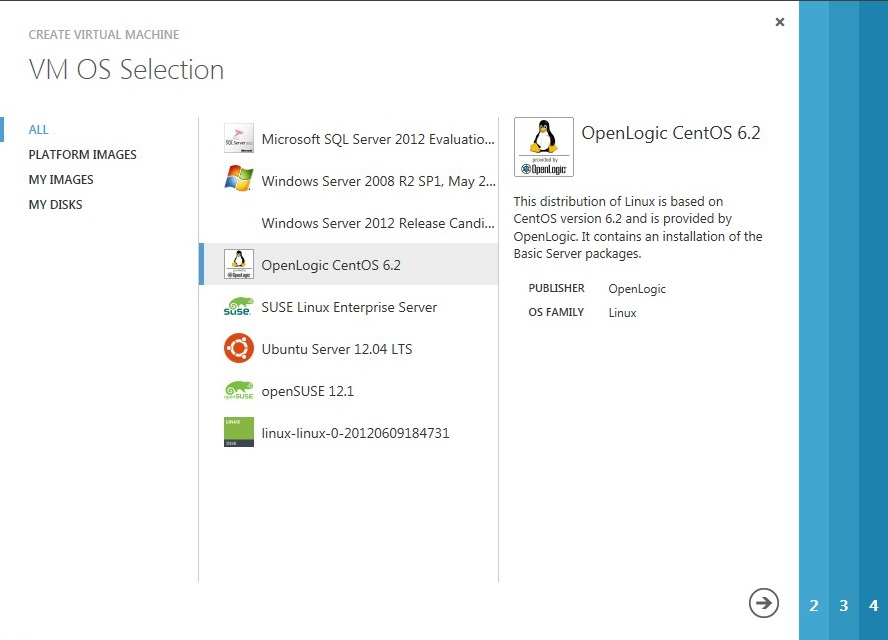
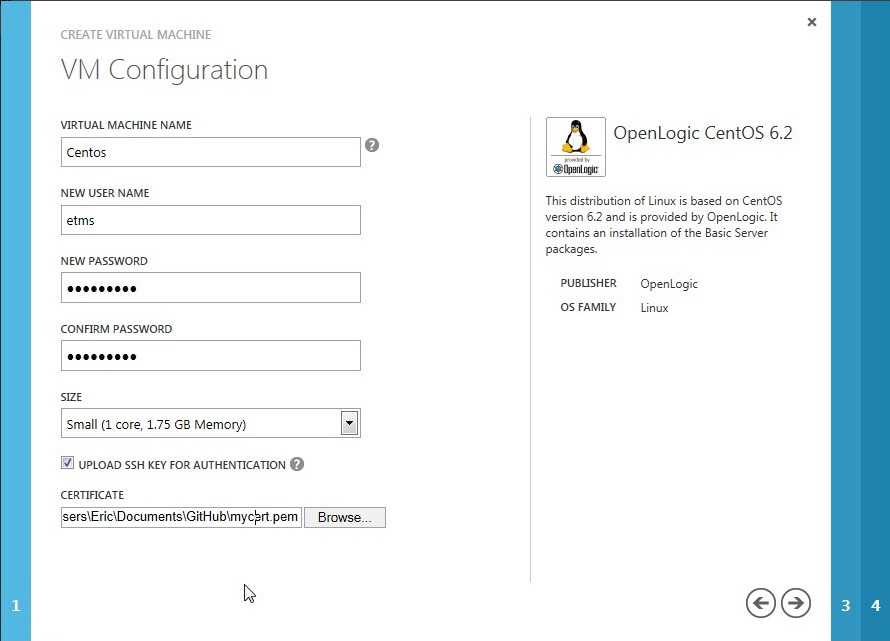
  1. Create a Virtual Machine from the OpenLogic CentOS 6.2 image
  2. Use SSH to connect to the Virtual Machine and install Mono
    ssh -i privatekey.key etms@168.62.6.189:22
    sudo -s
    yum install bison gettext glib2 freetype fontconfig libpng libpng-devel libX11 libX11-devel glib2-devel libgdi* libexif glibc-devel urw-fonts java unzip gcc gcc-c++ automake autoconf libtool make bzip2 wget
    cd /usr/local/src
    wget http://download.mono-project.com/sources/mono/mono-2.10.8.tar.gz
    tar zxvf mono-2.10.8.tar.gz
    cd mono-2.10.8
    ./configure --prefix=/usr/local
    make && make install
    
  3. Test Mono installation
    /usr/local/bin/mono --version
    
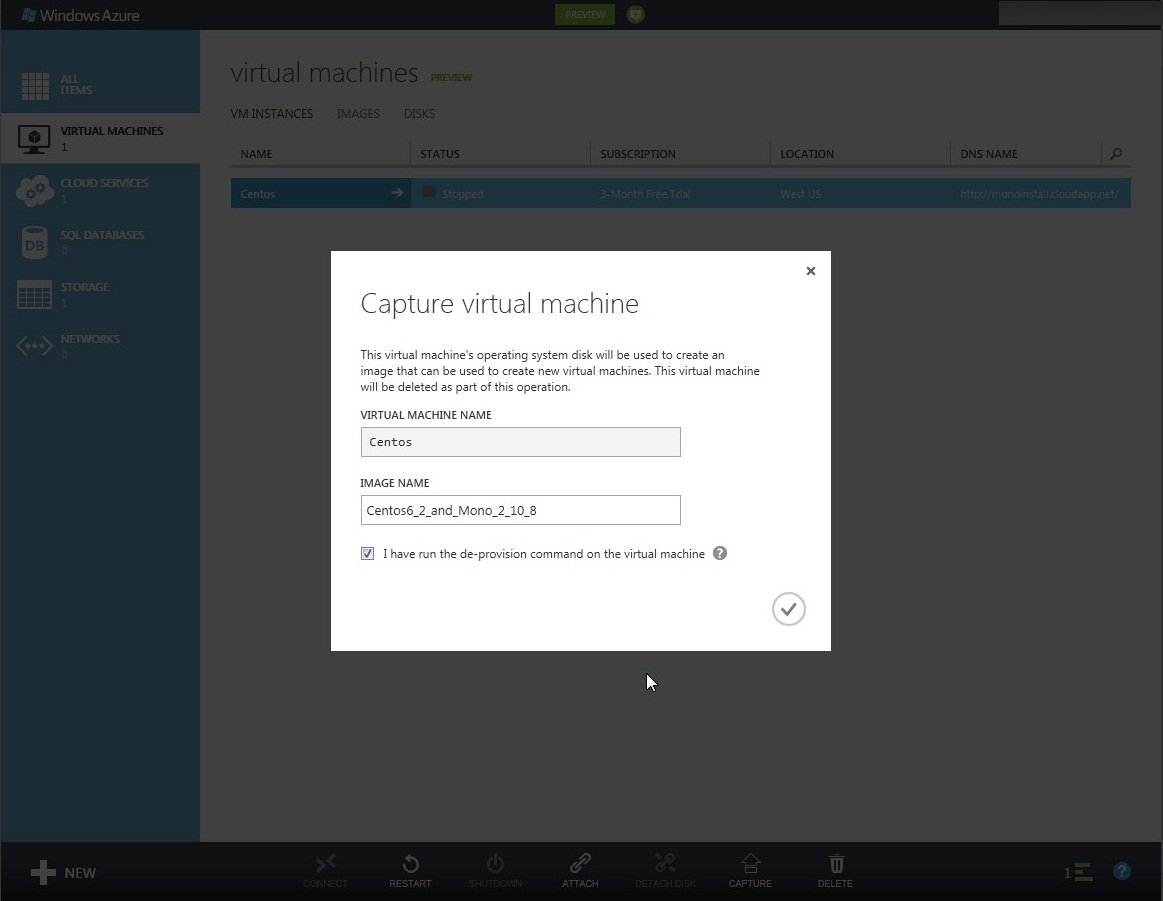
  4. Capture the image for faster setup on next test
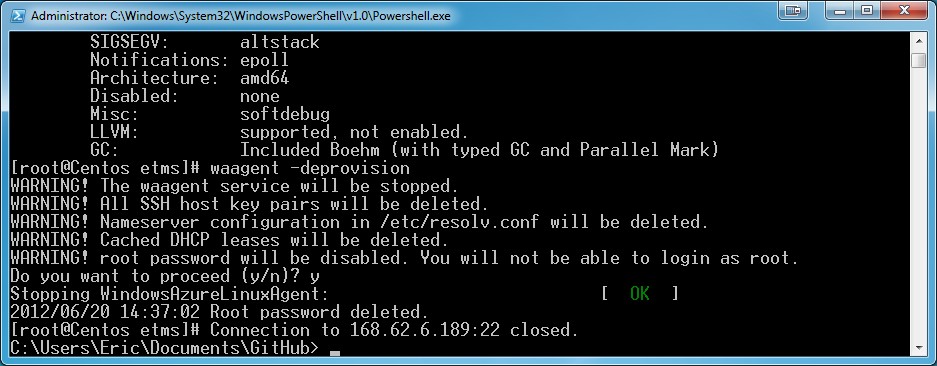
    waagent -deprovision
    

    Shutdown the Virtual Machine and Capture from the management site

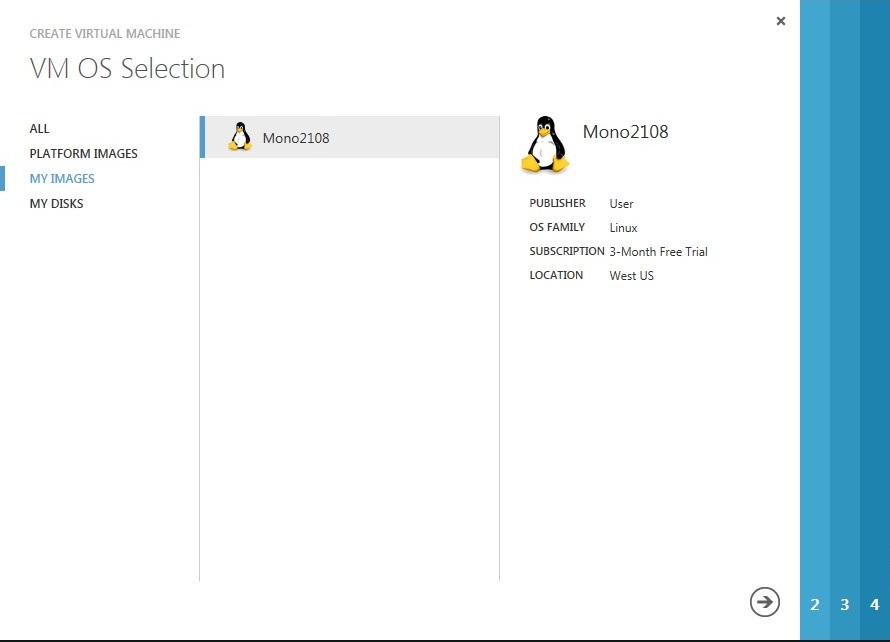
  5. The captured image is now in the list of VM OS Selection

Now I can build my repository of test machines without taking up space on my own hardware. Whenever I need a machine it is up and running in less than 10 minutes. The cloud is an enabler for Testing As A Service.

This post is based on these posts from Microsoft and Phonicuk:

Commic like screenshot explanation

Posted in Test | Tagged , , , , , , , , , , , , , , | Leave a comment

Wifi router setup

Recently I added an Airport Express to my Wifi network. Just following the wizard got me a working setup but poor Wifi coverage with different ip ranges from my Airport Express and Time Capsule. Last weekend I fixed it by following my instinct and a support article from Apple.

The dhcp on Time Capsule was giving me a warning which I suppressed. The modem with built in router had the same functionality so I moved all dhcp reservations there. I use the reservations to be transparant for unknown devices, but have a fixed address for printing and vnc. Eventualy my network acts like below

All it took was a centralized dhcp and some elbow grease to move the dhcp reservations.

Posted in Tooling | Tagged , , , , , , , | Leave a comment

Windows Azure SDK 1.6 update

Today I updated Windows Azure SDK to the latest 1.6 from November 2011. The update was from SDK 1.4 which I uninstalled before installing 1.6. After the update my unittests failed. Short solution below.

  1. Commandline to set environment variable:
    setx WindowsAzureEmulatorInstallPath "c:\program files\windows azure emulator\emulator"
  2. Regedit to change value:
    [HKEY_LOCAL_MACHINE\SOFTWARE\Microsoft\Windows Azure Emulator] 
    "InstallPath"="C:\\Program Files\\Windows Azure Emulator\\emulator"

For those who enjoy more information keep reading.

The first error I got running the unittests after the upgrade was

Microsoft.ServiceHosting.Tools.DevelopmentFabric.DevFabricException: Unable to find filedevstore\DSService.exe please verify your install is correct.

I thought this was me not running DSInit like described in so many posts. So I did. And it was certainly needed, but not the core problem. The execption was stil the same.

The release notes, that eveybody reads before installation, reports the location change of the Windows Azure Emulator. Changed locations and “Unable to find file” in the exception adds up. Now what can I do about it?

I love Reflector and have used it in many of my posts. In the code of Microsoft.ServiceHosting.Tools there is an Environment variable called WindowsAzureEmulatorInstallPath that should point to the emulator directory as a fallback. I’ve set this up by hand, but here is a commandline you can use:

setx WindowsAzureEmulatorInstallPath "c:\program files\windows azure emulator\emulator"

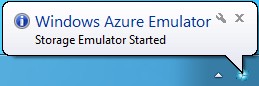
Now everything worked whenever the Storage Emulator was already started, but that wasn’t enough. The exception when the emulator was not running was

The type initializer for ‘Microsoft.ServiceHosting.DevelopmentStorage.Utilities.DevelopmentStorageConfigCache’ threw an exception. —> System.NullReferenceException: Object reference not set to an instance of an object.

Again using Reflector I found the use of a registry key for resolving the installation path of the Windows Azure Emulator (not very consistent Microsoft :|). Registry key was HKEY_LOCAL_MACHINE\SOFTWARE\Microsoft\Windows Azure Emulator\InstallPath. The registry key already existed, but the value was without the emulator subdirectory. After changing the value to c:\program files\windows azure emulator\emulator everything worked again, even starts the emulator when it is not running.
Posted in Development | Tagged , , , , , , , , , | Leave a comment

Windows Azure SDK better with wrappers

Since Windows Azure SDK 1.2 back in 2010 I’m trying to get my unittests up and running. I posted about it on the Microsoft forum and consulted the JustMock forum. Nobody was able to provide the solution as it looks like a loophole in C#. Last week I came across AzureContrib project on codeplex and the project from Noopman gave me a good workaround: use wrappers.

Wrappers are used to decouple from the Microsoft assemblies and to introduce Interfaces for easy unittesting. This also gives me the opportunity to do a little trick with static operations and a singleton. See code below.

// My RoleEnvironment wrapper
public class RoleEnvironmentHelper
{
    // Initializes the RoleEnvironmentHelper class on first (static) use.
    static RoleEnvironmentHelper()
    {
        // singleton implementation
        Implementation = new RoleEnvironmentHelperImplementation();
    }
    // The implementation which can be replaced by a Mock.
    public static RoleEnvironmentHelperImplementation Implementation { get; set; }
    // Gets the local resource from RoleEnvironment.
    public static ILocalResource GetLocalResource(string nameOfLocalResource)
    {
        return Implementation.GetLocalResource(nameOfLocalResource);
    }
}
// My implementation class
public class RoleEnvironmentHelperImplementation
{
    public virtual ILocalResource GetLocalResource(string nameOfLocalResource)
    {
        // use the Microsoft Windows Azure SDK RoleEnvironment to do the real work
        var resource = RoleEnvironment.GetLocalResource(nameOfLocalResource);
        // wrap the resource to use our Interface
        return new LocalResourceWrapper(resource);
    }
    // My LocalResource wrapper
    // internal class because the Interface is used for usage outside this implementation class
    internal class LocalResourceWrapper : ILocalResource
    {
        // Initializes the LocalResourceWrapper class 
        public LocalResourceWrapper(LocalResource resource)
        {
            Imp = resource;
        }
        // All properties are delegated to this implementation
        private LocalResource Imp { get; set; }
        // ILocalResource implementation
        public int MaximumSizeInMegabytes { get { return Imp.MaximumSizeInMegabytes; } }
        public string Name { get { return Imp.Name; } }
        public string RootPath { get { return Imp.RootPath; } }
    }
}
// ILocalResource for completeness
public interface ILocalResource
{
    // These are the public properties from the LocalResource abstract class
    int MaximumSizeInMegabytes { get; }
    string Name { get; }
    string RootPath { get; }
}

The RoleEnvironmentHelper removes the need for Windows Azure SDK assembly references in my main projects when it lives in its own WindowsAzure.Util assembly. Also I can replace the Implementation by a Mock object that only has to return a Mock/Stub of type ILocalResource. No more compiler errors, no more problems upgrading the SDK assemblies and the possibility to move to another platform. Win-win-win I would say. A sample unittest for JustMock, Rhino Mocks and Microsoft Moles below

[TestMethod]
public void GetLocalResource_Name_with_telerik_justmock_implementation()
{
    // Arrange
    var stub = Mock.Create<ILocalResource>();
    Mock.Arrange(() => stub.Name).Returns("some_resource");
    var mock = Mock.Create<RoleEnvironmentHelperImplementation>(Behavior.Strict);
    // GetLocalResource should return our stub
    mock.Arrange((ILocalResource) => mock.GetLocalResource("some_resource")).Returns(stub);
    // Use our mock for the RoleEnvironment implementation
    RoleEnvironmentHelper.Implementation = mock;

    // Act
    var result = RoleEnvironmentHelper.GetLocalResource("some_resource");

    // Assert
    Assert.IsNotNull(result);
    Assert.AreEqual<string>("some_resource", result.Name);
}

[TestMethod]
public void GetLocalResource_RootPath_with_rhino_mock_implementation()
{
    // Arrange
    var repo = new MockRepository();
    var stub = repo.Stub<ILocalResource>();
    SetupResult.For(stub.RootPath).Return(@"c:\temp");
    var mock = repo.StrictMock<RoleEnvironmentHelperImplementation>();
    // GetLocalResource should return our stub
    mock.Expect((ILocalResource) => mock.GetLocalResource("some_resource")).Return(stub);
    // Use our mock for the RoleEnvironment implementation
    RoleEnvironmentHelper.Implementation = mock;
    repo.ReplayAll();

    // Act
    var result = RoleEnvironmentHelper.GetLocalResource("some_resource");

    // Assert
    Assert.IsNotNull(result);
    Assert.AreEqual<string>(@"c:\temp", result.RootPath);
}

[TestMethod]
[HostType("Moles")]
public void GetLocalResource_MaximumSize_with_Moles_implementation()
{
    // Arrange
    var stub = new SILocalResource();
    stub.MaximumSizeInMegabytesGet = () => { return 1024; };
    var mock = new MRoleEnvironmentHelperImplementation();
    // GetLocalResource should return our stub
    mock.GetLocalResourceString = (input) => { return stub; };
    // Use our mock for the RoleEnvironment implementation
    RoleEnvironmentHelper.Implementation = mock;

    // Act
    var result = RoleEnvironmentHelper.GetLocalResource("some_resource");

    // Assert
    Assert.IsNotNull(result);
    Assert.AreEqual<int>(1024, result.MaximumSizeInMegabytes);
}

Microsoft Moles is available in Visual Studio 11 (beta) with the name Fakes.

Posted in Development | Tagged , , , , , , , , , , , , , , , | Leave a comment