Visual Studio 2012 upgrade from 2010

First some tips from Scott Hanselman to get the look-and-feel back.
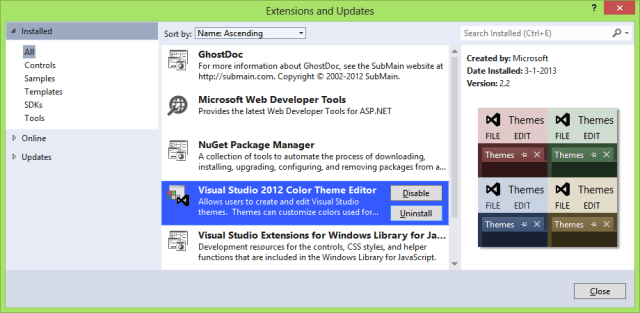
Visual Studio 2012 Color Theme Editor

Next to replace the pre- and postbuild macro with an add-in. The template takes care of the plumbing and running/debugging will make it available for use.
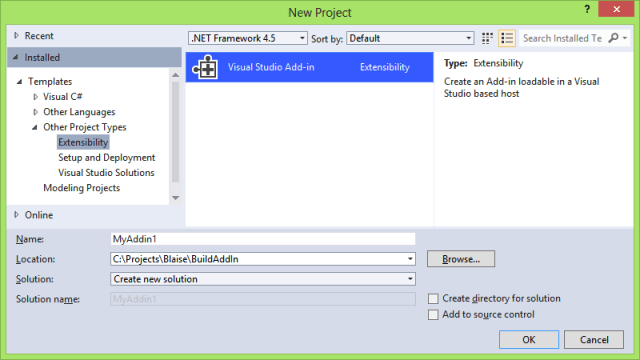
Visual Studio Add-in
Make sure to save the BuildEvents and SolutionEvents in a classlevel variable or the events will not work.

private BuildEvents _buildEvents;
private SolutionEvents _solutionEvents;
public void OnConnection(object application, ext_ConnectMode connectMode, object addInInst, ref Array custom)
{
   _applicationObject = (DTE2)application;
   _addInInstance = (AddIn)addInInst;
   // save the SolutionEvents object to get events working
   _solutionEvents = _applicationObject.Events.SolutionEvents;
   _solutionEvents.Opened += _solutionEvents_Opened;
   // save the BuildEvents object to get events working
   _buildEvents = _applicationObject.Events.BuildEvents;
   _buildEvents.OnBuildBegin += BuildEvents_OnBuildBegin;
   _buildEvents.OnBuildDone += BuildEvents_OnBuildDone;
}

Open your solution and everything just works. Except for things that don’t because they’re to old like Silverlight 3. But there is always the round tripping feature.
Posted in Tooling | Tagged , , , , , , , , , , | Leave a comment

15 minute ssd upgrade

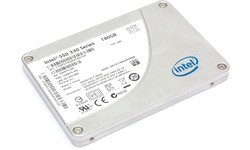
Ever since the native boot blog post from Scott Hanselman I’ve been running my Windows from a VHD. When my new machine arrived I upgraded to VHDX as that would support TRIM. I was preparing my machine for a SSD upgrade, waiting for the right time. And that was 15 minutes ago 😉

intel_330_series_180gb

Together with the SSD I ordered a USB 3.0 case for my soon to be old drive. Wise choice as the speed improvement is huge, like adding SSD to your laptop.

First I popped the bottom of my HP Probook and unscrewed the HDD, then added the SSD and put the HDD in the usb case.

Making sure I’ve plugged the HDD case in a USB 3.0 port, I booted from an Windows 8 installation USB and headed to the command prompt. (Repair your computer > Troubleshoot > Advanced options > Command Prompt) Then started the DISKPART fun.

DISKPART
SELECT DISK 0
CREATE PARTITION PRIMARY
FORMAT QUICK FS=ntfs LABEL=harddrive
ASSIGN LETTER=c
EXIT

Copy the VHDX to the c-drive. My 40Gb file only took 8 minutes!

DISKPART
SELECT VDISK FILE=c:\win8.vhdx
ATTACH VDISK
LIST VOLUME
SELECT VOLUME <vol_nr_of_vhdx>
ASSIGN LETTER=v
EXIT
cd v:\windows\system32
bcdboot v:\windows /s c:

DONE. Stop the time.

Posted in Tooling | 2 Comments

Visual Studio 2010 profiler on Windows 8 issue

I’ve been using Microsoft Visual Studio 2010 on my Windows 8 machine for a while now. Never had an issue until today when I tried to start the profiler. Turns out the driver it uses is not compatible with Windows 8.
Profiler incompatible message

Looks like I’ll be upgrading to Visual Studio 2012 very soon.

Further Reading

Posted in Tooling | Tagged , , , , | Leave a comment

AmbiguousMatchException on mock creation

See simple code below of ClassToTest with two public constructors with one parameter. My favorite mocking framework (Rhino Mocks) is unable to determine which constructor to use for mocking. The CreatePartialMock method throws an AmbiguousMatchException.

public interface IParam1 { string Name { get; } }
public interface IParam2 { string Name { get; } }
public class ClassToTest
{
    private ClassToTest() { }
    // Mocking framework is unable to determine which
    // constructor to use, because both have one parameter
    public ClassToTest(IParam1 param) { Name = param != null ? param.Name : string.Empty; }
    public ClassToTest(IParam2 param) { Name = param != null ? param.Name : string.Empty; }
    public virtual string Name { get; private set; }
}

The workaround for this is to create an extra layer of inheritance. The new class makes the choice for the mocking framework by specifying the base constructor. See the code below.

[TestClass]
public class UnitTest
{
    /// <summary>
    /// Mockable Class To Test
    /// </summary>
    /// <remarks>
    /// Has only the default constructor and will not throw the 
    /// AmbiguousMatchException when mocked
    /// </remarks>
    public class MockableClassToTest : ClassToTest
    {
        /// <summary>
        /// For Mocking of ClassToTest purposes only
        /// <summary>
        public MockableClassToTest() : base(default(IParam1)) { }
    }

    /// <summary>
    /// Creating the Mock fails with AmbiguousMatchException, 
    /// because ClassToTest has two constructors with one parameter
    /// </summary>
    [TestMethod]
    [ExpectedException(typeof(System.Reflection.AmbiguousMatchException))]
    public void ConstructorFailsWithAmbiguousMatchException()
    {
        // System.Reflection.AmbiguousMatchException: Ambiguous match found.
        var testObject = MockRepository.GeneratePartialMock<ClassToTest>(default(IParam1));
    }

    /// <summary>
    /// Create Mock with MockableClassToTest and set the
    /// Name of the Mock with an Expect
    /// </summary>
    [TestMethod]
    public void GetNameFromMock()
    {
        // arrange
        var testObject = MockRepository.GeneratePartialMock<MockableClassToTest>();
        testObject.Expect(x => x.Name).Return("Correct");
        Assert.IsNotNull(testObject);

        // act
        var actual = testObject.Name;

        // assert
        Assert.AreEqual<string>("Correct", actual);
    }
}

The UnitTestclass above can be run to reproduce the situation. Make sure to include the ClassToTest from the top of this post.

Posted in Test | Tagged , , , | Leave a comment

Mobile building blocks

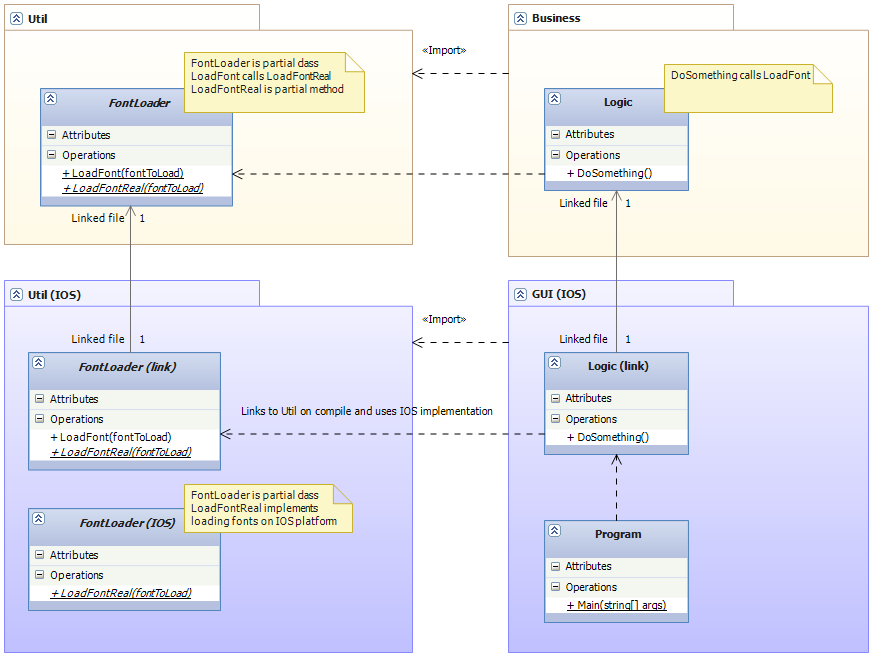
By using partial classes I can create libraries for every mobile platform that share a common interface. The component- / classdiagram below is a concept of this principle.

Component- / classdiagram of Util block

The light yellow blocks are generic code and the purple blocks are platform specific code, IOS in this case. A block is an project / assembly containing classes. You know the notation ;).

Top left is the partial class FontLoader that is used by the Logic class on the top right. The business project has a reference to the Util project (no linked file) and uses the Util.FontLoader.Load operation in the Business.Logic.DoSomething method.

Bottom right: an IOS project cannot have references to non IOS projects, so the Logic file is included in the project as a linked file. The same for the FontLoader file in the platform specific Util IOS project bottom left. Next to the linked FontLoader file I’ve added a FontLoader.IOS.cs file. (feel free to use other naming conventions) In FontLoader.IOS.cs I’ve implemented the partial method LoadFontReal with IOS specific code. The GUI IOS project has a reference to the Util IOS project.

Because of the same namespace for FontLoader in Util and Util.IOS the compiler will link the call to Util.FontLoader.LoadFont to the referenced Util.IOS implementation. This way I can keep my blocks in separate projects and reference them in stead of linking all the individual files needed.

Cons

  • Identify commonalities between platforms. The method signature must match on all platforms.
  • Not implemented partial methods just get skipped. (no build error)

Pros

  • The Util project in this example has become a true block.
  • Unittesting can be done with an unittest specific implementation of the block.
Posted in Development | Tagged , , , , , , , , | Leave a comment