Resolve certificate error for Synology Diskstation part 1 of 4

My Synology NAS allows the use of SSL to encrypt traffic. The default certificate supplied works, but gives an exception in the browser: There is a problem with this websites security certificate. The problem is the address and the certificate don’t add up. So the solution is to setup your own domain, link it to your NAS and create a certificate for it.

Other parts

Register and setup a domain

Registering for a domain is fairly easy. Just come up with a name and check if it is available. Then register it. I’ve used GoDaddy.com but there are more domain registration sites out there.

  1. First search for your desired domain name. I live in the Netherlands, so I want a .NL address.

    findmynas.nl.search
  2. Hit search and when it’s available click Add to put it in your shopping basket.
    findmynas.nl
  3. Review your order. I added private registration to mask my information and removed the business registration.

    findmynas.payment
    The order total is for the first year. Next years the price will be $21,48.
  4. Continue to check out. You will create an account, submit payment information, receive e-mails about your account creation and order. Setting up your domain starts after the payment is completed. Continue to the next step but keep in mind some things may not be there yet because the registration is in progress.
  5. Go to “My Account” and setup Free email forwarding for FINDMYNAS.NL. Details are in the godaddy support article Setting up a Forwarding Account in the Email Control Center. You will need this for the next parts.


Note that the used domain FINDMYNAS.NL is not mine and only used for demo purposes because it was available at the time I created this post.

Posted in Security | Tagged , , , , | 3 Comments

Code generation

Automate

We developers have T4 in Visual Studio. I’ve been playing with this for a while now and use it more often to speed up repetitive tasks.

The Business Intelligence team has BIML in Visual Studio. A colleague asked me to help with extending the functionality with the TableDiff component. I’ll be looking into this soon.

The prototype composer tool can generate working demo’s from requirements by the Information Analyst.

Code generation is here to stay and we should use it!

Posted in Development | Tagged , , , , | Leave a comment

My blog is carbon neutral

This blog is carbon neutral. Yours too?
With this post a tree is planted, neutralising the carbon dioxide emissions of my blog. Read all about it on Mach’s grün (no worries, it’s in english)

Spread the word and plant your own tree by blogging about this.

Posted in Uncategorized | Leave a comment

Loading generic.xaml from embedded assembly

My WPF application uses custom controls in a referenced library. To simplify deployment, all dependent DLLs are embedded resources of the application EXE file.
Read Jeffrey Richter: Excerpt #2 from CLR via C#, Third Edition to get the details.

The problem with this setup is that the generic.xaml from the referenced library is not applied. Resulting in an empty from on application start.

Expected

Expected

Actual

Actual

By writing some information to the tracelog I noted the ApplyTemplate was not fired. There are loads of discussions about this when you google, but all discuss the assembly: ThemeInfo settings. Which is not my problem. Everything works fine when the referenced library is located in the same folder …

Eventually I loaded the generic.xaml only in the controls and removed the MergedDictionaries from my MainWindow. This did the trick. Try my Sample solution. On the first run you get the almost empty window after the 3 second wait. Then locate the adding of generic.xaml in the constructor of MainWindow.xaml.cs and comment/remove it. Now everything works even when MyControl is removed.

Posted in Development | Tagged , , , , , | Leave a comment

Parallel Deflate issue in DotNetZip Library

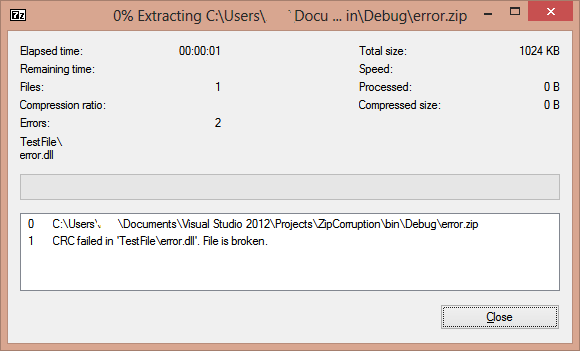
For deployment packages we use DotNetZip Library to create zip files. One of the files recently became corrupted when put in the package.

7zip error

CRC error in 7zip

We investigated the changing of Compression Level and Compression Method. Which solved the issue but none were acceptable. See details in table below.

After finding more discussion on the issue (ZipFile.AddFile fails depending of the file size) We noted the file size was 1048576, which is 128 * 8 * 1024 and fits the problem with the parallel deflate compression method. The solution is to not use parallelism.

zip.ParallelDeflateThreshold = -1;

This dropped the performance to 41 sec, but that was acceptable.

Deflate level 0 Deflate (issue) No parallel BZip2
3 sec 19 sec 41 sec 71 sec
292 Mb 110 Mb 110 Mb 96 Mb
Posted in Development | Tagged , , , , | Leave a comment