Our database is developed using Entity Framework Codefirst. Everything in code. Enabled migrations to update existing environments as we roll out. The code passed all the unittests, but it didn’t feel right. Time for an integration test.
This brought me to the idea to use Sqlite with an inmemory database. Installed some nuget packages, even wrote a MigrationSqlGenerator to create the tables and indexes, but no candy. The connection was closed before the first test fired and that killed the database.
Now I looked into SqlExpress as database engine. The problem was that existing data could influence the results. That is one of the problems with integration tests.
Entity Framework can dropcreate the database every testrun. This is slow, but that is again a problem with integration tests. I’ll show the differences (in code) between a unittest and an integration test below.
Unittest
Below is the code for the unittest. Some variable definitions are left out for clarity.
[Fact]
public void AddNewPerson_Creates_New_Person(){
    var business = CreateIsolatedBusinessObject();
    business.AddNewPerson(validName, validStreet, validNumber, validZipcode, validCity);
    business.Context.AssertWasCalled(x => x.SaveChanges());
}
private DoSomethingForTheBusiness CreateIsolatedBusinessObject() {
    var isolatedBusinessObject = new DoSomethingForTheBusiness();
    isolatedBusinessObject.Context = MockRepository.GenerateStub<IPeopleContext>();
    return isolatedBusinessObject;
}
First the business object is isolated. The code uses a Stub for the database (IPeopleContext). This limits the code to execute and the things that can go wrong. This also means checks done by the database (unique, references) are not performed.
Second the asserts on the Stubs are only to verify the code in the business object is well executed. The business object approves the record.
Integration test
The code for the integration test looks a lot like the unittest code. Again some variable definitions are left out for clarity.
IntegrationPeopleContext Context { get; set; }

public DoSomethingForTheBusinessIntegration() {
    System.Data.Entity.Database.SetInitializer(
       new DropCreateDatabaseAlways<IntegrationPeopleContext>()
    );
    Context = new IntegrationPeopleContext();
    Context.Database.Initialize(true);
}

[Fact]
public void AddNewPerson_Creates_New_Person() {
    var business = CreateIsolatedBusinessObject();
    business.AddNewPerson(validName, validStreet, validNumber, validZipcode, validCity);
    business.Context.Persons.First(p => p.Name.Equals(validName));
}

private DoSomethingForTheBusiness CreateIsolatedBusinessObject() {
    var isolatedBusinessObject = new DoSomethingForTheBusiness();
    isolatedBusinessObject.Context = Context;
    return isolatedBusinessObject;
}
During the setup (constructor) the DropCreateDatabaseAlways initializer is set and the Context is created. This is an inherited context that could have some extra Testing methods. The Context created in the beginning is used in all tests in the class to some save time.
The assert in the test is replaced by a Linq statement. This queries the database for the created person. If it doesn’t exists there will be an exception and a failed test.
Conclusion
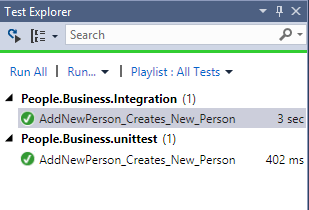
The code differences between unittests and integration tests can be small, but remember when to use which. Can you see the big difference in the screenshot of the Test Explorer below?
I’ve create a sample project. Download it here.






 .NET Development by Eric