My daughter got a new pair of glasses. The shop asked if she wanted to participate in an election. They took her picture and uploaded it to their website. We could then vote for her on that website.
Trying to vote multiple times was blocked for the same IP Address. That was something I wanted to beat with automation. Here’s my run for president with the use of WebJobs, BrowserStack and selenium automation.
Setup
 Signup for Windows Azure and BrowserStack. Take a look at the documentation for writing automate test scripts in C#. When you’ve logged in to BrowserStack it contains your user and token. Just copy-and-paste into your code.
WebJob
 You can run a console application as a webjob. Start Visual Studio and Create a Console Application. Add the nuget-package Selenium.WebDriver and use the code below
static int Main(string[] args) {
    IWebDriver driver;
    DesiredCapabilities caps = DesiredCapabilities.Firefox();
    caps.SetCapability("browserstack.user", "YOUR_USER");
    caps.SetCapability("browserstack.key", "YOUR_KEY");
    driver = new RemoteWebDriver(
        new Uri("http://hub.browserstack.com/wd/hub/"), caps
    );
    driver.Navigate().GoToUrl("http://VOTING_WEBSITE/");
    // write the title of the page loaded
    Console.WriteLine(driver.Title);
    // try to click the vote button
    IWebElement button = driver.FindElement(By.Name("submit-vote"));
    button.Click();
    // if element not found right away, retry for the next 10 seconds ...
    driver.Manage().Timeouts().ImplicitlyWait(TimeSpan.FromSeconds(10));
    var result = 1;
    try {
        IWebElement message = driver.FindElement(By.ClassName("message"));
        Console.WriteLine(message.Text);
        // When Thank you is displayed the vote was successful
        if (message.Text.ToLower().StartsWith("Thank you")) { result = 0; }
    }
    catch {
        Console.WriteLine("Exception");
    }
    finally {
        driver.Quit();
    }
    return result;
}
Run the console application to see it working on your local machine!
Create a zip archive from the files in the bin folder (your_console_app.exe and WebDriver.dll). This is the content for your webjob.
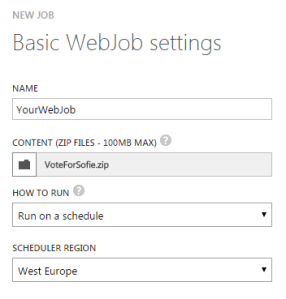
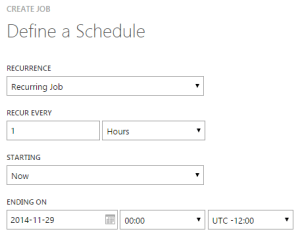
 Now create a new website on the windows azure portal. Add a webjob and upload the created zip archive as the content. Set a schedule and your done.
Monitoring
In the source code you see the return code is set to 0 when “Thank you” is displayed else the return code is 1. The webjob uses this return code for the status of the run.
On the AzureJobsextension the date/time and the status are showed in a table. The url is https://WEBSITENAME.scm.azurewebsites.net/azurejobs/. Return code 0 displays Success and code 1 displays Failed. No need to go into the logging for every run to see if the vote was registered.
Time’s up
After running the webjob for serveral weeks it started to Fail every time. The logging showed my BrowserStack free Automated testing time was used up.
[> abaad4: SYS INFO] Status changed to Initializing
[> abaad4: SYS INFO] Run script 'SeleniumBrowserStackTest.exe' with script host - 'WindowsScriptHost'
[> abaad4: SYS INFO] Status changed to Running
[> abaad4: ERR ]
[> abaad4: ERR ] Unhandled Exception: System.InvalidOperationException: Automate testing time expired.
[> abaad4: ERR ]    at OpenQA.Selenium.Remote.RemoteWebDriver.UnpackAndThrowOnError(Response errorResponse)
[> abaad4: ERR ]    at OpenQA.Selenium.Remote.RemoteWebDriver.Execute(String driverCommandToExecute, Dictionary`2 parameters)
[> abaad4: ERR ]    at OpenQA.Selenium.Remote.RemoteWebDriver..ctor(ICommandExecutor commandExecutor, ICapabilities desiredCapabilities)
[> abaad4: ERR ]    at SeleniumTest.Program.Main(String[] args)
[> abaad4: SYS INFO] Status changed to Failed
[> abaad4: SYS ERR ] Job failed due to exit code -532462766
I removed the webjob in the Windows Azure Portal as it would keep failing. Hope it was enough to win the election 😀 Results are expected first week of 2015.
TLDR
Using BrowserStack automated (selenium) testing and Azure Webjobs I automatically voted on a website that didn’t allow multiple votes from the same IP Address. This post describes how I did it.



 Minutes before my talk Marcel was desperately trying to get in touch. My badge for speaker was left at the check-in counter and my phone was on “do not disturb”. Marcel found me setting up my laptop and already figured out what happend: I registered as visitor and got that badge on check-in.


 .NET Development by Eric