Serialize Nullable<T> or not

When we tried to serialize an object to XML we noticed that Nullable types are special. A class is not serialized when null, but a Nullable type is a struct. See the code blow and notice the highlighted line in the output.

class Program
{
    static void Main(string[] args)
    {
        var obj = new MyType();
        var serializer = new XmlSerializer(typeof(MyType));
        serializer.Serialize(Console.Out, obj);
        Console.ReadLine();
    }
}

[Serializable]
public class MyType
{
    public string        MyStringProperty      { get; set; }
    public int           MyIntProperty         { get; set; }
    public Nullable<int> MyNullableIntProperty { get; set; }
}

Unwanted output:

<?xml version="1.0" encoding="ibm850"?>
<MyType>
  <MyIntProperty>0</MyIntProperty>
  <MyNullableIntProperty xsi:nil="true" />
</MyType>

The dotnet framework has a trick up its sleeve. Use the ShouldSerialize{PropertyName} function to manipulate the way a property is serialized. The corrected class is below. Using the same program the output now was without the (ugly) line of the nullable property.

[Serializable]
public class MyType
{
    public string        MyStringProperty      { get; set; }
    public int           MyIntProperty         { get; set; }
    public Nullable<int> MyNullableIntProperty { get; set; }
    // do not serialize MyNullableIntProperty if it has not been set
    public bool ShouldSerializeMyNullableIntProperty() 
    { 
        return MyNullableIntProperty.HasValue; 
    }
}

Correct output:

<?xml version="1.0" encoding="ibm850"?>
<MyType>
  <MyIntProperty>0</MyIntProperty>
</MyType>
Posted in Development | Tagged , , , | Leave a comment

Time Capsule Archive

My Time Capsule disk died on me recently after upgrading to a bigger one. Luckily my MacBook did not do the same so I could revert back to my old disk and start over with an initial backup. This got me thinking about backing up my Time Capsule itself. The disk that died was a Western Digital and since it was only a few months old I got a replacement disk after sending it to Germany. I planned to use the new disk as the backup disk and put it in a USB casing.

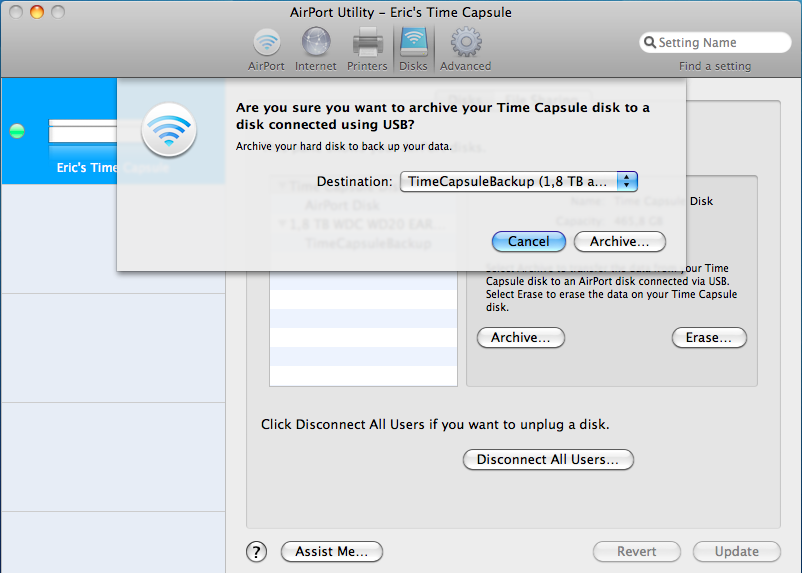
The Airport Utility that came with the Time Capsule has an Archive option that copies everything on the internal disk to a disk attached to the USB port. After selecting the disk and confirming, you see the amber light blink until it is ready.

To copy 200Gb it took about 9 hours. Not a speed record, but keep in mind you will only do this once or twice a year. That is my planned frequency. Afterwards I attached the disk to my MacBook and found a folder called AirPort Disk Archive with my sparsebundle file (TimeMachine) and everything else that was on the Time Capsule. As my wife still uses Windows XP, I use the SMB share option to backup files to the Time Capsule from her machine.

The problem with the WD disk was it did not stop spinning in the Time Capsule as the original disk does. I don’t expect my replacement drive to die on me soon, as I will be using it only to backup my Time Capsule.

What I read before starting the backup is in this Apple support article

Posted in Tooling | Tagged , , , , | 1 Comment

VS2010 not responding solved with Resource Monitor

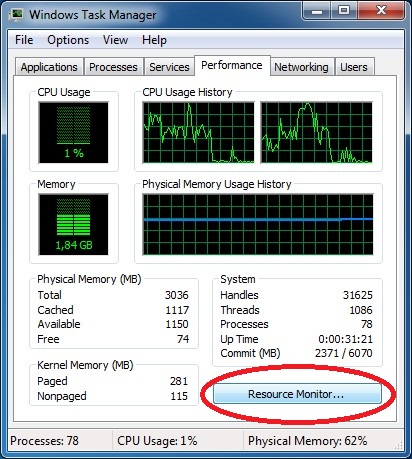
My Visual Studio 2010 randomly stopped responding. In my frustration I never looked further than the first tab of the Task Manager to end the task. Until I read a post about the Resource monitor in Windows. What is this magic tool and where does it live? Check the Performance tab of the Task Manager and find the Resource Monitor button.

Windows task manager with Resource Monitor button on the performance tabResource monitor with devenv not responding

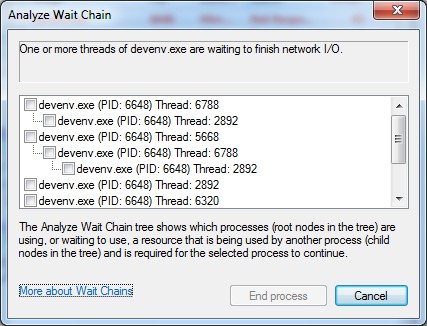
The resource monitor showed the devenv process in red, which meant it was not responding. I already knew that but now I had the option to investigate further. The context menu contains “Analyze Wait Chain” which showed me the threads of the process and why they were not responding: “One or more threads of devenv.exe are waiting to finish network I/O.”. As you can see in the screenshot one thread (2892) is blocking almost every other thread. Would be nice to just kill that thread, but that is not possible. End process will (as the name would suggest) end the complete process and kill all threads.

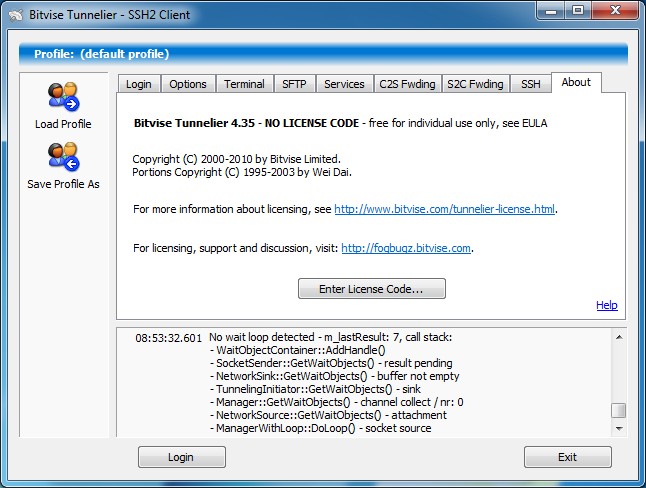
Analyze wait chain showing One or more threads of devenv.exe are waiting to finish network I/O. Tunnelier showing error No wait loop detected

Now I knew where to look. Truns out Tunnelier was spitting out error messages about a No wait loop. Turns out someone else was getting the same error: Bug report. After I upgraded to Tunnelier 4.40 everything runs fine.

Posted in Tooling | Tagged , , , , , , , | Leave a comment

WCF Streaming with REST on Mono

One of the problems with the mono framework is that streaming is not working properly. I tried to get it working myself and even tried to fix the framework myself. To much trouble as the solution is to use another approach called REST.

REST uses the url to submit parameters and the HTTP methods (GET, POST, PUT, DELETE) The supplied information is used to map te request to a service operation. Below is a sample of how to stream a file from a dotNET hosted REST service to a mono client.

The dotNET service is hosted in a console application. The configuration is below. Make sure to use the webHttpBinding.

<?xml version="1.0" encoding="utf-8" ?>
<configuration>
  <system.serviceModel>
    <services>
      <!--Streaming over REST-->
      <service name = "FileService.ServiceImplementation.RESTService">
        <host>
          <baseAddresses>
            <add baseAddress = "http://localhost:999/Files/REST"/>
          </baseAddresses>
        </host>
        <endpoint
          address   = ""
          binding   = "webHttpBinding"
          contract  = "FileService.ServiceContract.IRESTService">
      </service>
    </services>
  </system.serviceModel>
</configuration>

REST makes use of the WebGet Attribute on the opartions in the ServiceContract. The UriTemplate maps the url to the service operation. Here the last and second last parts of the url are maped to parameters of the DownloadFile operation. The name of the part between the braces ({}) maps to the parameter with the same name. The result is a stream, more about that in the client code. I trust you can implement the operation yourself, just make sure to return a stream.

[ServiceContract]
public interface IRESTService
{
    [OperationContract]
    [WebGet(UriTemplate = "downloadfile/{name}/{id}")]
    Stream DownloadFile(string name, string id);
}

In the client (on mono) make use of the HttpWebRequest object. Build the url with the knowledge of the interface UriTemplate and read the response stream which is the stream returned from the fileservice.

using System.Net;
using System.IO;
// ...
var name = "myfile.txt";
var id = "12345";
// create the request url with the parameters inside the url
var address = string.Format("http://localhost:999/Files/REST/downloadfile/{0}/{1}", name, id);
// create the request object
HttpWebRequest request = WebRequest.Create(address) as HttpWebRequest;
// call to the REST service
using (HttpWebResponse response = request.GetResponse() as HttpWebResponse)
{
    // Get the response stream  
    using (var stream = response.GetResponseStream())
    {
        // dosomething with the stream
    }
    // cleanup
    response.Close();
}

This solution uses default HTTP implementation and is supported on all platforms. Because the url is used for passing parameters the use of string paramaters is prefered. Complex types are not support, but could be passed in with the header of the request. These differences make REST less transparent but it is the price to pay if you need streaming on mono.

Posted in Development | Tagged , , , | Leave a comment

Monotouch

The mono port to iOS is monotouch. Or is it. The code is compiled to native Objective-C, not the Intermediate Language code that compiles at runtime. They call it Ahead of Time compiling.

Because C# is now supported on iOS I can share code from my Windows Phone 7 app when I port it. When using the MVC pattern this could add up to about 66% code sharing.

Be sure to read the documentation. I quickly ran into the problem of incompatible versions of MonoTouch, MonoDevelop and XCode. But a quick e-mail to Xamarin solved this for me. Also deploy the app to an actual device. iOS 3.1.2 on my old iPhone crashed the app before showing the initial view. Turns out iOS 3 needs a window.AddSubView(controller.view) where iOS 4 and up can handle window.RootViewController = controller which is used in the getting started samples.

Be sure to read my post on mono.

Posted in Development | Tagged , , , , , , | Leave a comment