My Maintainable Automated UI Tests

Original post By Mehdi Khalili on 9 Oct 2013 here
I just modified it to best suit my needs.

Mehdi Khalili uses Selenium webdriver to do an automated UI test. The key of the post is to see the test code as “code” and use object oriented patterns. Here is how I’m using it with xunit and Trackyon CUIT Helpers.

Basic MVC example

Complete solution for download here.

  1. Create a new MVC 4 Intranet Application (Razor engine)
    Project properties:

    • Anonymous Authentication (Disabled),
    • Windows Authentication (Enabled),
    • URL (notice port)

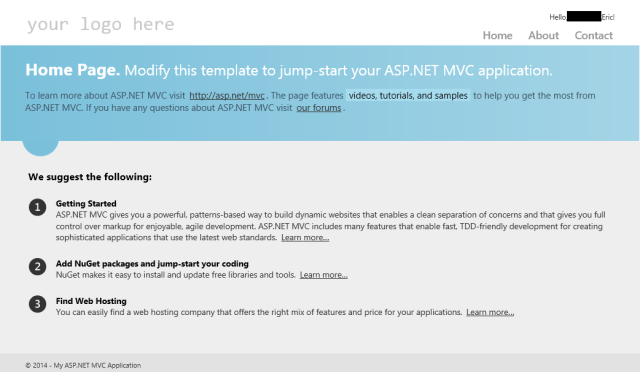
    basic mvc

  2. Create a new Class Library to hold the tests
    Nuget packages:

    • xunit,
    • Trackyon.CUIT.Helpers,
    • Selenium.WebDriver,
    • Selenium.Support
  3. Download and add IEDriverServer
    File properties:

    • Build Action (None),
    • Copy to Output Directory (Copy if newer)
  4. Create base classes Host, Page, SeleniumApplication. For simplicity only the changes from the original post are shown below.
    public class SeleniumApplication {
        public void Run(string websiteName, int portNumber) {
            IISExpress.Start(websiteName);  // Trackyon.CUIT.Helpers
            var options = new InternetExplorerOptions() {
            IntroduceInstabilityByIgnoringProtectedModeSettings = true
            };
            WebDriver = new InternetExplorerDriver(options);
            WebDriver.Navigate().GoToUrl(
                   string.Format("http://localhost:{0}", portNumber));
            AppDomain.CurrentDomain.DomainUnload 
                    += CurrentDomainDomainUnload;
        }
        private void CurrentDomainDomainUnload(object sender, 
                                               EventArgs e) {
            WebDriver.Quit();
        }
    }
    
  5. Create a class to mimic the HomeController Index page
    public class HomeIndex : Page {
        public static HomeIndex Initiate() {
            var driver = Host.Instance.WebDriver;
            driver.Navigate().GoToUrl(driver.Url);
            return new HomeIndex();
        }
    
        // bullets on the index page of the home controller
        public string[] Bullets {
            get {
                return WebDriver.FindElement(By.ClassName("round"))
                                .FindElements(By.TagName("li"))
                                .Select(x => x.Text).ToArray();
            }
        }
    }
    
  6. Create a class to hold the testdata.
  7. Create a class to hold the coded UI tests. The IUseFixture takes care of initializing and disposing the testdata. This is a xunit feature.
    public class HomeTest {
        [Fact]
        public void HomeIndexPage_Shows_gettingStarted() {
            var page = HomeIndex.Initiate();
            Assert.True(page.Bullets.Any(bullet => 
                    bullet.ToLower().Contains("getting started")));
        }
        [Fact]
        public void HomeIndexPage_Shows_nuget() {
            var page = HomeIndex.Initiate();
            Assert.True(page.Bullets.Any(bullet => 
                    bullet.ToLower().Contains("nuget")));
        }
        [Fact]
        public void HomeIndexPage_Shows_hosting() {
            var page = HomeIndex.Initiate();
            Assert.True(page.Bullets.Any(bullet => 
                    bullet.ToLower().Contains("hosting")));
        }
    }
    

The testcode checks the Index page for the text in the three bullets. Getting started, nuget and hosting.
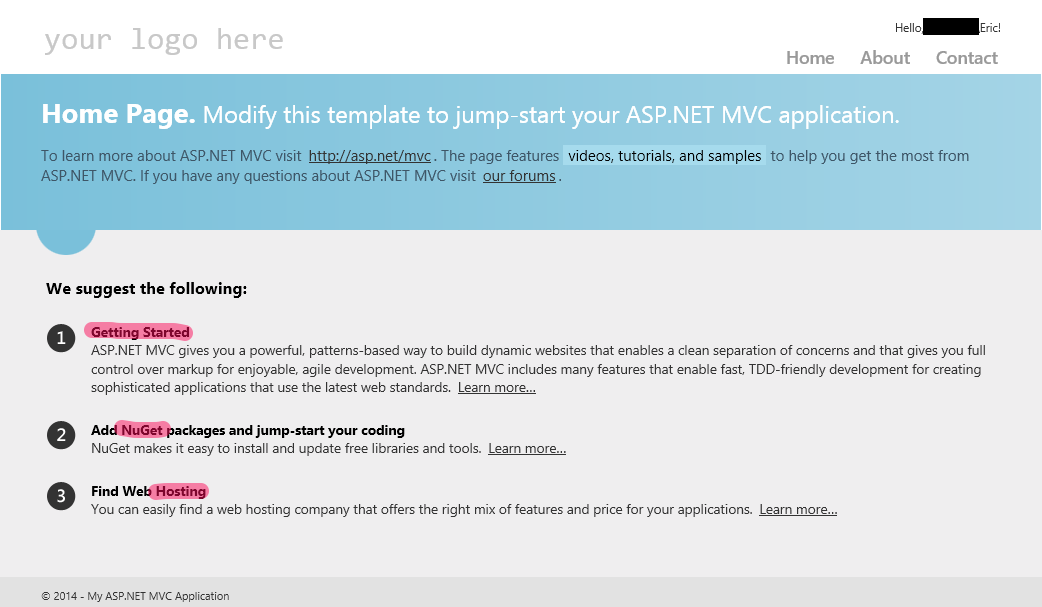
basic mvc highlighted
Complete solution for download here.

More details

Because of the security I’m using (Windows Authentication) I’m using the Trackyon.CUIT.Helpers IISExpress class. The original solution started the process from the commandline with a custom port, but that needed IISExpress to be configured the same for all websites. I could’t figure out a way to use the visual studio solution from the commandline. The Trackyon solution just starts the website that is in the applicationhost.config and is adjusted by visual studio.

Xunit provides the IUseFixture for handling testdata. I’m using it to load a certain page, do all the tests on it and then close the page after all tests are done.

When the tests are run, the webdriver is still active as a process. I’m still looking into the AppDomain.CurrentDomain.DomainUnload event and why it is not firing when the xunit tests are done. I might add the WebDriver.close() to the testdata / IUseFixture.

[update]
I’m using WebDriver.Quit() to stop the process. After upgrading to xUnit.net runner 0.99.3 the event was triggered and everything is just “fine and dandy” now.
[update]
No need for IUseFixture (removed) and updated demo project.

Posted in Test | Tagged , , , , , , , | 3 Comments

Week roundup

Here are the best articles I’ve read/seen last week:

What are your best reads this week? Leave them in the comments below.

Posted in Uncategorized | Tagged , , , , , | Leave a comment

Visual Studio Online Project Portal

With visual studio online everybody has access to team foundation service without installing. It is software as a service. But there are some limitations. One is no integration with sharepoint for your team project portal. You can use some other website for it.

Microsoft describes the process in the MSDN article configure or add a project portal. After linking to a website (could be sharepoint) you can access the portal from visual studio Team menu.
Show project portal

The one feature you’ll miss is the documents integration in Team Explorer. Vote for sharepoint integration on uservoice.

Posted in Development | Tagged , , , , | Leave a comment

Remove titlebarbuttons from Visual Studio 2013

Microsoft has changed Notifications in Visual Studio 2013 and are proud of it. There are also the new Feedback button and User Information Card.
vs2013 titlebarbuttons

I personally hate this kind of uncontrolled buttons in my development environment. Searching Google for a way to remove this nonsense I found two solutions

  • Use Visual Commander to hide the buttons (with a timer to keep hiding them 😕 )
  • Hack the registery [HKEY_CURRENT_USER\Software\Microsoft\VisualStudio\12.0_Config\MainWindowFrameControls]

I removed the Feedback Button, UserNotifications Badge and User Information Card with the registry hack. There is an Option in Visual Studio to hide the Quick Launch or I could use the registry to hide that.

And finally a clean development environment:
vs2013 titlebarbuttons removed
All disabled items are available in the menu. Feedback under Help, Notifications under View and Account Settings under File.

Registry hacking at your own risk, make sure you have a backup.

Posted in Development | Tagged , , , , , | Leave a comment

Could not find a concrete type mapped to MappingAdded

Last week I had some problems with my project using NServiceBus. In a handler I tried to publish an event. The exception message is below, where MappingAdded is my interface inherited from IEvent.

Could not find a concrete type mapped to MappingAdded

The problem was not very obvious, but checking the warnings got me to solve it.

Repro

No repro, no problem. So here’s how to get the exception or you can download the solution

  1. Create class library project on dotNET 4.5.1
  2. install-package nservicebus
  3. install-package entityframework
  4. Add class, name it SubmitMapping. It inherits IMessage
  5. Add interface, name it MappingAdded. It inherits IEvent
  6. Add class, name it MappingHandler. It inherits IHandleMessages.
    public IBus Bus { get; set; }
    public void Handle(SubmitMappingCommand message){
        Bus.Publish<MappingAdded>();
    }
    
  7. Add class, name it MappingContext. It inherits DbContext.
  8. Create another class library project on dotNET 4.5.1
  9. install-package xunit
  10. install-package nservicebus.testing
  11. install-package fakedbset
  12. Add class, name it MappingHandlerTest, with constructor and Fact
    public MappingHandlerTest(){
        Test.Initialize();
    }
    [Fact]
    public void OnSubmitMappingCommand_handlerPublishesMappingAdded(){
        var handler = Test.Handler<MappingHandler>();
        handler.ExpectPublish<MappingAdded>(e => true)
                .OnMessage<SubmitMappingCommand>();
    }
    
  13. Running the test will give you the ArgumentException

Investigate

In the build warnings there is an entry

Found conflicts between different versions of the same dependent assembly that could not be resolved. These reference conflicts are listed in the build log when log verbosity is set to detailed.

The problem here is that FakeDbSet uses an older version of EntityFramework. This version clash is triggered by the DbContext in the handler project. When NServiceBus tries to resolve the MappingAdded interface to a concrete type and it fails to find / generate the NServiceBus proxy. Throwing an error something is wrong with the type or mapping (yes, it inherits IEvent)

Solution

You can solve this

  • by upgrading the entityframework package in the testproject (install-package entityframework -version 6.0) or
  • by removing the DbContext class (step 7) from the handler project.

NServiceBus is a good product. This post is not to proof them wrong but to make it better.

Posted in Development | Tagged , , , , , | Leave a comment