Delay start ServiceControl on slow Windows startup

Lately I noticed my Windows 8.1 machine was taking a long time to become responsive after login. The files in Explorer would only show up after a terrible long load, and the icons would still be white. After some time (too long) everything was responsive again and my work could start.

Today I used the Windows Performance Toolkit and MagicAndre1981‘s post as a guide. After the first reboot and generating the summary the search for my waiting started.

Somewhere at the lower end of the summary file I found ServiceControl and RavenDB to be taking a lot of time.

<serviceTransition name="Particular.ServiceControl" 
                   processingTimeDelta="72962"
                   container="ServiceControl.exe (2188)"/>
<!-- removed other items and details -->
<serviceTransition name="RavenDB"
                   processingTimeDelta="20043"
                   container="Raven.Server.exe (2420)"/>

Both items are services and set to start automatic on boot. By setting the start option to Automatic (Delayed start) I can breath again. The services do start, but 2 minutes after the last automatic service has started.
Problem solved.

Posted in Tooling | Tagged , , , , | Leave a comment

Octopus deploy upgrade

We first started using octopus deploy on version 2.1. Now it is time to upgrade to the latest stable version.

If it ain’t broke, don’t fix it.
Bert Lance

First things first: make sure you have a recent backup! Start a manual backup from the Configuration tab of the admin user.

backup.octopusdeploy

After the backup completes start the MSI and wait for the upgrade to finish. Then head into the Octopus manager and start the Octopus service.

octopus.manager

The tentacles can be upgraded from the server. Go to the environments tab and click on Upgrade machines.

upgrade.tentacles

Done. This was hands down the easiest upgrade ever.

References

Octopus upgrade manual

Posted in Tooling | Tagged | Leave a comment

Week 20 roundup

Last week recap an links:

Image courtesy of kanate / FreeDigitalPhotos.net

Image courtesy of kanate / FreeDigitalPhotos.net

What are your best reads this week? Leave them in the comments below.

Posted in Uncategorized | Tagged , , , | Leave a comment

Template post on wordpress.com

I’ve been publishing roundup posts for some time now and just discovered wordpress has copy a post. This is kind of a template for posts.
copy.post

After choosing Copy a Post from the menu make sure to enable the Writing Helper in the Screen Options from the top of the page.
show.onscreen.writing.helper

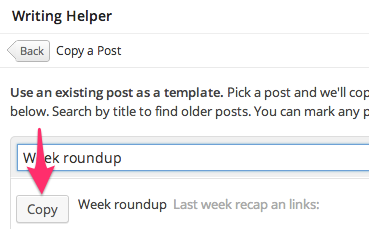
Now you find the Writing Helper below the post editor. Find the post you want to copy and click on Copy.
copy

Edit the post and publish 😉

Posted in Tooling | Tagged | Leave a comment

SpiraTeam database hack for user access

My test colleague uses SpiraTeam and needed some help restoring a backup. After restoring we granted access to the database from IIS (network service). But now he tells me nobody knows the Administrator password. What to do?

Solution

The SQL Server database of SpiraTeam contains the users with their (hashed) passwords. The steps below show how I gained access without knowing the origional password or the answer to the password reset question.

  • Make sure you have access to the database with something like SQL Server 2008 Management Studio Express
  • Register for an account with the link on the login screen, you will know this password spirateam.needaccount
  • Update the administrator user in the database with the password and hash from the new account. This will
    UPDATE [dbo].[tst_user]
    -- exact copy-paste from new user!
    SET [PASSWORD]         = 'SSu3dCIy8pYaCmqi9dXU+0sm9Kg='
      , [PASSWORD_SALT]    = 'jQLO/JRcWFwP0S0tvoLAEQ=='
      , [IS_LEGACY_FORMAT] = 0
    WHERE [user_id] = 1
    
  • Log in with Administrator and the password you entered when registering for the new account
  • You can now start creating new accounts and granting access, since you’re :mrgreen: now
  • [optional] Ask SpiraTeam for this process in a new feature

Background

SpiraTeam uses ASPNET SQL Membership providers with a (salted)hashed password. This encryption is one-way and there is no way (except for brute force) to recover a password. But when you have access to the database you can use the system against itself.

By registering for an account the system inserts a new record in the user table with an encrypted password. Now we have an encrypted password we do know the unencrypted value for. Update an existing user with the encrypted password and password_salt with the values for the known password and you have access to the system with that user.

Posted in Security | Tagged , , , , | 1 Comment