nServiceBus message versions

Our integration project was going well until we actually integrated with other parties. Our tests passed, their tests passed, but integration failed.

integration spy vs spy

After inspecting both implementations I noticed a difference in version of the messages assembly. (0.4.0.0 vs 1.0.0.27)

In NServiceBus V3.0 and onwards subscriptions for types with the same Major version are considered compliant. This means that a subscription for MyEvent 1.1.0 will be considered valid for MyEvent 1.X.Y as well.
docs.particular.net

After using the same mayor version for the messages assembly we could finally integrate.

Posted in Development | Tagged , | Leave a comment

Why you should TDD

tdd
In a recent code review I noticed a bug that was undetected by the unit tests. Read: all tests passed, but the code was wrong. When asked the developer confessed the unit tests were created after the code was created. That is why you should do Test Driven Development.

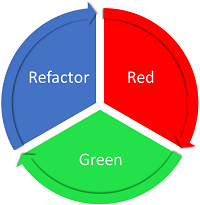
The first step in TDD is add a failing unit test. This ensures your test code is correct. Then create code to make the unit test pass. At the end do refactoring, but make sure the tests keep passing. Eat – sleep – rave – repeat.

Can you spot the fault in the nservicebus code below? This is a simplified version of the code I found in the review.

// unit test
[Fact]
public void FooHandler_sends_BarMessage_when_FooMessage_is_handled()
{
    var msg = new FooMessage();
    Test.Saga<FooPolicy>()
        .When(x => x.Handle(msg))
        .ExpectSend<BarMessage>();
}

// saga implementation
public void Handle(FooMessage message)
{
    // send the wrong message type
    Bus.Send<FooMessage>(msg => { });
}

Try the code and see the unit test pass. What is going on? Seems like the ExpectSend is not executed. When TDD was used the unit test would pass even without the implementation and the wrong test code wouldn’t go unnoticed.

Move the ExpectSend before the When and the test will fail until you send a BarMessage from the saga implementation. Now you know why to write your tests before you start to implement.


Posted in Test | Tagged , | Leave a comment

Week 24 roundup

Last week recap and links:

Image courtesy of kanate / FreeDigitalPhotos.net

  • Octopus deploy is working on a delte compression implementation. They need help to beta test it.
  • Entity Framework migrations in a development team video

Image courtesy of kanate / FreeDigitalPhotos.net

What are your best reads this week? Leave them in the comments below.

Posted in Uncategorized | Tagged , , , | Leave a comment

Browserstack screenshot followup

I asked browserstack for a reaction on the timeout in my Browserstack first look post. They upgraded my account to include the Defer Time option for free, but no candy.

We use Selenium to automatically capture the screenshots. It seems that Selenium is unable to capture your website correctly on the iOS simulators.

Unfortunately, there are no immediately available solutions as this is the default behavior of Selenium on the iOS simulators. You’ll be able to test other URLs and devices, just fine.

Also, we are working on a Real Mobile cloud, where we will have actual iOS, Android, etc. physical devices hosted for testing and we expect such problems to be resolved there. We’ll be sure to keep you posted on developments.
support@browserstack.com

Keep an eye on the browserstack website, more good stuff is on the way!

Posted in Tooling | Tagged , | Leave a comment

Octopus deploy export – import

Imagine you don’t have acces to a customer’s serverpark but still want to use a central octopus deploy server. Now you can export that release from your octopus deploy server and import it into the (local) installation on the customer’s serverpark.

Commandline export – import

What I hoped octo commandline would do: export all variables and nuget packages to disk. Then I could import everything to the customer installation. But what it did was export the definition of the project / release in JSON. Not sure when they think this is used.

Nuget to the rescue

My solution is to get the nuget packages that octo.exe creates and upload them with nuget.exe to the octopus deploy server.

NuGet.exe push <YourApp.nupkg> -ApiKey <Your API Key> -Source http://customer.octopus/nuget/packages

Then create the same process steps (tailored to the customer) and begin releasing. Next release upload the nupkg files again and create a release from the latest versions.

Posted in Tooling | Tagged , | Leave a comment