Week 7 roundup

Last week recap and links:

Image courtesy of kanate / FreeDigitalPhotos.net

Image courtesy of kanate / FreeDigitalPhotos.net

What are your best reads this week? Leave them in the comments below.

Posted in Uncategorized | Tagged , , , , | Leave a comment

Setup logging in configuration with powershell

Manipulation of config files with notepad is a burden for every developer / operator. It is the source of many errors.

With DEVOPS we try to automate this process. The result is less prone to errors. See the powershell script below to add a shared listener to a config file.

$configFile = "PATH_TO_YOUR.config"
$xml=New-Object XML
# Load the configuration from disk into memory
$xml.Load($configFile)
# Find the sharedListener named TextFileLogListener
$tracelistenernode = $xml.SelectSingleNode("/configuration/system.diagnostics/sharedListeners/add[@name='TextFileLogListener']")
if (!$tracelistenernode)
{
	# Create the filter element inside the listener
	$filter = $xml.CreateElement("filter")
	$filter.SetAttribute("type", "System.Diagnostics.EventTypeFilter")
	$filter.SetAttribute("initializeData", "Information")
	# Create the add element to add the shared listener
	$tracelistenernode = $xml.CreateElement("add")
	$tracelistenernode.SetAttribute("name", "TextFileLogListener")
	$tracelistenernode.SetAttribute("type", "System.Diagnostics.TextWriterTraceListener")
	$tracelistenernode.SetAttribute("initializeData", "c:\\log.txt")
	# Here is the filter added
	$tracelistenernode.AppendChild($filter)
	# You can use "fluent style" navigation
	$xml.configuration.'system.diagnostics'.sharedListeners.AppendChild($tracelistenernode)
	# Now create an entry in the trace listeners to the shared listener
	$listener = $xml.CreateElement("add")
	$listener.SetAttribute("name", "TextFileLogListener")
	$xml.configuration.'system.diagnostics'.trace.listeners.AppendChild($listener)
	# Save the config to disk
	$xml.Save($configFile)
}

You can run the script above and see the changes it makes to the config file. To prevent errors on multiple runs, the script checks the presence of TextFileLogListener and will only add it once.

This is part of our Automate test environment with Azure Virtual Machines script.

Posted in Tooling | Tagged , , , , , | Leave a comment

Deploy to Azure button

The Deploy to Azure button takes the sting out of deployment. Just click the button and the wizard will guide you through the process. How to set this up?

I’ve got my ASPNET MVC4 project in github. Every builds local. First I’ll try the process by supplying the repository in the querystring:

https://azuredeploy.net?repository=your_repository_here

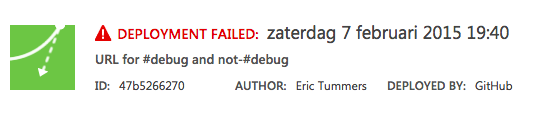
Browsing to the URL triggers the build and deploy of the project in the repository. But the deployment fails with little to no details (Git deployment failed)

azure_deploy_fail

In the azure portal the details of the failure are logged. Seems a framework issue that failed the build.

azure_deploy_fail2

Azure websites are framework 3.5 or 4.5. Setting the framework of the project to .NET 4.5 and doing a nuget upgrade fixed the build and the deployment completed with no more issues.

Posted in Development | Tagged , , , | Leave a comment

Week 6 roundup

Last week recap and links:

Image courtesy of kanate / FreeDigitalPhotos.net

  • Azure friday video deploy to Azure button sounds great. Must try this soon.
  • This week used the IEditableObject to be able to undo operations in my WPF application.
  • I installed SickRage on my Synology NAS. Struggled to get auto post processing working. But now it is up-and-running I’m loving it and the rest of the family too 😉

Image courtesy of kanate / FreeDigitalPhotos.net

What are your best reads this week? Leave them in the comments below.

Posted in Uncategorized | Tagged , , , | Leave a comment

My 2015 developer and power user tools

toolbox by vectorolie / FreeDigitalPhotos.net
Below a list of tools I use today. If you’re like me, you check them out and add the ones you like to your own toolbox.

Image courtesy of vectorolie / FreeDigitalPhotos.net

Environment

Chocolatey, installation automation. I’ve written about it before on my blog. (See posts)
F.lux, it makes the color of your computer’s display adapt to the time of day
7-zip, the new standard in compressing files
DropBox, file share/sync between computers and the internet
Chrome, best browser today
AdBlock for Chrome, blocks adds in chrome

Productivity

TimeManage.me, my pomodoro app
Powershell, the automation solution from microsoft
RescueTime, background logging of where you spend your time
Wunderlist, task list on every platform
IFTTT, automate the internet
Trello, collaboration tool that uses boards and cards. I’ve written some small automation scripts for my uses. (Post)
Pocket, my preferred read later list, available on all platforms
Evernote, remember everything. I use it for my GTD technique called The secret weapon.
1Password, my password is CTRL + \
Autohotkey, run macro’s on keyboard shortcuts like CTRL+ALT+5 types €

Development

Visual Studio 2013, the best IDE out there
NuGet, source of all the good in the world
Visual Studio Gallery, extend visual studio
Ghostdoc, CTRL+SHIFT+D to comment your code, that simple
Specflow, cucumber for .net for behavior driven development (BDD)
Just Decompile, see the code of .net assemblies
Fiddler, log http calls via this proxy
Wireshark, deep logging of network traffice
SourceTree, my preferred git tool with advanced branching support
Notepad++, notepad on steroids
BrowserStack, test webpages on any platform, live or automated
Selenium, webbrowser automation, also runs on browserstack
smtp4dev, development smtp server

Misc

ZoomIt, I use this in all my demos to zoom
Bit.ly, url shortener service
windirstat, see what is hogging your hard disk space
prey, install and forget, until you need it

Mac

Cyberduck, connect to anything
DaisyDisk, see what is hogging your hard disk space
SafeCopyBackup, automated cloud backup
Type2phone, make my mac a Bluetooth keyboard for iPad or AppleTV
Handbrake, convert movies
1Password, my password is ⌘ + \

iPhone/iPad

Tweetbot, easy twitter client with pocket integration
Workflow, automate tasks, like send ETA and navigate home
CloudMagic, handles my e-mail and offers tasks like send to evernote or pocket
Pocket, I do my reading mostly on iPhone or iPad

Some of the tools cost money, some are free, some offer paid options. If it saves you time or improves your work, why not support the developer that made it possible?


Posted in Tooling | Tagged | Leave a comment