

My kids’ school has a website created in WordPress. It is maintained by a teacher and one volunteer. The position of volunteer became vacant and I offered to help.
The NextGEN Gallery plugin had suddenly stopped working. Since nobody knew what changed and nobody had WordPress deeper knowledge the issue remained. The teacher emailed the developers, but was unable/scared to perform the steps offered as a solution. This is where I enter the game. Ignoring the email steps (maybe it is your jquery version) I asked some colleagues and dr. google.
TLDR
Turning on logging and installing some plugins helped me pinpoint a wrong value in the settings. Changing the setting fixed the issue.
PHP logging
To enable logging I edited the wp-config.php file in the root of the website. Every developer wants this setup to pinpoint issues. The code below puts the statements in the logs folder under wp-content in a file called php-errors.log.
@ini_set('log_errors', 1);
@ini_set('display_errors', 0);
@ini_set('error_log', dirname(__FILE__) . '/wp-content/logs/php-errors.log');
@ini_set('error_reporting', E_ALL ^ E_NOTICE );
No need to restart anything. The changes are picked up by WordPress on the next request.
Memory usage
I installed WP-Memory-Usage plugin to see why fatal errors were being logged. I was able to see when Fatal error: Allowed memory size of 67108864 bytes exhausted was about to happen.

Unfortunately I was unable to change any memory limit because it was locked down by the hosting provider.
Memory viewer
With the Memory-viewer plugin I got an insight in the memory usage while loading the site. WordPress is loaded on every request and offers hooks for plugins to do their thing.
I noticed a spike in memory in the init hook and a 40Mb using in the first hook called plugins_loaded. Disabling all plugins showed a memory usage of 25Mb in the first hook and the same spike in the init hook. My colleague Robert suggested that it isn’t uncommon to claim 15Mb for an image editing plugin.
Next to the memory usage in the hooks the MySQL statements are printed. This turned out to be golden information.
Database browser
Using the Database-browser plugin I could replay all MySQL statements printed by the memory viewer plugin. One statement showed an empty page (PHP exception) and needed further inspection.
SELECT DISTINCT wp_2_ngg_pictures.* ,
  GROUP_CONCAT(CONCAT_WS('@@', meta_key, meta_value)) AS 'extras'
FROM `wp_2_ngg_pictures`
LEFT OUTER JOIN `wp_2_postmeta`
  ON `wp_2_postmeta`.`post_id` = `extras_post_id`
GROUP BY wp_2_ngg_pictures.pid
LIMIT 1000
The last line suggests a limit of 1000 items which is quite steep. Other statements limit to 100 or less. Changing the number resulted in output.
Solution
Looking into the code of the failing plugin I noticed a setting being used for the query limit. This setting could be set on the plugin’s options tab. Changing the value from 1000 to 100 did the trick. I will not ask who put the 1000 in there 🙄
Final thoughts
Does support on wordpress.org plugins mean that everybody gets emailed a solution? Why not post the solution in the support forum? I did post my solution to their support forum.
PHP is a nice language, understandable even for me, but hard to debug. The white screen of death is sometimes the only result.
Even with it’s quirks WordPress is a nice platform for websites/blogs. I’m using it myself.
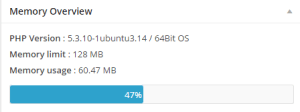
[update] The hosting provider has upgraded the PHP memory to 128 Mb. Everything works great now!


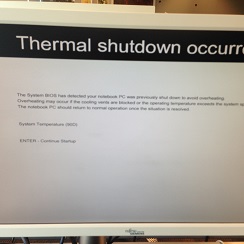 My laptop did a Thermal Shutdown. Which is good to preserve my hardware, but bad because I don’t know why the hardware is getting too hot. The cooling past was replaced and no issues for about a week or two. Then again a Thermal Shutdown. It was time for further inspection.
 I’m happy to see that swapping hardware did not force me to do a complete re-install. The swap-out and reconfiguration took about 30 minutes. You’ll need an active internet connection for downloading the drivers. Easy does it.


 .NET Development by Eric