Billing Alert Service

Azure keeps adding features and most of them first end up as preview features. After this beta phase they become general available. You’ll need to opt-in for the preview features.

billing_alert_iconI’ve signed up for the Billing Alert Service. After being queued for 9 days the feature showed up on the billing portal as an extra tab. Also got an e-mail about this, but only noticed it after setting up some alerts.

Clicking the tab gets me to the (preview) billing alerts. There I can create up to 5 alerts. The types of alerts are billing total or monetary credits. After creation you’ll get a confirmation e-mail on the address supplied.

Billing total

When my total amount spent reaches the alert total I get notified. I created an alert to notify me whenever Azure is costing me money. This is when the bill is €0 or more.

billing_alert_billing_total

Monetary Credits

With my Visual Studio Premium account I get some Azure credits each month. When these drop to the alert amount I get notified.

I tried to input €37.50 since this is the half of €75, but the alert service only accepts “positive whole numbers”. Who cares, but it’s a limitation.

billing_alert_monetary_credits

Overview

The existing alerts are displayed in a list with the UTC time of the last notification sent.

billing_alert_overview

To be notified at the beginning of a new billing period (and to have something to show here) I added a monetary credits alert for €76. This is €1 more than I’m entitled to with Visual Studio Premium. My first e-mail arrived within one hour after the alert was created.
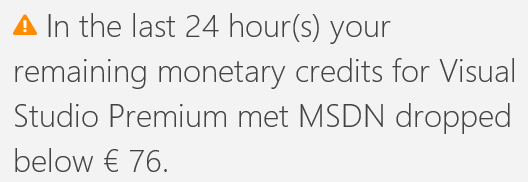
alert_service_below_76

By starting a heavy Virtual Machine (D4 = €0.948/hour) I managed to trigger another alert. (HalfWayCredits)

The frequency the alerts are checked isn’t clear to me, just keep in mind it could take up to 24 hours before you get notified.

References

Set up billing alerts post on azure.microsoft.com
How to Create an Azure Billing Alert Email post from march 2014, probably the first ever to use the alert service

Posted in Tooling | Tagged , , | Leave a comment

Week roundup

Last week recap and links:
Image courtesy of kanate / FreeDigitalPhotos.net

  • Running Ranorex with MTM, this automated test tool integrates with almost anything, this post describes how to integrate with the Microsoft stack
  • Try Docker: online tutorial to get hands on with Docker
  • Octopus 3.0 tested, it uses less resources than 2.6 and uses SQL Server now

Image courtesy of kanate / FreeDigitalPhotos.net

What are your best reads this week? Leave them in the comments below.

Posted in Uncategorized | Tagged , , , , , , | Leave a comment

Ask google

Bart-Simpson-Blackboard
In my case I ended up on a number of stackoverflow pages.

Unit testing error, could not load file or assembly

To reproduce a bug I created a unit test with Rhino mocks. The testclass inherited from the testObject which had a virtual method. This virtual method returned a type defined in another assembly which wasn’t explicitly referenced by the unit test project. When building / discovering tests the following exception is thrown

Could not load file or assembly ‘x’ or one of its dependencies. Signature missing argument. (Exception from HRESULT: 0x801312E3)

By referencing the project that holds the type returned by the virtual method the exception was resolved and my repro unit test was ready.

How do I get a Distinct list to work with EF 4.x DBSet Context and the IEqualityComparer?

I ended up here when my MVC 4 with EF code first would give me an error. My controller needed to get the max price for each category. For this is tried to get the unique (distinct) categories and then query for the max price for each category. Turns out that can be done with the following:

var maxCategoryPrice = db.Products
    .GroupBy(x => x.CategoryId)
    .Select(x => new { 
        CategoryId = x.Key, 
        MaxPrice = x.Max(y => y.Price) 
    });

Last and LastOrDefault not supported

Last one I figured out myself while I was correcting the previous linq statement, but there was a stackoverflow question. Just in case someone needed the answer I did the search…
LastOrDefault is not supported by EF, but can be replaced with OrderByReverse and FirstOrDefault.

// not supported
var lastNewProduct = db.Products
    .OrderBy(x => x.CreateDate)
    .LastOrDefault();
// same result and supported
var lastNewProduct = db.Products
    .OrderByDescending(x => x.CreateDate)
    .FirstOrDefault();
Posted in Development | Tagged , , , | Leave a comment

Microsoft TechDays 2015

techdays2015
With all the new stuff Microsoft has presented at Build, pushed to Azure and is going to release, I just had to go to TechDays. After an amazing keynote about zombies in the AppStore, the future of monetization (micro payments) and IoT the sessions started.

Below a list of the sessions I attended.

Microservices

  • Introduction to Azure Service Fabric Used by Microsoft internally, now available as local install. (Azure support is coming) The Fabric Explorer shows the VM’s (nodes) and containers (applications). Microsoft offers 4 templates to create the applications: Reliable actor API (stateless/full) and Reliable service API (stateless/full). The actor contain both the state and behavior, whereas a service stores the state in ReliableCollections. The actor is limited to HTTP protocol, whereas a service can use whatever it likes. A service also contains a virtual RunAsync for long running operations. More on Microsoft.com
  • Architecting systems for continuous delivery Microservices are silos where the team is responsible: you build it, you run it. A microservice is a vertical with business value (no traditional layers), is responsible for it’s own data (data duplication is not a bad thing) and can function on it’s own (no coupling).
    Testing is done in production and we never rollback, but fix the problem. Make sure to have early adopters, not-so-beta users and full paying customers when testing in production. [Slides]
  • Exploring microservices in a Microsoft landscape Migrate from a monolyth to microservices, don’t do a big-bang with the complete system. General list of used frameworks:
    • UI: AngularJs
    • Microservices: ASP.NET WebApi or MVC 5/6
    • Messaging: NServiceBus or Azure Servicebus
    • Internal services can use WCF

.NET

  • Making .NET applications faster Look at runtime complexity (value types, struct VS class), space complexity (linkedlist VS array) and specialized operation (Trie for spellcheck and word suggestion).
    To improve startup speeds use NGen, RyuJIST, ILmerge, .NET Native and Opt-in mutli-core background JIT. [Slides]
  • Using Managed Extensibility Framework IoC and dependency injection framework in System.ComponentModel.Composition (part of the .NET framework!) Crashes when multiple implementations are found.

Quality

  • Going DEVOPS on the Microsoft Stack The new way to go is PowerShell, the existing agents will be deprecated. It uses PowerShell DSC (desired state configuration) to get the machine up and running and than the deployment starts. [Slides]
  • Mastering Intellitrace In Visual Studio the itrace file is always created, in production you can use the intellitracesc.exe to capture an itrace file, sharepoint has a PowerShell command Start-IntellitraceCollection, during testing with Test Manager the itrace is created for easy repro and in Azure the option is available to create an itrace file (which can get really big)[Slides]
  • Automated UI Testing for iOS Controls are identified (like selenium) and operated by Repl, when using Xamarin Forms you’ll need some extra startup code to get this running. Xamarin.UITest is on nuget, iOS also needs the agent nuget because of the sandboxing. Running local is free, using Xamarin Insights is free for now (crashreports remain free).

Miscellaneous

  • Functional programming: F# for C# developers Install the F# MVC5 extension to get templates in Visual Studio. Make sure you’ve got the files in the correct order, the is no forward declaration and back to C again, but without the headers. Main advantage is immutable objects (everything is a function) which makes parallelism easier. [Slides]
  • State of PowerShell Version 5 of PowerShell focuses on DEVOPS. It will contain a package manager and Pester: a unit test framework. If your product does not contain PowerShell we will not buy it.
  • Event-sourcing your AngularJS applications In his demo Maurice showed how to add a new field to an event-sourcing application. Awesome talk with people standing in the hallway listening. [Slides]
  • IoT crash cource Lots of home projects and tips-n-trick when starting IoT like hackerstore.nl
  • Best practices using open source software in the enterprise When distributing software the license is triggered. GPL is not triggered when hosting in Azure and offering SAAS on it (AGPL is triggered). Manage and register what nugets you use by using a artifact repository, publishing you own software as nugets and scanning the nugets on licences and known vulnerabilities. [Slides]

Conclusion

A lot is happening around Microsoft. My weekend projects are filled until the summer. I’ll be installing Azure Service Fabric, playing with Xamarin REPL and trying powershell DSC.

Fun

techdays_2015_drone_hyperlapse
Here’s a nice hyperlapse I’ve made of the driving/jumping drone at Techdays.

Next to Chaos Monkey there is now Chaos Gorilla that outputs a complete datacentre. SimianArmy repository.

Talked to some guys that offer Beacons with an App as a service. It is called Shopmate and will be rolled out in their hometown first. Keep an eye on this.

Posted in Conference | Tagged , , , , , , , , , , , , , , , , , | 3 Comments

Week roundup

Last week recap and links:
Image courtesy of kanate / FreeDigitalPhotos.net

Image courtesy of kanate / FreeDigitalPhotos.net

What are your best reads this week? Leave them in the comments below.

Posted in Uncategorized | Tagged , , , , | Leave a comment