I’ve been fine tuning my code coverage runsettings file for some time now and I’m ready to share it with the world.
You can use it in Visual Studio by setting the test settings file.
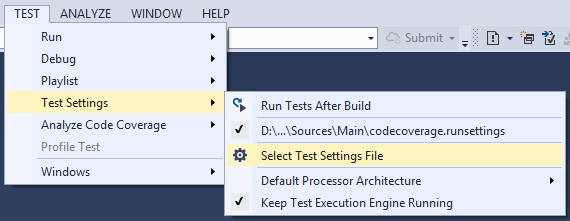
In MSBuild you can specify the runsettings file

My current codecoverage.runsettings is listed below. It excludes the .xaml.cs source files since I can only unit test non-GUI code. Also some third party libraries are excluded with the CompanyName tag.
<?xml version="1.0" encoding="utf-8"?>
<RunSettings>
  <DataCollectionRunSettings>
    <DataCollectors>
      <DataCollector friendlyName="Code Coverage"
                     uri="datacollector://Microsoft/CodeCoverage/2.0"
                     assemblyQualifiedName="Microsoft.VisualStudio.Coverage.DynamicCoverageDataCollector, Microsoft.VisualStudio.TraceCollector, Version=11.0.0.0, Culture=neutral, PublicKeyToken=b03f5f7f11d50a3a">
        <Configuration>
          <CodeCoverage>
            <ModulePaths>
              <Include>
              </Include>
              <Exclude>
              </Exclude>
            </ModulePaths>
            <UseVerifiableInstrumentation>True</UseVerifiableInstrumentation>
            <AllowLowIntegrityProcesses>True</AllowLowIntegrityProcesses>
            <CollectFromChildProcesses>True</CollectFromChildProcesses>
            <CollectAspDotNet>False</CollectAspDotNet>
            <Functions>
              <Exclude>
                <Function>^std::.*</Function>
                <Function>^ATL::.*</Function>
                <Function>.*::__GetTestMethodInfo.*</Function>
                <Function>^Microsoft::VisualStudio::CppCodeCoverageFramework::.*</Function>
                <Function>^Microsoft::VisualStudio::CppUnitTestFramework::.*</Function>
                <Function>.*::YOU_CAN_ONLY_DESIGNATE_ONE_.*</Function>
              </Exclude>
            </Functions>
            <Attributes>
              <Exclude>
                <Attribute>^System.Diagnostics.DebuggerHiddenAttribute$</Attribute>
                <Attribute>^System.Diagnostics.DebuggerNonUserCodeAttribute$</Attribute>
                <Attribute>^System.Runtime.CompilerServices.CompilerGeneratedAttribute$</Attribute>
                <Attribute>^System.CodeDom.Compiler.GeneratedCodeAttribute$</Attribute>
                <Attribute>^System.Diagnostics.CodeAnalysis.ExcludeFromCodeCoverageAttribute$</Attribute>
              </Exclude>
            </Attributes>
            <Sources>
              <Exclude>
                <Source>.*\\atlmfc\\.*</Source>
                <Source>.*\\vctools\\.*</Source>
                <Source>.*\\public\\sdk\\.*</Source>
                <Source>.*\\microsoft sdks\\.*</Source>
                <Source>.*\\vc\\include\\.*</Source>
                <Source>.*\.xaml.cs$</Source>
              </Exclude>
            </Sources>
            <CompanyNames>
              <Exclude>
                <CompanyName>.*microsoft.*</CompanyName>
                <CompanyName>.*galasoft.*</CompanyName>
                <CompanyName>.*sourceforge.net.*</CompanyName>
              </Exclude>
            </CompanyNames>
            <PublicKeyTokens>
              <Exclude>
                <PublicKeyToken>^B77A5C561934E089$</PublicKeyToken>
                <PublicKeyToken>^B03F5F7F11D50A3A$</PublicKeyToken>
                <PublicKeyToken>^31BF3856AD364E35$</PublicKeyToken>
                <PublicKeyToken>^89845DCD8080CC91$</PublicKeyToken>
                <PublicKeyToken>^71E9BCE111E9429C$</PublicKeyToken>
                <PublicKeyToken>^8F50407C4E9E73B6$</PublicKeyToken>
                <PublicKeyToken>^E361AF139669C375$</PublicKeyToken>
              </Exclude>
            </PublicKeyTokens>
          </CodeCoverage>
        </Configuration>
      </DataCollector>
    </DataCollectors>
  </DataCollectionRunSettings>
</RunSettings>
References
Customizing Code Coverage Analysis


 For the birthday of our kids my wife creates hard-copy Photo Books. The procedure is time consuming but worth every minute.



 .NET Development by Eric