Change vmsize of package

I’m enrolled into the Extra Small vm beta program. Now I want to use it to test my old packages for performance differences. How to change the vmsize of packages?

There is a post about this here on the Microsoft Azure forum. I tried to hack te package by disabling the encryption like described here. Then I opened the cspkg file with 7Zip and the cssx inside. Both files turn out to be zip archives. The cssx file contains RoleModel.xml which could be the csdef file from your Visual Studio project, because it has the same xmlns.

Adding the vmsize=”ExtraSmall” results in an errormessage while uploading in the portal.
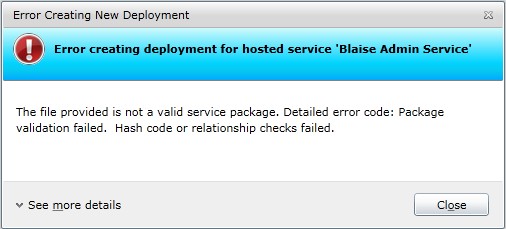
For now I change the vmsize in the csdef and repackage the files with the CSPack util in the Azure SDK. The properties.txt file contains the line “TargetFrameWorkVersion=v4.0”.

cspack [projectfolder]\ServiceDefinition.csdef /role:[webrolename];[webrolename] /out:Repackaged.cspkg /rolePropertiesFile:properties.txt

The package that comes from cspack doesn’t contain the vmsize=”extrasmall” entry in the RoleModel.xml, so my statement that it is the csdef file is wrong. Conclusion for now is: repackage your project to change the vmsize.

Posted in Development | Leave a comment

Silverlight and WCF exception handling

A colleage asked me why he got “not found” expections in his Silverlight client whenever an exception was returned from my WCF service. My answer was this is a Silverlight problem and needs to be resolved by you. But I offered him to snif the messages with fiddler.
The exception was serialized and send to the silverlight client. There seemed to be nothing wrong with the WCF. But why the “not found” exception in stead of the actual exception?
After reading this post by John Papa: http://msdn.microsoft.com/en-us/magazine/ee294456.aspx I noticed the HTTP error stacktrace in the Silverlight client. Seems that the async pattern Silverlight uses can’t handle HTTP500+ statuscodes. The offered solution uses a endpointbehavior that resets the statuscode to HTTP200 whenever a fault is returned.

// This is only part of the actual code
public class SilverlightFaultBehavior : BehaviorExtensionElement, IEndpointBehavior
{        
        public class SilverlightFaultMessageInspector : IDispatchMessageInspector
        {
            public void BeforeSendReply(ref Message reply, object correlationState)
            {
                if (reply.IsFault)
                {
                    HttpResponseMessageProperty property = new HttpResponseMessageProperty();
                    // Here the response code is changed to 200.
                    property.StatusCode = System.Net.HttpStatusCode.OK;
                    reply.Properties[HttpResponseMessageProperty.Name] = property;
                }
            }
}

We decided to create a datacontract that returns aditional exception information and added a try-catch to the toplevel implementation of the WCF service. Whenever an exception is thrown in the service a default of the datacontract is created in the catch block and exception information is added for debugging. Now we don’t need special behaviors for Silverlight.

Posted in Development | Tagged , , , | Leave a comment

Azure watchdog

With the new Remote Desktop beta program of Azure a small negative test can be performed. The task manager can be used to kill some processes. Lets see how Azure recovers from this ‘error-behind-keyboard’.

I uploaded a package with the portal using a Production Deployment. The package is SDK 1.3 with a WebRole but not using full IIS. (removed the sites node)
After a little wait I see the Instance is created. Now I request the WSDL of one of the services I am hosting. Works. The feed from the servicebus displays my endpoint. And I start a Remote Desktop.

Everything worked as I expected. Now I’m going to kill the host process of my Role.

After I killed the proces my Remote Desktop lost the connection. The WSDL request cannot be serviced. (Internet explorer cannot display the webpage) The feed from the servicebus still displays my endpoint, but that is cached information. Soon that disappeared too.

Now I wait and see if the instance is recoverd. The status of the Deployment and Role changes to Aborted and the status of the Instance changes to Preparing node. Then Deployment and Role status becomes Busy and the Instance status Recovering role. Then back to Aborted and Preparing node and again to Busy and Recovering role. After a few cycles everything worked again. The WSDL, the servicebus endpoint and the Remote Desktop. The portal reports status ready again.

I started the same test yesterday before going home and the instance had recovered in the morning. The logging told me it recovered at the hour. The same test this morning showed it recovered at the hour too. Looks like there is a watchdog running every hour.

Posted in Development | Leave a comment

Azure Beta programs

Recently I signed up for all three beta programs of the azure platform. I got enrolled in the “VM Role”. Here’s what I did.
The new features are part of the new SDK. Install it from http://msdn.microsoft.com/en-us/windowsazure/cc974146.aspx. My existing solution needed an upgrade after this new SDK was installed. I let the Wizard do its work and ended up with some new items in my cscfg file.

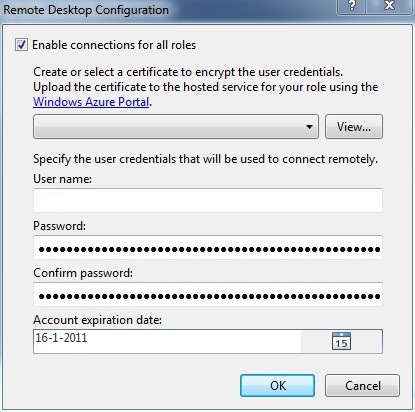
Next I uploaded a certificate and created my package from VS2010. The publish wizard has an extra feature called “Configure Remote Desktop connections …”. Clicking the link gets you to the configuration section for this feature. Select the certificate you uploaded and set the username/password and expiration date. Configure Remote Desktop connection

After the upload the option Connect is available in the Remote Access section of the ribbon. This linkes to a Remote Desktop link.
Login with your username/password supplied in the publish wizard and a minute later you are looking at the blue desktop in the Cloud. Open the IIS Manager and see your WebRole hosted as promised 😉
Remote Access - Connect

My colleage got enrolled in the “extra small VM”. I also tried to use the “extra small VM” but that gave an error on uploading. My account was not enrolled in the requested features.

Posted in Development | Leave a comment

OpenID

I have a project hosted at unfuddle and I noticed the choice of signing in with OpenID. My wordpress url can be a key to login to another site. How cool is that!
Ater linking my OpenID to my Unfuddle account I logged in to Unfuddle. A confirmation step asked my if I was shure and if I wanted it to pass just once or allways. I first picked just once, but after subsequent logins I choose allways. Now I have one password less I need te remember. Note that you have to login to the site you use for OpenID first.

Posted in Security | Leave a comment
