Resize image in Word with macro

Whenever I need to walk through a wizard I make screenshots of the steps. This comes in handy when someone else needs to do the same thing or just for logging purpose. The screenshots come in a Word document. To resize these images to minimize the number of pages I use this macro:

Sub ResizeImage()
'
' ResizeImage Macro
' Selected image(s) are resized to 5 cm in width
'
    Dim shape As InlineShape
    ' iterate all selected shapes
    For Each shape In Selection.InlineShapes
        ' remain aspect ratio
        shape.LockAspectRatio = msoTrue
        ' set with to 5 cm
        shape.Width = CentimetersToPoints(5)
    Next
End Sub

Every Image selected (CTRL+A) will be resized to 5cm with aspect ratio locked. I pinned the macro to the Word Quick Access Toolbar for easy access.

Requested code by Nano07 with al little help from Graham Mayor

Sub ResizeImage()
'
' ResizeImage Macro 2
' Selected image(s) are scaled to 100% and moved behind text in top left corner of the page
'
    Dim shape As InlineShape
    Dim shapeRange As shapeRange
    
    ' iterate all selected shapes
    For Each shape In Selection.InlineShapes
        ' remain aspect ratio
        shape.LockAspectRatio = msoTrue
        ' set with to 100 %
        shape.ScaleWidth = 100
        ' convert to shape to get a shaperange
        shape.ConvertToShape
        Set shapeRange = Selection.shapeRange
        ' position relative to the page
        shapeRange.RelativeHorizontalPosition = wdRelativeHorizontalPositionPage
        shapeRange.RelativeVerticalPosition = wdRelativeVerticalPositionPage
        ' anchor to 0.0
        shapeRange.Top = 0
        shapeRange.Left = 0
        ' set to behind text
        shapeRange.WrapFormat.Type = wdWrapBehind
    Next
End Sub
Posted in Tooling | Tagged , , | 36 Comments

WCF message tracing

To many times I’ve searched for this in google. How to trace the WCF messages to disk. Here is how:

<?xml version="1.0" encoding="UTF-8"?>
<configuration>
  <system.diagnostics>
    <sources>
      <source         name="System.ServiceModel.MessageLogging">
        <listeners>
          <add        name="messages"
                      type="System.Diagnostics.XmlWriterTraceListener"
                      initializeData="c:\admin.svclog" />
        </listeners>
      </source>
    </sources>
  </system.diagnostics>

  <system.serviceModel>
    <diagnostics>
      <messageLogging  logEntireMessage="true" 
                       logMalformedMessages="true" 
                       logMessagesAtServiceLevel="true" 
                       logMessagesAtTransportLevel="true" />
      <endToEndTracing propagateActivity="true" 
                       activityTracing="true" 
                       messageFlowTracing="true" />
    </diagnostics>
  </system.serviceModel>
</configuration>
Posted in Development | Tagged , , | Leave a comment

WPF treeview node select

My project contains a treeview which is bound to a hierarchical list. The data is displayed correct, but the nodes cannot be selected by clicking the text, you must click on the little space reserved for an icon of so. Here’s my code:

<UserControl x:Class="MainDetailControl"
             xmlns="http://schemas.microsoft.com/winfx/2006/xaml/presentation"
             xmlns:x="http://schemas.microsoft.com/winfx/2006/xaml"
             xmlns:mc="http://schemas.openxmlformats.org/markup-compatibility/2006" 
             xmlns:d="http://schemas.microsoft.com/expression/blend/2008" 
             xmlns:my="clr-namespace:DetailProject"
             mc:Ignorable="d">
    <UserControl.Resources>
        <my:TestData x:Key="testdata" />
        <HierarchicalDataTemplate x:Key="hierarchicalitemtemplate" 
                                  DataType="{x:Type my:Node}"  
                                  ItemsSource="{Binding Path=Children}">
            <TreeViewItem>
                <TreeViewItem.Header>
                    <TextBlock Text="{Binding Path=Name}" />
                </TreeViewItem.Header>
            </TreeViewItem>
        </HierarchicalDataTemplate>
    </UserControl.Resources>
    <Grid>
        <Grid.ColumnDefinitions>
            <ColumnDefinition/>
        </Grid.ColumnDefinitions>

        <TreeView Name="ManagerTree" 
                  ItemTemplate="{StaticResource hierarchicalitemtemplate}"
                  ItemsSource="{Binding Path=NodeList}"
                  Grid.Column="0" 
                  VerticalAlignment="Stretch" 
                  HorizontalAlignment="Stretch">
            <TreeView.ItemContainerStyle>
                <Style TargetType="TreeViewItem">
                    <Setter Property="IsExpanded" Value="True"/>
                </Style>
            </TreeView.ItemContainerStyle>
        </TreeView>
    </Grid>
</UserControl>

And here is the solution. Do not use the TreeViewItem but directly put the content in.

<HierarchicalDataTemplate x:Key="hierarchicalitemtemplate" 
                          DataType="{x:Type my:Node}"  
                          ItemsSource="{Binding Path=Children}">
 
   <TextBlock Text="{Binding Path=Name}" />

</HierarchicalDataTemplate>
Posted in Development | Tagged , , | 1 Comment

EF4 and SQLite

I want to create my datalayer with Entity Framework. But I’m using SQLite as the database. How to create the database if it is a new file?
First create a database to import in EF. Model first just isn’t that simple. Import the model into VS2010 and do your thing. I keep everything as is because I just want to use the mapping to CLR objects. Then install the T4 file located here or direct link and select it as the DDL Generation Template.

Right click somewhere on your model and choose Generate Database from Model … This starts a wizard that creates the SQL statements to create the tables and stores it in a file. (added to the project) This file should be an embedded resource.

Now you can create the structure in a new database by loading the embedded resource and executing it.

public class MyManager
{
    protected virtual EntityConnection Connection
    {
        get;
        set;
    }

    public MyManager(string fileName, bool isNew)
    {
        // construct connectionstring
        var connectionString = string.Format("data source={0};Version=3;New=True;", fileName);
        // use builder to create entity connectionstring
        var builder = new EntityConnectionStringBuilder();
        builder.ProviderConnectionString = connectionString;
        builder.Provider = "System.Data.SQLite";
        builder.Metadata = @"res://*/MyModel.csdl|
                             res://*/MyModel.ssdl|
                             res://*/MyModel.msl";
        // create entity connection
        Connection = new EntityConnection(builder.ToString());
        // create tables if new database is created
        if (isNew == true)
        {
            CreateTables(Connection.StoreConnection);
        }
    }

    protected virtual void CreateTables(DbConnection connection)
    {
        // load assembly
        var assembly = Assembly.GetAssembly(typeof(MyEntity));
        // load resource from assembly with create database script
        using (Stream stream = assembly.GetManifestResourceStream("DataLayer.MyModel.edmx.sql"))
        {
            System.Diagnostics.Debug.Assert(stream != null, "Failed loading embedded resource");
            using (var reader = new StreamReader(stream))
            {
                var sql = reader.ReadToEnd();
                var cmd = connection.CreateCommand();
                cmd.CommandText = sql;
                if (connection.State != System.Data.ConnectionState.Open) connection.Open();
                // execute create database script
                cmd.ExecuteNonQuery();
            }
        }   
    }
}

Sample project for download here

Posted in Development | Tagged , , , , , , | 2 Comments

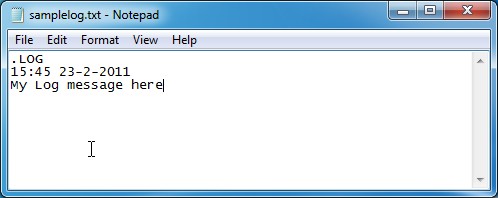
Log with notepad

I’m using a hack found here to log with notepad. Whenever the link is opened a window of notepad is openen, with a timestamp inserted at the end of the file and the cursor positioned after the timestamp.

Now I need to remember to use the log …

Posted in Tooling | Tagged , , , | Leave a comment