
My macbook became my work-from-home device and I was hesitant to update to Big Sur. The question today is “when to update, not if”. So I made a backup, had my trusty macbook 2009 ready for emergencies and started the installer.
TLDR: no issues on my MacBook Pro (Retina, 15-inch, Mid 2015) except for Little Snitch 4 which is incompatible and I had to upgrade to version 5 for €25
Hardware

MacBook Pro (Retina, 15-inch, Mid 2015)
Processor 2,2 GHz Intel Core i7
Memory 16 GB 1600 MHz DDR3
SSD 256 Gb
Graphics Intel Iris Pro 1536 MB
I’ve written about my update to 10.14 (Mojave update without issues) and updated to 10.15 sometime ago without any issues.
Installation
After the download of 10+ Gb the installation completed in about an hour. I left the scene and don’t have an exact number. It was ready when I returned.
Success
After the first login I was presented with some privacy pop-ups and some blocked extensions. Again I had to upgrade little snitch just like with Mojave. I allow the app store to just update everything when available (like on iOS) and all other apps were up-to-date.
All other apps just worked. I was most happy about Camtasia 2 and Alfred 3 still working. Check https://roaringapps.com for compatibility of your favourite apps. But keep an eye on the versions – since Little Snitch is supported on Big Sur but not version 4.
Failure
Unfortunately Parallels Desktop 11 had stopped working. Never really used it, so I won’t be buying the upgrade.

Work around
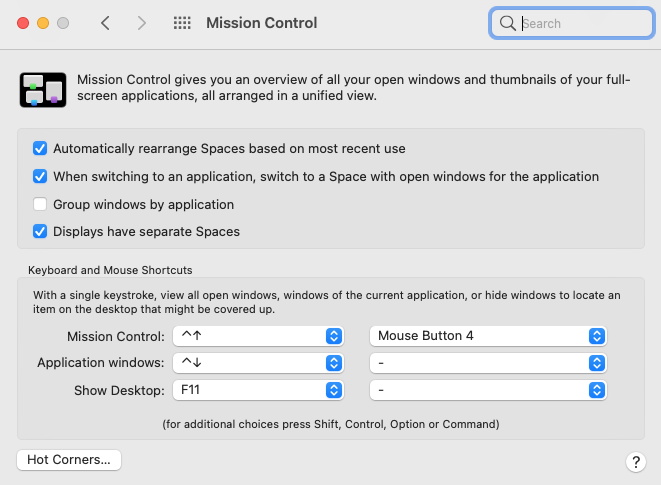
Logitech Control Center was a disappointment. I only needed my Logitech Performance MX mouse extra button(s) configured to trigger Mission Control and that was not possible (for me). Turns out that is part of macOS settings > Mission Control > Mouse Button xxx.
On Monday I can work-from-home with an updated macbook. Everything just works.
Why upgrade?
1. I want to have my macbook running the latest and greatest macOS (patches)
2.New control centre and other improvements – https://www.apple.com//macos/big-sur/


 .NET Development by Eric