
After installing Cloud Foundry it is time to deploy your first dotnet core app.
Make sure you’re using the right framework/sdk version. If the version is not supported by Cloud Foundry you’ll get logging like below
-----> Dotnet-Core Buildpack version 2.0.1
-----> Supplying Dotnet Core
-----> Installing libunwind 1.2.1
       Download [https://buildpacks.cloudfoundry.org/dependencies/manual-binaries/dotnet/libunwind-1.2.1-linux-x64-80af276a.tgz]
-----> Installing dotnet 2.0.3
       Download [https://buildpacks.cloudfoundry.org/dependencies/dotnet/dotnet.2.0.3.linux-amd64-b56d13fc.tar.xz]
-----> Finalizing Dotnet Core
-----> Restore dotnet dependencies
       /tmp/contents738113418/deps/0/dotnet/sdk/2.0.3/Sdks/Microsoft.NET.Sdk/build/Microsoft.NET.TargetFrameworkInference.targets(135,5):
error :
The current .NET SDK does not support targeting .NET Core 2.2.
Either target .NET Core 2.0 or lower, or use a version of the
.NET SDK that supports .NET Core 2.2. [/tmp/app/newcore.csproj]
       /tmp/contents738113418/deps/0/dotnet/sdk/2.0.3/Sdks/Microsoft.NET.Sdk/build/Microsoft.NET.TargetFrameworkInference.targets(135,5): error : The current .NET SDK does not support targeting .NET Core 2.2.  Either target .NET Core 2.0 or lower, or use a version of the .NET SDK that supports .NET Core 2.2. [/tmp/app/newcore.csproj]
       **ERROR** Unable to run dotnet restore: exit status 1
Failed to compile droplet: Failed to run finalize script: exit status 12
Exit status 223
Stopping instance 872072e8-a3db-4b10-94ba-9dd207587dcc
Destroying container
Error staging application: App staging failed in the buildpack compile phase
FAILED
You can force the use of a supported dotnet core version by adding a global.json to the root of your project. This can be generated by the dotnet cli.
{
   "sdk": {
      "version": "2.0.3"
   }
}
Now create a simple website with the cli and push it to cloud foundry. You should be greeted with success messages 😉
mkdir core
cd core
dotnet new global --sdk-version 2.0.3
dotnet new mvc
cf push core
In Stratos the new app is visible. There you can view logging, scale up/down and configure routes.
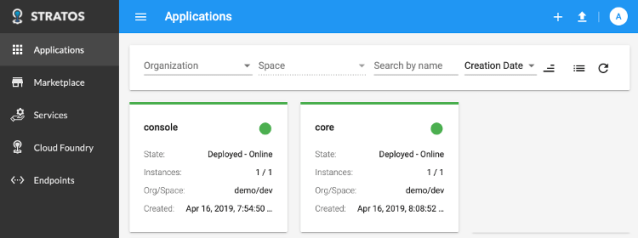
The new app is available on http://core.bosh-lite.com (default route)


 .NET Development by Eric