
My machine boots native from VHDX. This means BitLocker cannot be used to encrypt the contents of my disk. How to get that extra sense of security by encrypting my files?
My Evernote account has two step verification enabled, but when my laptop is stolen the data is out in the open. I’ve setup Windows EFS to encrypt my local copy.
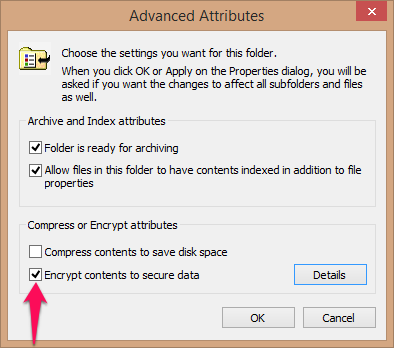 Enable EFS by going into the properties of the folder and click advanced. Check the encrypt contents to secure data to encrypt the folder. In Windows Explorer the folder is colored green now.
Back up Encrypting File System (EFS) certificate to ensure access when you do a new install or have to access the data from somewhere else. I’ve put it in Evernote since that is accessible from the web.
Whenever I try to access the folder without the certificate in the keychain, Windows will show an error. After installation of the certificate Windows never nags me about the folder being encrypted. Management by exception.


 .NET Development by Eric