Week 30 roundup

Last week recap and links:

Image courtesy of kanate / FreeDigitalPhotos.net

  • Reviewed my productivity post. Still using all tools, added TimeManage.me to the list.
  • Started training for the half marathon Eindhoven. Here’s a video from last years full marathon

Image courtesy of kanate / FreeDigitalPhotos.net

What are your best reads this week? Leave them in the comments below.

Posted in Uncategorized | Tagged , | Leave a comment

Powershell training course

Powershell the “new” automation tool from Microsoft. For octopus deploy we mostly use the powershell task to handle start/stop service, configure nservicebus and manage certificates. Time to learn some more on microsoft virtual academy. Here is my learning list:
virtualacademy-learingplan

Posted in Tooling | Tagged | Leave a comment

Notes to a Software Team Leader by Roy Osherove

The book Notes to a Software Team Leader writes about leadership in three phases of a team.

  1. Survival, everything is urgent, leader introduces slack to get learning
  2. Learning, enough slack, leader becomes a coach
  3. Self-Organization, well oiled machine, leader can focus on vision

Real eye opener and must read for any development team.

Posted in Uncategorized | Tagged , | Leave a comment

Week 29 roundup

Last week recap and links:

Image courtesy of kanate / FreeDigitalPhotos.net

Image courtesy of kanate / FreeDigitalPhotos.net

What are your best reads this week? Leave them in the comments below.

Posted in Uncategorized | Tagged , | Leave a comment

Encrypt file when booting from VHDX

My machine boots native from VHDX. This means BitLocker cannot be used to encrypt the contents of my disk. How to get that extra sense of security by encrypting my files?

My Evernote account has two step verification enabled, but when my laptop is stolen the data is out in the open. I’ve setup Windows EFS to encrypt my local copy.
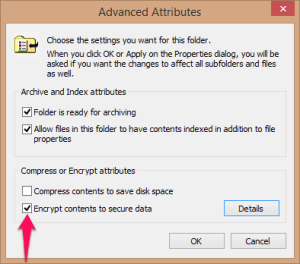
windows.efsEnable EFS by going into the properties of the folder and click advanced. Check the encrypt contents to secure data to encrypt the folder. In Windows Explorer the folder is colored green now.

Back up Encrypting File System (EFS) certificate to ensure access when you do a new install or have to access the data from somewhere else. I’ve put it in Evernote since that is accessible from the web.

Whenever I try to access the folder without the certificate in the keychain, Windows will show an error. After installation of the certificate Windows never nags me about the folder being encrypted. Management by exception.


Posted in Tooling | Tagged , | Leave a comment