HTML5 and CSS3 for IE8

IE8 and lower are not playing nice with HTML5 pages. Also CSS3 wasn’t invented when it released. To get the best result on IE8 with the least effort just add some scripts. Not pixel perfect, but good enough for the remaining 2.5 percent of unsupported browser users.

html5 + css3 > ie8

Scripts

First up are the new HTML tags like nav, section and footer. Theses are defined by adding html5shim in the <head>. Now the page looks a lot less messed up.

To get css3 working add selectivizr. This emulates CSS3 pseudo-classes and attribute selectors. There is a no-script option to fallback to a different stylesheet when scripting is disabled.

Last to enable media queries in css add css3-mediaqueries. This enables things like first-child in css.

Code added to the masterpage

<!--[if lt IE 9]>
<script src="/scripts/html5shiv.js"></script>
<script src="/scripts/css3-mediaqueries.js"></script>
<script src="/scripts/selectivizr.js"></script>
<![endif]-->

Last tips

  • Don’t apply styling to <a>, wrap it with a <div> with the styling
    <div class="blox span4">
       <a href="somewhere.else.html">
          <h2>Take me somewhere</h2>
       </a>
    </div>
    
  • Tried -ms-behaviors like css3 pie and background-size-polyfill but they didn’t help. Avoid them.
  • IE8 and lower is a small piece of the internet users. Make the page readable and move on.

Posted in Development | Tagged , , , | Leave a comment

Week roundup 32

Last week recap and links:

Image courtesy of kanate / FreeDigitalPhotos.net

Image courtesy of kanate / FreeDigitalPhotos.net

What are your best reads this week? Leave them in the comments below.

Posted in Uncategorized | Tagged , , , , | Leave a comment

Readable code and compiler optimization

Most comments on my code during reviews are about optimization. Tools like Resharper suggest code changes for cleaner code and optimization. But what about readability? Are most of today’s compilers smart enough to optimize the code?

The sample code below writes output to the console when writeToFile is false. Both lines do the same, but I prefer the first as it is more readable (to me).

if (false == writeToFile) Console.WriteLine("Whatever");
// OR
if (! writeToFile) Console.WriteLine("Whatever");

With ILDASM the IL code is read from the compiled assembly. The code is exactly the same. Looks like the compiler is smart enough for this case.

Back in the day I learned C++. One of the program tests was the for statement. See the C# code below with that mindset. The first line got you flunked, the second was 1 point, the third got you 5 points and the last the full 10 points.

for (int i = 0; i < 10; i = i + 1) Console.WriteLine("output");
for (int i = 0; i < 10; i += 1) Console.WriteLine("output");
for (int i = 0; i < 10; i ++) Console.WriteLine("output");
// Below is different!
for (int i = 0; i ++ < 10; ) Console.WriteLine("output");

Again getting the IL code from the assembly showed the first three lines resulted in the same code, where the last was different.
Debugging the code will show the behavior is slightly different (hint: when is the index incremented) So be warned not to optimize the code so it changes behavior!

I’ll be programming my code for readability no matter what the tools suggest.

Posted in Development | Tagged , , | 1 Comment

Week 31 roundup

Last week recap and links:

Image courtesy of kanate / FreeDigitalPhotos.net

Image courtesy of kanate / FreeDigitalPhotos.net

What are your best reads this week? Leave them in the comments below.

Posted in Uncategorized | Tagged | Leave a comment

Octopus deploy step detail tip

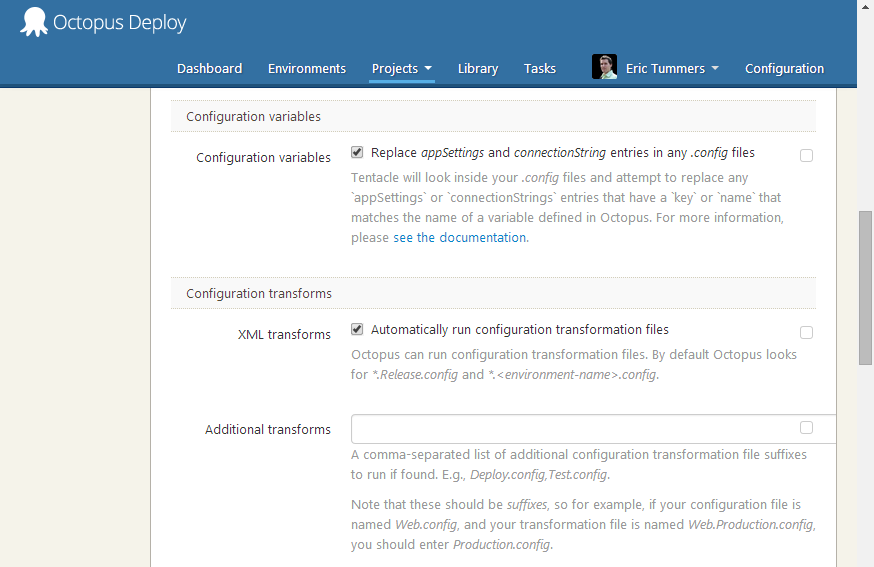
Click the question mark on octopus deploy step detail
octopusdeploy.step.questionmark.1

Get extra information about what the options do
octopusdeploy.step.questionmark.2

Saved me some time searching-and-finding on Octopus Deploy Documentation.

Posted in Tooling | Tagged | Leave a comment