Powershell Functions in my Azure setup script

In my Automate test environment with azure virtual machines post I’ve written about my Azure setup script. To improve readability and making the creation of a new machine easier I decided to rewrite some parts to functions.

The customscript extension had me puzzled some time, but the logs got me sorted out. Make sure to host your file in Azure Storage or some other “direct access” location; dropbox-link shares contain illegal characters (the questionmark).

$subnet= "subnet-1"
$redundancy = "Standard_LRS"
$size  = "Small" #"ExtraSmall" "Small" "Medium" "Large" "ExtraLarge"
$location = "West Europe"
$service = "YOUR_SERVICE_HERE"
$un = "Someone"
$pwd = "*****"
$configurewebserver = "http://url_to_your_powershell/script.ps1"
$configurewebserverrun = "script.ps1"
# Create the storage account if needed, remove old (running) instance and 
# name the new VHD
function Prepare {
    param([string] $storage, [string] $machine)
    New-AzureStorageAccount -StorageAccountName $storage -Location $location -Type $redundancy -ErrorAction Ignore
    Get-AzureVm -ServiceName $service -Name $machine -WarningAction Ignore | Remove-AzureVM -DeleteVHD
    $context = (New-AzureStorageContext -StorageAccountName $storage -Anonymous).BlobEndPoint
    Write-Output "$context/vhds/$machine$((Get-Date).Ticks).vhd"
}
# Create a VM to host the web role on loadbalanced ports (80 and 443) and 
# install some IIS features using the customscript extension
function CreateWebVM {
    param([string] $storage, [string] $machine)
    $webLocation = Prepare -storage $storage -machine $machine
    Write-Host "Creating $machine"
    $vmWeb = New-AzureVMConfig -Name $machine -InstanceSize $size -ImageName $image.ImageName -MediaLocation $webLocation |
      Add-AzureProvisioningConfig -Windows -AdminUsername $un -Password $pwd |
      Add-AzureEndpoint -Protocol tcp -LocalPort 80 -PublicPort 80 -Name 'web' -LBSetName 'web' -DefaultProbe |
      Add-AzureEndpoint -Protocol tcp -LocalPort 443 -PublicPort 443 -Name 'https' -LBSetName 'https' -DefaultProbe | 
      Set-AzureSubnet $subnet |
      Set-AzureVMCustomScriptExtension -FileUri $configurewebserver -Run $configurewebserverrun |
      New-AzureVm -ServiceName $service
}

After the creation of the VM some custom software had to be installed. For this I’ve used a download with Invoke-WebRequest. The file can be hosted on dropbox now since I don’t check for illegal characters. Some (very basic) retry logic is in place to make sure the file exists before installation can start.

$download = "https://download_msi_from/dropbox/file.msi?dl=1"
# Install custom software in a remote session
function InstallSoftwareForWeb {    
    param([System.Management.Automation.Runspaces.PSSession[]] $sessions)
    Invoke-Command -Session $sessions -ScriptBlock {
        param([String]$file)
        $msi = "c:\custominstall.msi"
        $completed = Test-Path $msi
        while($completed -ne $true) {
            Invoke-WebRequest $file -OutFile $msi | Write-Debug
            $completed = Test-Path $msi
            if ($completed -ne $true) { Write-Host "Retry downloading MSI" }
        }
        Unblock-File $msi
        Start-Process -FilePath $msi -ArgumentList /qn, /L!V, c:\\install.txt -Wait
    } -ArgumentList $download -AsJob
}

After all functions are defined the script calls them in the correct order. This way adding an extra machine looks like this.

$webstorage = "MyWebStorageInAzure"
$webMachine3 = "WebMachine3"
CreateWebVM $webstorage $webMachine3
$sessionToWebMachine3 = StartRemoteSession $webMachine3
ConfigureFirewall $sessionToWebMachine3
InstallSoftwareForWeb $sessionToWebMachine3
GenerateCertificates $sessionToWebMachine3
RegisterCertificates $sessionToWebMachine3
RegisterHttpsCertificate $sessionToWebMachine3
RegisterNode $sessionAdmin $webMachine3

Everyone with a technical background and a basic understanding of English should be able to guess what would happen if we run this.

Posted in Development | Tagged | 1 Comment

Week roundup

Last week recap and links:
Image courtesy of kanate / FreeDigitalPhotos.net

Image courtesy of kanate / FreeDigitalPhotos.net

What are your best reads this week? Leave them in the comments below.

Posted in Uncategorized | Tagged , , | Leave a comment

Lessons learned while solving a software issue on a client’s laptop

“This laptop has the latest version of the software and it’s not working”.

That is how it ended up on my desk. After two days of debugging, crashing and reading log files I solved the problem. I’m hired to get things done, not to try-and-fix.

The problem was caused by a corrupted IIS Metabase and IIS 6 configuration compatibility Windows feature. A DirectoryService object would throw a COM Exception after thirty something seconds and we are using it twice in a WCF service. Two times 30 seconds is a little more than a minute and that is the receive timeout of our binding.

The solution was to re-install the Windows feature.

Lessons learned

  • Logging with System.Diagnostics.Trace works great, but sometimes remote debugging is needed
  • Remote debugging is best done over UTP, Wifi signals are not always stable enough
  • When remote debugging to a computer that isn’t yours, use “No Authentication”
  • Repro will take 80% of the time, sometimes even more
Posted in Development | Tagged , , | Leave a comment

First look at Managed Extensibility Framework (MEF)

Microsoft’s solution for dependency injection is called Managed Extensibility Framework (MEF). Dennis presented about this on the Techdays 2015. Now it is time to look at this myself with a simple demo app.

Demo app

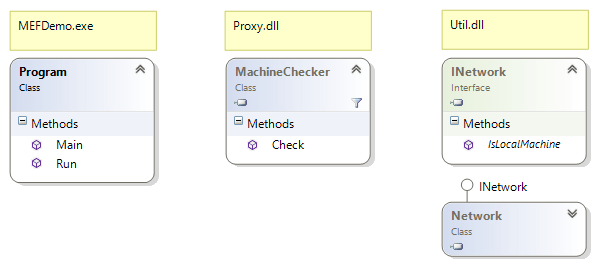
I’ve created a demo app to play with MEF. The class diagram is below. Program in MEFDemo will create a MachineChecker (that takes INetwork as parameter in the constructor) and call the Check method.
MEFDemo_ClassDiagram

Next I will show the different classes. A complete working sample is for download at the end of this post.

Util

The Network class implements the INetwork interface. By putting Export on the type MEF can handle it.

[Export(typeof(INetwork))]
public class Network : INetwork {
   // implementation
}

The implementation uses System.Net.Dns, but it’s irrelevant for my demo.

Proxy

Like above the MachineChecker class needs the Export attribute. To instruct MEF how to construct the class I need to put the ImportingConstructor attribute on the constructor, since there is always a default constructor.

[Export]
public class MachineChecker {
   [ImportingConstructor]
   public MachineChecker(INetwork network) { 
      // implementation
   }
   // implementation
}

An interface would make replacing the MachineChecker easier.

Program

Now in the Main I’ll create a container to wire up the classes. Then pass the container to the Run method.

public static void Main(string[] args) {
    var catalog = new AggregateCatalog();
    var assemblyDirectory = ".";
    catalog.Catalogs.Add(new DirectoryCatalog(assemblyDirectory));
    var container = new CompositionContainer(catalog);
    Run(container);
    Console.ReadLine();
}

public static string Run(CompositionContainer container) {
    var machineChecker = container.GetExport<MachineChecker>();
    var check = machineChecker.Value.Check("localhost");
    return check;
}

The container.GetExport returns a Lazy as in lazy loading. The value property contains the object MEF has constructed with INetwork as parameter.

Unit test

Isolating object for unit testing is easy when using dependency injection. The ComposeExportedValue extension is in the System.ComponentModel.Composition namespace.

using System.ComponentModel.Composition;
using System.ComponentModel.Composition.Hosting;

private CompositionContainer CreateIsolatedContainer() {
    var fakeNetwork = MockRepository.GenerateStub<INetwork>();
    var catalog = new TypeCatalog(typeof(INetwork), 
        typeof(MachineChecker));
    var container = new CompositionContainer(catalog);
    // inject the stub here
    container.ComposeExportedValue<INetwork>(fakeNetwork);
    return container;
}

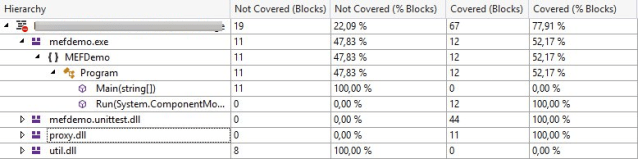
In the code coverage you’ll see that Network is not used since it is replaced by the stub. Also the Main method is not called by the unit tests.
mefdemo_code_coverage

Conclusion

Dependency injection makes applications easier to unit test. Now it is part of the .NET framework (since v4.0), that’s one reason less not to use it.

References

Posted in Development | Tagged , , , | 1 Comment

Week roundup

    Last week recap and links:
    Image courtesy of kanate / FreeDigitalPhotos.net

Image courtesy of kanate / FreeDigitalPhotos.net

What are your best reads this week? Leave them in the comments below.

Posted in Uncategorized | Tagged , , , , | Leave a comment